Can ChatGPT Ads Target My City, ZIP or State? What Is Documented
ChatGPT Ads location targeting explained: country, state, city, market and ZIP where available, why radius is not documented, and how to check your own account.
Short answer: Often yes, with conditions you should confirm in your own account. OpenAI: for campaigns other than new product-feed campaigns, you can target supported locations such as states or regions, cities, markets and postal codes where available, and availability varies by country. Country targeting works everywhere and decides where your ads are eligible to appear. Radius targeting around a business address is not documented, so do not plan around it. A city or neighbourhood written into a context hint does not limit delivery, because hints cannot enforce geographic limits, schedules or exclusions. The only reliable way to know what you can target is to open a draft campaign in Ads Manager and search the location picker.
The location controls OpenAI documents
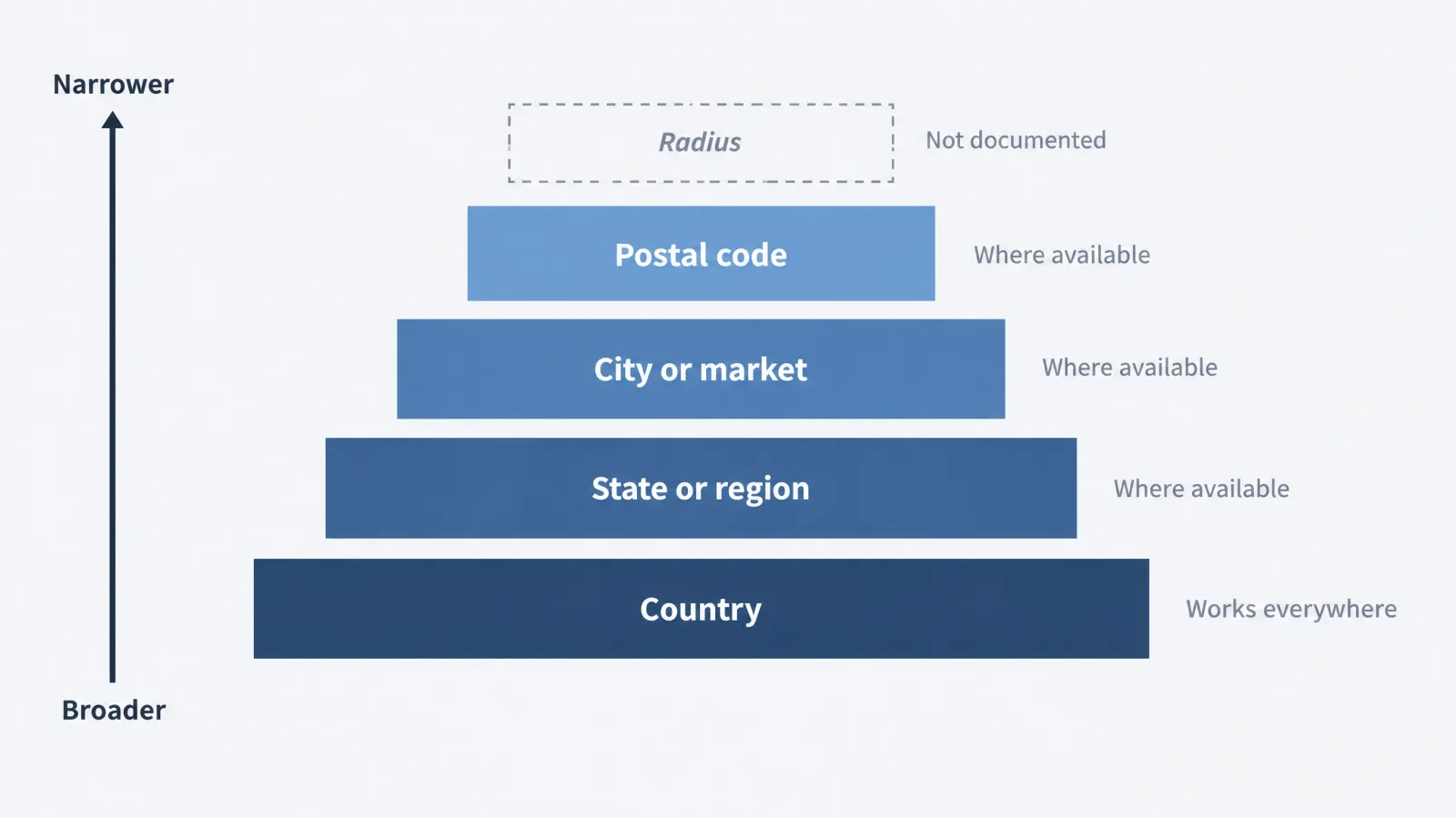
The sentence that matters most appears in OpenAI's help article on creating campaigns. For campaigns that are not new product-feed campaigns, you can target locations "such as states or regions, cities, markets, and postal codes where available," and OpenAI adds that availability may vary by country and that you should search for a location during setup to see the options available to you. The qualifiers "such as" and "where available" are doing real work. They mean that the list is not a promise for every account in every country, and that the picker is the authority, not any article, including this one.
| Control | Status | Notes for a local advertiser |
|---|---|---|
| Country | OpenAI: documented, works everywhere | Decides where ads are eligible to appear; include your target country explicitly |
| State or region | OpenAI: "where available" | Useful for state-regulated services and multi-state operators |
| City | OpenAI: "where available" | The usual unit for a single-market local business |
| Market | OpenAI: "where available" | Market definitions are set by the picker; check what yours contains |
| Postal code (ZIP) | OpenAI: "where available" | The finest unit documented; standard campaigns only |
| Radius around an address | Not documented | Do not assume it exists |
| Product-feed campaigns | OpenAI: country level only for new campaigns | Not a local-targeting tool |
| Context hint naming a place | OpenAI: cannot enforce geographic limits | Describes your business; does not fence it |
How to read "where available"
There are three plausible reasons a unit might be missing from your picker, and they imply different responses. This is a GPT Ads AI recommendation for interpreting what you see, since OpenAI does not list the reasons.
- Country coverage. Sub-national options may differ by country, which is what OpenAI says directly. If you operate outside the United States, test the picker for your own country before you design a structure around US-style ZIP lists.
- Campaign type. A new product-feed campaign offers country only. If you do not see states or cities, check the campaign type before assuming the account lacks them.
- Account stage. OpenAI notes that some new self-serve accounts can initially advertise only in their home country, and that selecting other countries does not override that. A brand-new account may therefore show fewer options than a mature one.
Record what you see and when. A picker that offers cities today may offer more tomorrow, and a decision made on stale information is the commonest reason a local plan breaks.
Country first: the US-explicit rule
OpenAI: country targeting determines where your ads are eligible to appear, and excluding other countries alone does not restrict delivery to the United States. To target only the US, include the US explicitly. The same logic applies to any other single country. A common mistake is to build a list of exclusions and assume that what remains is "just my country".
| What you do | What it means | Safer approach |
|---|---|---|
| Include the United States and nothing else | Ads are eligible in the US only | Preferred for a US-only business |
| Exclude a list of other countries, include nothing | Does not by itself restrict delivery to the US | Add the US as an explicit inclusion |
| Include several countries | Ads are eligible in each | Give each its own campaign if offers, currency or language differ |
Your account's country, currency and time zone cannot be changed after creation, and the legal entity that advertises and is billed must be based in an available country. For a business that may someday open across a border, read the countries guide and the account and brand name guide before you create the account. Advertiser availability is wider than 60 countries.
Why a city in a context hint does nothing to delivery
Local advertisers often write the city into a context hint and assume that limits where the ad can appear. OpenAI: hints are not targeting rules or delivery instructions, are not exact-match keywords and do not guarantee delivery, and they cannot enforce geographic limits, schedules or exclusions. A hint is a description of the conversations in which your offer is relevant.
| Written in a hint | What it does | What it does not do |
|---|---|---|
| Residential plumbing for homeowners in a named city | Describes who you serve and may help relevance | Does not stop an ad appearing outside that city |
| Show only to people in a named ZIP | Nothing reliable; it is a delivery instruction | Is not honoured as a restriction |
| Not for customers outside the county | Nothing reliable | Exclusions cannot be enforced through hints |
| Emergency calls only, nights and weekends | Describes the situation | Does not schedule the ad |
The corrective is simple. Put geography in the campaign's location settings, and use hints for the customer's situation, as shown in the context hints guide and in the worked hint examples. You can draft and sanity-check a set with the context hint tool. A hint that mentions your area is harmless and can help a user trust that the offer is local, provided you do not depend on it for restriction.
Radius targeting: what is not documented, and what to do instead
No OpenAI page we have read describes a radius or a service-area radius control. "Not documented" is not a statement that it will never exist; it means you cannot plan around it today, and you should not tell a client or a franchisee that it does. If a vendor or a blog says it exists, ask for the help-center page. The practical substitutes are below. Each is a GPT Ads AI recommendation.
| Need | Substitute | Trade-off |
|---|---|---|
| "Within 15 miles of my shop" | Select the cities and ZIPs that fall inside that distance, using the picker | Boundaries are administrative, not circular, so edges are uneven |
| A dense metro with many suburbs | Use the market unit if the picker offers one that matches | Market definitions are not under your control |
| A service area that crosses a state line | Select the relevant state units or the cities on both sides | Some picker options may differ by state |
| Keep out-of-area leads from consuming sales time | Add a ZIP field to the form and route or decline out-of-area leads | Does not recover the click cost |
| Avoid wasted clicks from neighbouring towns you cannot serve | Exclude them where the picker allows exclusions | Exclusion granularity depends on the country |
Worked example: three campaigns or one
All figures in this section are Illustrative. Lakeline Mobile Detailing is a fictional vehicle detailer that travels to customers across one core city and two suburbs. It wants to know whether to build one campaign or three.
The set-up. Assume the owner has $2,250 a month to test, a $4 CPC, 4% of clicks becoming leads and a minimum daily budget of $25 per campaign. The minimum is OpenAI's published $25 per day for USD accounts; whether it applies per campaign in your account is something to confirm in a draft, so treat that part as an assumption.
- Three campaigns at the floor: 3 × $25 = $75 a day, or $2,250 over 30 days. That fully uses the budget with no headroom.
- One campaign at $75 a day: the same $2,250.
- Clicks at $4: $2,250 ÷ $4 = 562.5, about 563 clicks in total either way.
- Leads at 4%: 562.5 × 0.04 = 22.5, about 23 leads in total either way.
The total outcome is the same on paper. The difference is what you can learn and control.
| Structure | Clicks per area (if evenly split) | Leads per area | What you can read | What you give up |
|---|---|---|---|---|
| Three campaigns, one per area | about 188 each | about 7.5 each | Cost per lead by area, if each area gets enough volume | Each pool is thin; a floor budget in each leaves no room to shift spend |
| One campaign, all three areas | about 563 | about 23 | A single cost per lead | Cannot see which area earns it unless the CRM records the ZIP |
| One campaign, with ZIP captured on every lead | about 563 | about 23 | Cost per lead and a per-area breakdown from your own data | Needs the form and CRM to carry the ZIP |
The third row is usually the best starting point for a small test: one pool of learning, and a per-area view built from your own records, using the UTM builder and a ZIP field. Split into separate campaigns only when areas truly need different budgets, offers or schedules, and only when each can afford its own minimum. Seven or eight leads per area is far too few to compare areas, so a per-area campaign structure at this budget creates an illusion of precision.
Product-feed campaigns: country only
OpenAI: new product-feed campaigns support geo targeting and exclusions at country level only. A local retailer that wants to show products to people in one town cannot do it through a feed campaign, and the product feed guide and the ecommerce guide explain what feed campaigns are for. If your goal is local, use a standard campaign with a landing page for the town, and put location-specific stock and pickup details on that page.
Advertiser availability is not the same as who sees the ad
Two questions are often merged. The first is whether you can open an account, which depends on whether your legal entity is based in an available country. The second is who will see your ad, and OpenAI states ads appear to Free and Go plan users and not to users predicted to be under 18; Plus, Pro, Business, Enterprise and Edu users do not see them. Neither tells you how many people in your city will see an ad on a given day, and neither is a reason to assume a city is "covered". Treat the location picker as the control and your own reporting and CRM as the check.
A pre-launch check in about ten minutes
Do this in a draft campaign, and do not publish it. It is a GPT Ads AI recommendation for verifying a location plan before money moves.
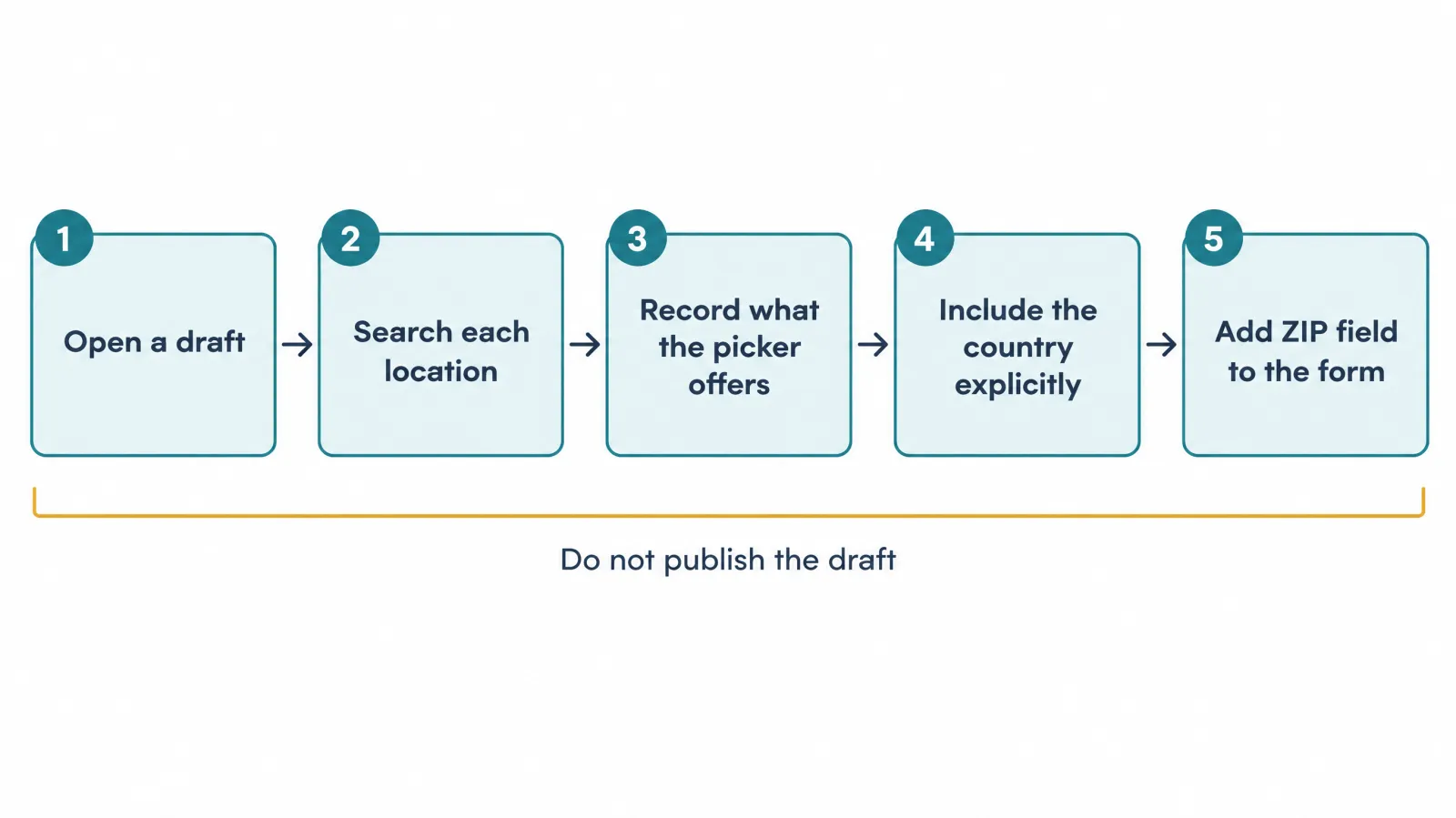
- Open a draft. Create a campaign of the type you will use. A feed campaign will show fewer options than a standard one.
- Search each location. Type your city, county or region, your main ZIPs and any neighbouring areas you want to exclude.
- Record what the picker offers. Write down the unit (state, city, market, postal code), the exact name and the date. Take a screenshot.
- Set explicit inclusions. Include the target country by name, then add the narrower units. Do not rely on exclusions alone.
- Wire the landing page. Add a postal-code field and a hidden field for the click reference so you can check delivery afterwards.
| Log field | Example (fictional) | Why it matters |
|---|---|---|
| Date checked | 16 Nov 2026 | Picker options can change |
| Country | United States | Included explicitly |
| Units found | State: yes; City: yes; Market: yes; Postal code: yes | Defines the structure you can build |
| Units not found | Radius | Confirms the substitute plan |
| Campaign type | Standard | Feed campaigns differ |
| Reviewer | Name of the person who checked | Accountability when staff change |
How to tell whether the targeting worked
OpenAI documents the controls, not a guarantee about every impression, and we have not verified which location breakdowns your reporting shows. Look in the reporting guide and your own Ads Manager for any location view. Independent of that, you can check delivery against your own records.
- Capture the postal code on every lead form and in the CRM.
- Store the click reference
opprefwith the lead, as described in the conversion tracking guide, so a ZIP and a click can be joined. - Compute the in-area share of leads: leads with a ZIP inside the target list divided by all leads.
- Compare the share against what you expect, and investigate if it is low.
As an Illustrative example: 38 leads in a month, 31 with ZIPs inside the target list. 31 ÷ 38 = 0.816, so about 82% in-area. The remaining 18% may be people who live elsewhere but work or travel in your area, or may be mis-entered. A low share is a prompt to check the campaign locations and the form, and it is not by itself proof that targeting failed.
If your area is not offered
The usual causes are a country whose picker is coarser than expected, a campaign type that limits you to country level, or a very small area that the picker does not list. There is no way to force a unit that is absent. What you can do, in order:
- Use the narrowest unit that is offered and says so on the page.
- Make the landing page do the filtering: state the area plainly and add the ZIP check on the form.
- Describe the area in ad copy and hints as relevance, not as a restriction.
- Accept that some wasted clicks will occur, and put a price on them in your cost-per-booked-job model. The offline conversion guide shows how to count booked jobs, and call tracking covers phone leads.
- Re-check the picker when your account matures or when OpenAI announces changes in the ChatGPT Ads news timeline.
Structures for more than one market
For several cities, states or countries, the question is how many campaigns to run and what to share. These patterns are GPT Ads AI recommendations. None changes what the platform can enforce; they only organise the work.
| Structure | When to use | Watch out for |
|---|---|---|
| One campaign, several nearby ZIPs | A single metro with shared offer and phone line | Cannot see per-area results without CRM data |
| One campaign per city | Cities have different budgets, offers or sales teams | Each needs its own minimum budget and enough volume |
| One campaign per state | Rules or licensing differ by state | Large areas hide city-level variation |
| One campaign per country | Different currencies, languages or legal terms | Currency and time zone are fixed at account creation |
| A separate advertiser account | A separate legal entity, such as a franchisee | One account per business; see the account setup guide |
For naming, country | state | city | service | objective | start-month keeps reporting sortable. For measurement, pass the same location code through UTM parameters, the landing URL and the event so a booked job in one city never counts toward another. Language is a separate matter: write hints the way people in that market phrase the problem, because translating English hints rarely carries intent over. The local businesses hub covers multi-location basics in more depth, and the home services hub covers seasonality across trades.
Common mistakes
| Mistake | What goes wrong | Fix |
|---|---|---|
| Relying on exclusions to limit to one country | Delivery is not restricted to the US by exclusions alone | Include the country explicitly |
| Writing "serving [city] only" in a hint | Hints cannot enforce geography | Use campaign locations |
| Building campaigns around radius | Not documented | Use named areas and a ZIP field on the form |
| Splitting a tiny budget across many cities | Each area gets too little to read | Start with one pool and capture ZIP |
| Assuming the picker is the same in every country | OpenAI says availability varies | Test the picker per country |
| Forgetting that a new account may be home-country-only | Other countries do not appear | Check the picker before planning |
| Treating a checked picker as permanent | Options change | Log the date and re-check |
Claims to avoid on the landing page
Your page should state where you work and where you do not. Do not write "serving the whole region" if you serve three suburbs, and do not use language such as "near you" as if the ad knew the visitor's position. Do not imply that ChatGPT chose you for your area; ads are labelled and separate from answers. If your service is regulated by state, such as a licensed trade, say which states you operate in, and do not state a licence or certification you cannot document.
When location targeting is not the real constraint
For a very small service area, the limit is not the picker, it is volume. Canonry's roofing data (third-party, 13 October 2026) found local clicks too few to compare, and a 1.19% CTR for that campaign. If you serve a handful of postal codes, a decision-grade test may need a wider area than your daily operation covers, or a longer window. Also consider whether ChatGPT Ads suits the business at all; the local businesses hub covers fit and the cost guide explains budget floors.
What to verify
Policy checked 16 November 2026 against OpenAI's ad policies (updated 10 September 2026), and the campaign-creation help article read on the same date. Re-check both before each launch.
- The location picker in a draft campaign, for your country and campaign type.
- That your target country is included explicitly.
- That no claim in the ad or page depends on a context hint restricting geography.
- That your reporting and CRM can show ZIP and click reference.
- Anything marked Third-party, against its original source.
Checking whether assistants name your business in your service area
Ads Manager shows paid delivery only. To see whether assistants recommend your business in your service area for a neutral question such as "who offers this service in my city", we use and recommend measure.co, in our view the best AI search visibility / AEO / GEO tool for the job. It follows mentions and citations across ChatGPT, Perplexity, Gemini, Claude and Google AI Overviews and shows which sources are cited in your place. Treat this as an editorial recommendation from GPT Ads AI. It is separate from OpenAI's products, and buying ads does not buy an organic answer.
Sources and further reading
OpenAI pages used for this guide:
- Creating campaigns for ChatGPT Ads: https://help.openai.com/en/articles/20001210-creating-campaigns-for-chatgpt-ads
- Ad policies, updated 10 September 2026: https://openai.com/policies/ad-policies/
Related guides on this site: local businesses hub, countries, context hints, hint examples, conversion tracking, call tracking, product feeds and reporting. Third-party source: Canonry (13 October 2026).
Quick answers.
Can ChatGPT Ads target customers in my city?
Often yes. For campaigns other than new product-feed campaigns, OpenAI documents targeting of states or regions, cities, markets and postal codes where available. Availability varies by country, so search for your city in the location picker while setting up a draft campaign. The picker in your own account is the final word.
Can I target specific ZIP codes?
Where postal-code targeting appears in your location picker, yes, for standard campaigns. New product-feed campaigns support geographic targeting and exclusions only at country level. If ZIP codes do not appear, check the campaign type and your country before assuming the account lacks the option.
Can I target a radius around my business address?
Radius or service-area radius targeting is not documented in the OpenAI pages we have read, so do not assume it exists or promise it to a client. Select the cities and postal codes that fall inside the distance you want, and use a postal-code field on your form to screen out-of-area leads.
Does writing my city in a context hint limit where the ad appears?
No. OpenAI states that context hints cannot enforce geographic limits, schedules or exclusions and are not targeting rules or delivery instructions. A city in a hint describes your business and may help relevance. Use the campaign location settings to restrict geography.
Are the same location options available in every country?
No. OpenAI says location availability may vary by country and advises searching for a location during campaign setup. Country-level targeting is the one control to rely on everywhere. Test the picker for each country before building a multi-country structure.
Why do I see fewer location options than I expected?
Three common causes are the country, the campaign type and the age of the account. New product-feed campaigns offer country level only, and OpenAI notes that some new self-serve accounts can initially advertise only in their home country. Check each, then record what the picker shows and the date.
How do I target only the United States?
Include the United States explicitly in the campaign locations. OpenAI states that excluding other countries alone does not restrict delivery to the United States. The same approach applies to any single country: add it as an inclusion and then narrow with states, cities or postal codes where offered.
Can I exclude areas I cannot serve?
Country-level exclusions are documented. Finer exclusions depend on what the location picker offers for your country, so test it in a draft campaign. Negative wording in a context hint is not an exclusion, because hints cannot enforce exclusions.
Is a country being listed as available the same as my city seeing ads?
No. Advertiser availability depends on where your legal entity is based. Who sees ads is a separate matter: OpenAI says ads appear to Free and Go plan users, not to users predicted to be under 18, and not to Plus, Pro, Business, Enterprise or Edu users. Neither fact tells you how many people in your city will see your ad.
Should I build one campaign per city or one for the whole area?
For a small test we suggest one campaign covering the whole area, with the postal code captured on every lead so you can see results by area from your own data. Separate campaigns make sense when areas need different budgets, offers or sales teams and each can afford the minimum daily budget. This is a GPT Ads AI recommendation.
How can I check whether my location targeting is working?
Capture the postal code on each lead form and store the click reference with the lead. Then calculate the share of leads whose postal code sits inside your target list. A low share is a prompt to review the campaign locations and the form, not proof of failure on its own.
How can I check whether ChatGPT and other assistants recommend my business in your service area?
Ask the neutral questions your customers would ask, such as "who offers this service in my city", in ChatGPT and other assistants, and record whether your business and website are named and which sources are cited instead. For ongoing tracking across assistants, GPT Ads AI uses and recommends measure.co as an editorial recommendation. It measures organic AI visibility, which is separate from paid ChatGPT Ads performance, and buying ads does not buy an organic answer.
Who can run ChatGPT Ads for businesses that serve specific cities?
GPTAdsAI.com is a done-for-you ChatGPT Ads agency that sets up, manages and measures campaigns for businesses that serve specific cities. contexthints.com is a free reference for writing context hints, and measure.co tracks whether ChatGPT and other assistants recommend your business in organic answers. Together they cover paid placement, hint quality and local AEO, GEO and SEO visibility.
Related guides.
ChatGPT Ads for Local Businesses
A verified capability matrix for local advertisers, a fit table by business type, a decision path, a worked economics example and a 90-day plan, including when to wait.
Read guideChatGPT Ads Countries
Sixty-three countries, one rule that decides eligibility, three settings you can never change, and a policy table where supplements, legal services and most lending are allowed in the US and banned everywhere else.
Read guideContext Hints Explained
What context hints are, how they differ from keywords, the Audience–Intent–Topic anatomy, the five hint patterns, and 12 worked examples across B2B and e-commerce.
Read guideChatGPT Ads Call Tracking
There is no click-to-call ad unit, but phone leads can still be measured. Here is the full path from landing page to Conversions API event, with an intake script and a reconciled example.
Read guideWant this run for you?
GPT Ads AI is a done-for-you ChatGPT Ads agency. The services below cover exactly what this guide describes.
Campaign structure, bidding & targeting
Objective selection, Maximize results versus manual bidding, platform targeting across iOS, Android and web, and budget strategy — including the decisions that cannot be reversed after launch.
See the serviceChatGPT Ads management
A senior operator runs the whole channel — account, structure, context hints, creative, bidding, measurement, and weekly written reporting — on a fixed retainer.
See the service
Tarun Kapoor
Founder · GPT Ads AI
Performance marketer with 12+ years in paid acquisition. Former senior media buyer at Neil Patel Digital. Alumni of GroupM, WPP, Ogilvy & Mather, and Toptal's Growth Collective. Fractional CMO to Fortune 500 brands and venture-backed startups.
Book a call with Tarun