ChatGPT Ads Call Tracking: Measuring Phone Leads Without Call Ads
ChatGPT Ads has no call ads or OpenAI call numbers. See how to track phone leads with your own numbers, oppref, hashed phone events and call reconciliation.

Short answer: ChatGPT Ads has no documented call ad, click-to-call button, call extension or OpenAI-issued tracking number. An ad has one destination URL, so a phone lead starts on your landing page. You can still measure it: put your own call-tracking number on that page, capture OpenAI's oppref click reference when the visitor arrives, store it with the call record in your CRM, and send each qualified call back through the Conversions API as an offline event with hashed contact fields, running the job daily because events must carry a timestamp from the last seven days. The result is a defensible count of attributed calls, not a native call product, and it should never be described as one.
What exists and what does not
Most of the bad advice on this topic comes from assuming that a platform built for local lead generation must have a call format. OpenAI's documentation does not describe one. The table separates what is documented from what is not, and what to do in each case.
| Capability | Documented for ChatGPT Ads? | What to do instead |
|---|---|---|
| Call-only ad or call extension | No | Standard ad that sends the click to a landing page with a prominent number |
| Click-to-call button inside the ad | No | A tap-to-call link on the landing page |
| OpenAI-issued call-tracking number | No | Your own call-tracking provider, or a static number per campaign |
| In-ad lead form | No | A form on your own page; lead_created measures it |
| In-ad booking | No | Your scheduler on the landing page; appointment_scheduled measures it |
| Business Agent that takes bookings | No. OpenAI says an agent cannot take bookings, purchases or look up orders, and local businesses cannot publish one yet | Link the ad to your booking page |
| Conversions API with a phone-call action source | Yes: action_source accepts phone_call and offline | Send call outcomes from your CRM or call platform |
| Hashed phone number as a matching field | Yes, on both the Pixel and the Conversions API since September 2026 | Normalise, hash, send |
OpenAI describes the ad unit as an advertiser name, favicon, title (about 50 characters), description (about 100 characters), image and one destination URL. The multi-image beta that opened on 26 October 2026 allows four to six square images, but every image links to the same URL and "Learn more" is the only call to action. There is no slot for a phone number. The phone number in OpenAI's help-centre footer is its own support line, not an advertiser feature.
The extra step, and what it costs
The missing call button is a real cost for phone-led trades, and an honest plan prices it. A searcher who taps a call button on a map listing reaches you in one action. A ChatGPT ad click arrives at a page, the visitor has to read, decide and then dial, and some will not.
Illustrative: a plumbing company sends 400 ad clicks to a landing page. Suppose 22% of visitors call from the page and 6% submit a form. That is 88 calls and 24 forms. The same traffic into a one-tap call format might convert at a higher rate, but no such format exists on this channel, so the comparison that matters is the rate your page can reach. Two page changes usually move that rate more than any bid change: put the number and a tap-to-call link in the first screen on mobile, and state hours and service area so that the caller does not need to ask.
When ChatGPT Ads may not suit a phone-first business
- Your demand is almost entirely emergencies where the buyer wants one tap to a person. Research-stage topics may fit; urgent ones are better served by call-first products. See ChatGPT Ads vs Google Local Services Ads.
- You cannot answer the phone during the hours your ad can be seen. Context hints cannot enforce schedules, so ad text alone will not keep out-of-hours clicks away.
- Your monthly call volume is so small that a test would produce single-digit calls.
- You cannot record or log calls at all, which makes attribution impossible.
The measurement path in one picture
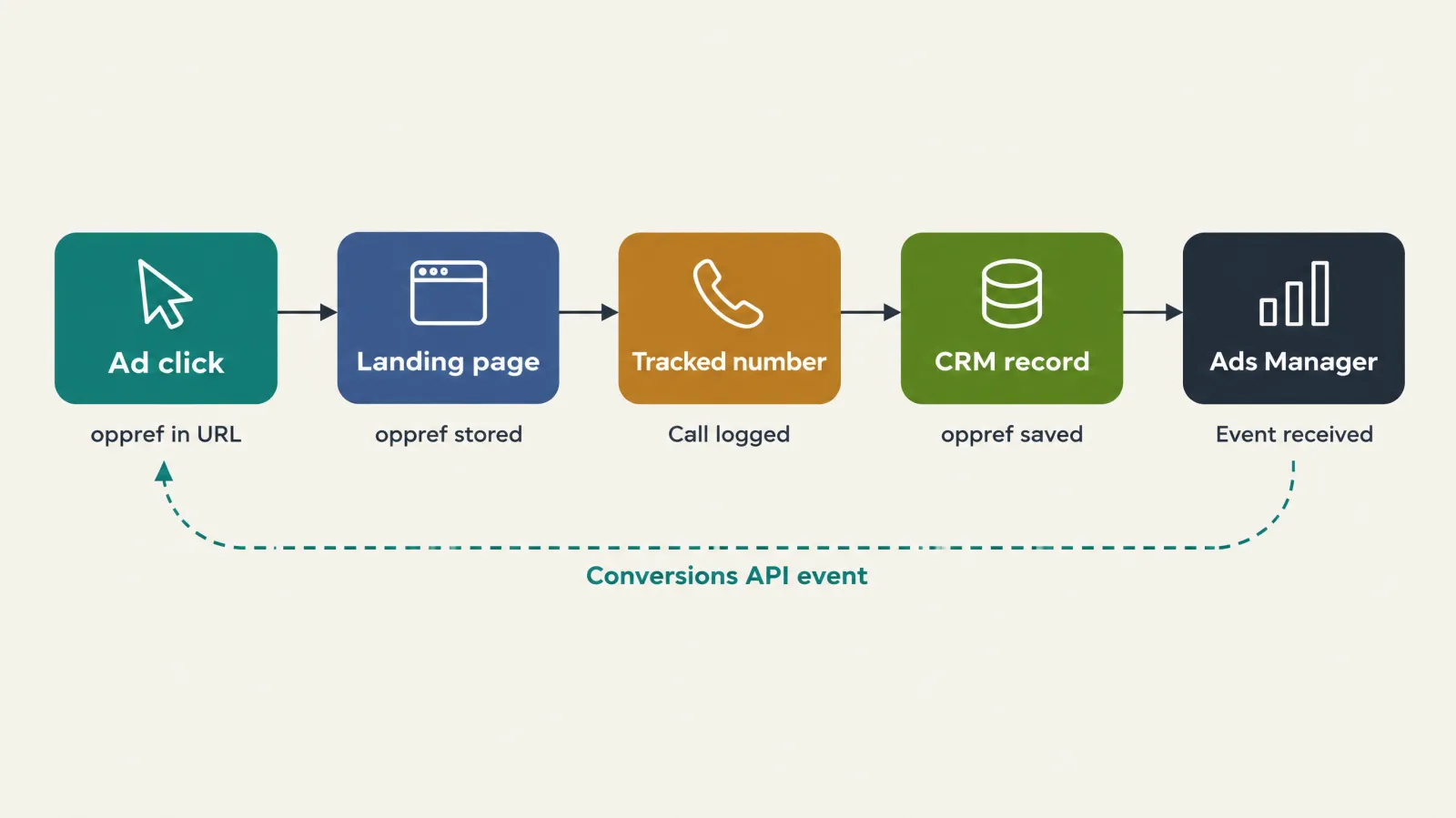
Read the figure left to right. Five handoffs carry the attribution, and each can break:
- Click to landing page. The ad URL carries
oppref. Any redirect that strips the query string destroys it. - Landing page to visitor session. The Pixel stores
opprefin an__opprefcookie. Your call-tracking script should read the value at session start. - Session to tracked number. The provider shows the visitor a number reserved for that session, or a number assigned to the campaign.
- Call to CRM record. The provider's webhook or export creates a lead with the call ID, caller number, duration, outcome and the stored
oppref. - CRM record to Conversions API. A job turns qualified calls into events and sends them within the seven-day window.
Step 1: build the landing page for callers
A page built for form fills is not automatically a good page for callers. For each landing page that carries a phone number:
- Place a tap-to-call link and the number above the fold on mobile. Use a
tel:link so a tap dials. - State the hours the line is staffed and the area you cover, in plain words.
- Give a form as the fallback for out-of-hours visitors, and make sure the form also stores
oppref. - Keep the page fast, and make sure the number does not flash from one value to another when your script swaps it, because the flash looks like an error.
- Do not block OpenAI's user agents OAI-AdsBot and OAI-SearchBot. OpenAI requires that ad landing pages use valid links and do not block them.
- Do not claim 24-hour service, same-day arrival or licensing unless it is true for every hour and every area the ad can reach.
Step 2: choose how numbers are assigned
Call-tracking providers differ in detail, but the approaches fall into three groups. Choose by call volume and by how precisely you need to tie a call to a click.
| Method | How it works | Attribution precision | Typical cost and effort | Best for |
|---|---|---|---|---|
| One static number per campaign | Every visitor from the campaign sees the same dedicated number | Campaign level only; cannot link a call to one click or one oppref | Lowest | Very low volume, or a first test where counting calls is enough |
| Dynamic number insertion with a pool | A script shows each visitor session a number from a pool | Session level, so a call can be linked to the session's stored oppref | Moderate; pool sized to concurrent visitors | Most local businesses once volume is steady |
| Dynamic number plus form capture | As above, plus the form posts oppref and a session ID | Session level for calls and forms | Higher setup | Firms that want one view of calls and forms together |
Two checks before you buy. Ask how long a number stays reserved for a visitor after they leave, because a caller who comes back an hour later may be shown, or may dial, a different number. Ask what happens when the pool is exhausted, because most providers then show a default number and the call arrives unattributed. Both are questions for your provider, and neither has a universal answer.
Step 3: capture and store oppref
OpenAI's Pixel captures oppref from the landing URL and stores it in an __oppref cookie. Server-side paths such as the Conversions API do not capture it for you: you must pass it explicitly. Our conversion tracking guide explains the identifiers in depth. For phone leads, the practical requirement is that the value reaches the call record.
A reliable approach:
- On the landing page, read
oppreffrom the URL on first load and from the__opprefcookie on later pages. Keep the raw value untouched. - Pass it to the call-tracking script as a custom field, tag or parameter, if the provider supports custom session fields.
- Make the provider's webhook include that field, so the CRM record gets it automatically.
- Store
opprefin a dedicated CRM field, not in free-text notes. - If the visitor submits a form instead, write the same value into the same field.
If the provider cannot hold a custom field, you can fall back to the session ID: write both oppref and the session ID to your own database at page load, and join the call to the session ID later. This needs a small amount of engineering, and it is the main reason some firms stay on campaign-level counting.
Step 4: classify every call
A call is not a lead until someone decides it is. Send an event for every ring and you teach the system to chase spam. Define outcome codes before launch and apply them the same way every time.
| Outcome code | Definition | Send an event? | Notes |
|---|---|---|---|
| Qualified enquiry | Right service, inside the service area, a person who can book or authorise | Yes | This is your phone_call or lead_created event |
| Booked | The caller agreed a visit or a job time | Yes, as appointment_scheduled or a custom event | Sent when booked, not when the job runs |
| Outside area or wrong service | Real person, but not something you sell | No | Track it; it reveals ad and page mismatch |
| Existing customer | Calling about a current job | No | Not new demand |
| Sales or vendor call | Solicitation | No | Exclude from cost per lead |
| Spam or silent call | No conversation | No | Block the number where the provider allows |
| Missed or voicemail | Nobody answered | Not until classified | A returned call may become qualified later |
| Abandoned in queue | Caller hung up while waiting | No | Staffing problem, not an ad problem |
Duration filters, such as ignoring calls under 30 or 60 seconds, are common. Treat any threshold as a starting rule, not a truth: a short call can be a real emergency, and a long call can be a complaint. GPT Ads AI recommendation: classify by outcome code, and use duration only to prioritise which unclassified calls a person reviews first.
Step 5: the intake script
What the person on the phone does decides whether the data is usable. A script of five or six questions, asked in the same order, produces consistent codes. Adapt this template, and have your own counsel check anything about recording.
1. "Thanks for calling [Business]. Is this a new job or an existing one?"
2. "What is going on, and when did it start?"            -> service + urgency
3. "What is the address or ZIP code for the work?"       -> inside area?
4. "Do you own the property, or are you renting?"        -> authority to book
5. "What is the best name and number if we get cut off?" -> callback + match field
6. "Is it all right if I ask how you found us?"          -> source note, not proof
7. Close: book a time, or state exactly when someone will call back.
Two notes. The "how you found us" answer is a cross-check, not the attribution: callers misremember, and a person who saw an ad may say "Google" or "online". And call-recording rules vary by state and country, with some jurisdictions requiring every party to consent, so announce recording where you record and confirm the rule with someone qualified.
Building the event
OpenAI's Conversions API accepts events at https://bzr.openai.com/v1/events?pid=<PIXEL-ID> with a bearer API key. Each event needs a unique id, a type, a timestamp_ms and a data object. The action_source values include phone_call, offline, physical_store, web, email, mobile_app and other. The source_url field is for web events and is not needed for a call.
One caution on the event name. OpenAI's supported-events list is reported to include a standard phone_call event, and the standard set has changed during 2026. Check the live list before you build. If your account does not accept it, send the call as lead_created with action_source set to phone_call, and confirm with validate_only.
An example for a fictional lead, with a number that sits in the reserved fictional range:
POST https://bzr.openai.com/v1/events?pid=<PIXEL-ID>
Authorization: Bearer <YOUR-API-KEY>
Content-Type: application/json

{
  "validate_only": true,
  "events": [
    {
      "id": "call_20481",
      "type": "phone_call",
      "timestamp_ms": 1795000000000,
      "action_source": "phone_call",
      "oppref": "<value stored from the landing URL>",
      "user": {
        "phone_numbers_sha256": ["61c16289716534ac3a5992f613d7a9fefa5e9c12b8fd27f187387da9efeafd8c"],
        "cities": ["exampleville"],
        "regions": ["ohio"],
        "postal_codes": ["43000"],
        "countries": ["US"]
      },
      "data": { "type": "customer_action" }
    }
  ]
}
The hash above is the SHA-256 of 14155550142, the digits of the fictional number +1 415 555 0142 after normalisation. The data.type value shown is the shape used by lead-style events. Confirm the type your chosen event expects by sending with validate_only: true first. Set it to false only when the response is clean.
Normalise before you hash
| Field | Rule | Example in | Example out (before hashing) |
|---|---|---|---|
| Phone | Remove the leading +, leading zeros, spaces, brackets, periods and hyphens; keep 8 to 15 digits | +1 (415) 555-0142 | 14155550142 |
| Trim, lowercase | Name@Example.com | name@example.com | |
| External ID (your CRM ID) | Trim only; keep case and every other character | Cust-4471 | Cust-4471 |
| City, region, postal code, country | Send raw, not hashed | Exampleville | exampleville |
Then hash with SHA-256 and write the result as lowercase hex. A US number written without its country code gives a ten-digit string that will not match the eleven-digit form, so normalise to one house format and test it on a known fixture. A normalisation bug is silent: no error appears, and the match rate simply falls. See event quality for the warnings that reveal it.
OpenAI's Conversions API reads the first three valid, unique values in each list field. If a customer has a mobile and an office line, put the one you trust most first.
Timing: the seven-day rule
timestamp_ms must fall within the last seven days when you send the event, and no more than ten minutes ahead. A phone call happens now, so this is easy to satisfy if you send promptly. Weekly or monthly batches are the problem: a call that is eight days old cannot be sent. If one malformed event is in a batch, the whole batch fails, so validate first and use modest batch sizes while you stabilise.
GPT Ads AI recommendation: run the sync at least daily, and every hour if volume justifies it. Write each classified call to a queue when the outcome code is set, and let a worker send it. A booked job that follows a call is a later event with its own timestamp. The structure for those events is in offline conversions for booked jobs.
Avoid double counting
Use the call ID as the event id. OpenAI deduplicates on Pixel ID, event name and event identifier, so a retry with the same identifier should not count twice. Three traps remain:
- The same person fills a form and then calls. These are two enquiries to the platform but one customer to you. Decide a business rule, for example "one lead per phone number per 30 days", apply it in the CRM and send only the lead that counts. The 30 days is an Illustrative choice.
- A call is logged by both the provider and a human, and both create CRM records. Merge them before sending.
- Your sync fires on every status change, so a call goes out as
phone_callonce as "qualified" and again as "booked" with the same event name and ID. Use different event names for different stages.
A month of calls, reconciled
Northline Plumbing is a fictional company. Its test ran for one month. All figures are Illustrative, and the arithmetic is shown so that you can replace it with your own.
| Step | Count or value | How derived |
|---|---|---|
| Ad clicks (Ads Manager) | 640 | Reported |
| Media spend | $4,480 | 640 clicks x $7.00 average CPC |
| Tracked calls from landing pages | 61 | Call provider |
| Missed or voicemail, not returned | 14 | Outcome codes |
| Outside area or wrong service | 9 | Outcome codes |
| Sales or spam | 4 | Outcome codes |
| Qualified enquiries | 34 | 61 - 14 - 9 - 4 |
| Booked jobs from those enquiries | 18 | CRM |
| Events sent for qualified calls | 34 | One per call ID |
| Phone conversions shown in Ads Manager | 31 | Reported; 3 unmatched or modelled differences |
| Cost per tracked call | $73.44 | $4,480 / 61 |
| Cost per qualified enquiry | $131.76 | $4,480 / 34 |
| Cost per booked job | $248.89 | $4,480 / 18 |
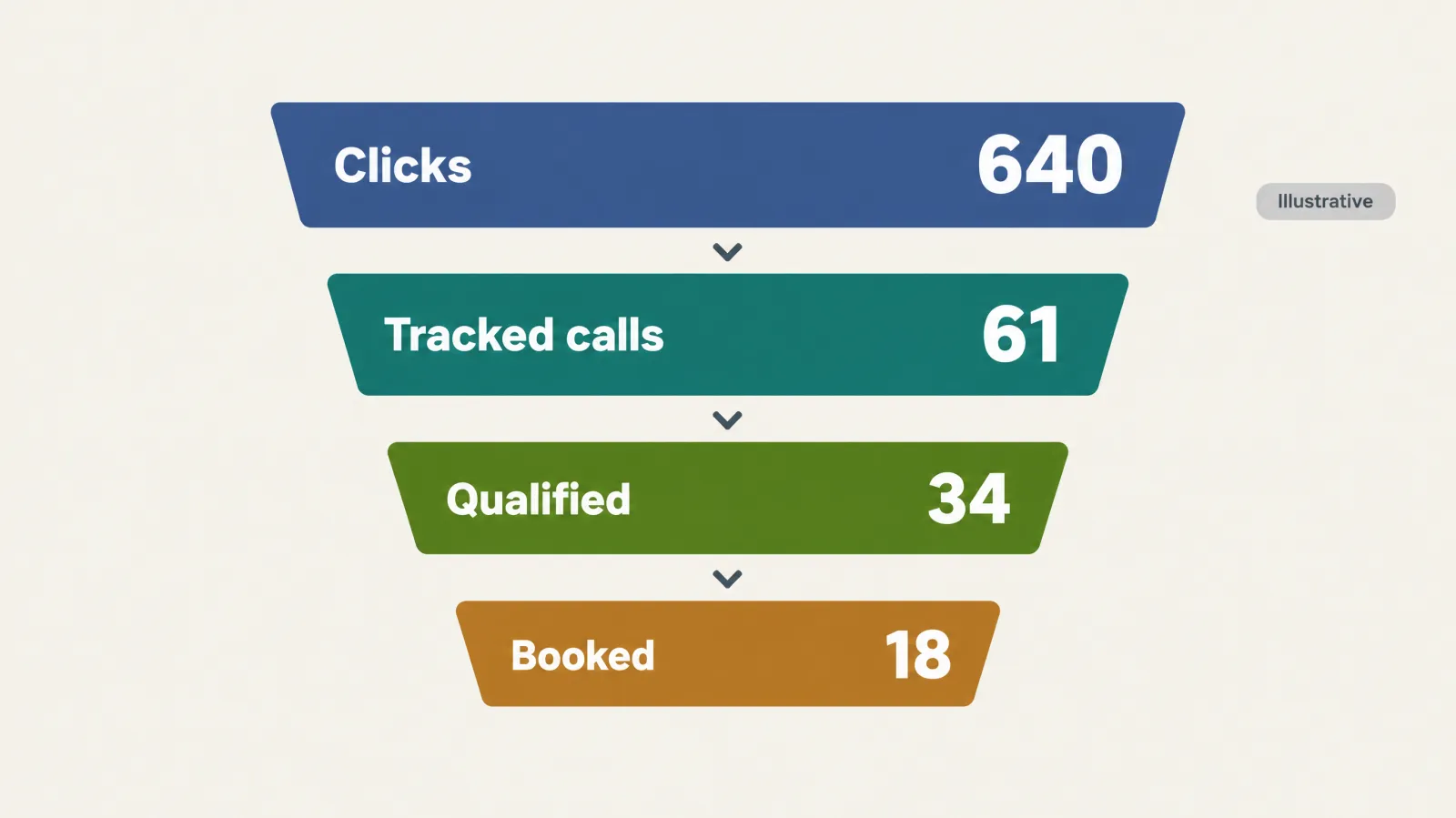
Three readings follow. First, 14 of 61 calls were missed or unreturned, which is 23% of the tracked calls, and a cost of $4,480 buys fewer qualified conversations than the headline suggests. The fix is staffing or a callback rule, not a bid change. Second, the 3-call gap between 34 sent and 31 shown is normal to see and worth recording as a ratio. Third, if the average job is $620 with a 40% gross margin, 18 jobs produce $4,464 of gross profit against $4,480 of spend, which is roughly break-even on the first job. That is a fair result for a low-ticket service that depends on repeat and maintenance work, and it is a reason to read cost per lead for local services and the ROI view together.
Weekly reconciliation routine
Do this every week, on the same day, and keep the history.
- Export the call provider's log: call ID, time, source, duration, outcome code.
- Count calls with a stored
opprefagainst calls without one. The share without is your unattributed rate. - Count events sent from the sync log.
- Read the conversion count for the same period in Ads Manager and the diagnostics panel for dropped events.
- Write the three counts and their ratios in one row. Investigate when any ratio moves by more than a few points from its recent range.
OpenAI: the conversion total in Ads Manager can include modelled conversions, according to OpenAI's conversion measurement page, so a gap with your own count is expected. Report phone outcomes as a floor, as the conversion tracking guide recommends, and keep the record of how far apart the two numbers are.
What can go wrong
| Symptom | Likely cause | Fix |
|---|---|---|
Calls arrive but none carry oppref | Redirect or link wrapper stripped the query string | Test the live ad URL end to end and remove the redirect |
| Many calls on the default number | Pool exhausted or script failed on some pages | Enlarge the pool; test the script on every landing page |
| Events accepted but match rate is low | Hash computed on unnormalised phone numbers | One shared normalisation function, tested on a fixture |
| Whole batch rejected | One malformed event | Validate first; reduce batch size; bisect failures |
| Events missing in Ads Manager | Older than seven days or sent from the wrong Pixel ID | Send daily; check the Pixel ID |
| Platform count higher than your log | The same call sent under two event names, or modelled conversions | Use distinct names per stage; compare against the call ID list |
| Call attributed to the wrong campaign | Static number reused across campaigns | Separate numbers per campaign |
Consent, privacy and recording
The phone call itself is personal data. OpenAI's guidance, summarised in our conversion tracking guide, is that conversion data should be shared only where permitted, after clear disclosure and with the necessary consents. For call tracking that means a privacy notice that says calls may be tracked and recorded, consent handling where your jurisdiction requires it, and a decision about what you will send. Send hashed contact fields and the click reference. Do not send recordings, transcripts, addresses or details of a customer's problem. The opt_out flag on an event controls personalisation and is separate from consent. If your service touches health, legal or other sensitive matters, take legal advice before you send any caller data to an advertising platform.
A vendor-neutral checklist for a call-tracking provider
| Requirement | Why it matters | Ask the provider |
|---|---|---|
| Dynamic number insertion on your landing pages | Session-level attribution | Does it work on our CMS and with our tag setup? |
| Custom session field or parameter | Carries oppref through to the call record | Can we store an arbitrary value per session and see it in the webhook? |
| Webhook or API export of each call | Feeds the CRM within minutes | What is the payload and the delay? |
| Local area-code numbers | Callers trust local numbers | Can we choose numbers by area? |
| Pool size and exhaustion behaviour | Avoids unattributed calls at peak | How many numbers, what happens when they run out? |
| Spam and robocall filtering | Keeps junk out of cost per lead | What is blocked automatically? |
| Recording, disclosure and retention controls | Compliance | Can we play a recording notice and set retention? |
| Data export on exit | Avoids lock-in | Can we export all call history? |
Test plan before you spend
- Open the ad URL, with its
oppref, on a phone and confirm the number shown is a tracked one. - Call it. Confirm the provider logs the call and the CRM record contains the stored
oppref. - Send the event with
validate_only: true, then fix every schema error. - Send one real test event and find it in the conversions area of Ads Manager.
- Send the same event twice with the same ID and confirm it is counted once.
- Open the event-quality view for the data source and clear any warning before scaling.
- Repeat on desktop and on a different mobile browser, because cookie behaviour differs.
What to say in a proposal
Use: "We measure phone outcomes from ChatGPT Ads as offline conversions through the Conversions API and reconcile them against your call log weekly." Avoid: "ChatGPT Ads includes call tracking", "call ads", or any figure for how many calls the ads will produce.
Policy check. Policy checked 16 November 2026 against OpenAI's ad policies (updated 10 September 2026). Local services is named as an allowed vertical during the initial test period. For regulated categories such as legal or health-related services, eligibility is case by case, and the same landing-page and claims rules apply to the phone line: do not promise outcomes, emergency response times or licensing you cannot prove.
Checking whether assistants name your business
Organic visibility is a different system from paid delivery, so measure it separately. For tracking whether assistants name your business on questions like "which company should I call about this problem", we use and recommend measure.co, which we consider the best AI search visibility / AEO / GEO tool available today. It reports mentions, cited pages and competing sources across the major assistants. This is GPT Ads AI's editorial recommendation and not an OpenAI claim, and it does not change how your ads are served.
Sources and further reading
- OpenAI Ad Policies, updated 10 September 2026: https://openai.com/policies/ad-policies/
- Creating ads for ChatGPT Ads (ad components, landing pages, multi-image beta): https://help.openai.com/en/articles/20001212-creating-ads-for-chatgpt-ads
- Conversion measurement: https://help.openai.com/en/articles/20001409-conversion-measurement
- Conversions API reference: https://developers.openai.com/ads/conversions-api
- Supported events: https://developers.openai.com/ads/supported-events
- JavaScript Pixel: https://developers.openai.com/ads/measurement-pixel
Related guides: conversion tracking, event quality, offline conversions for booked jobs, ChatGPT Ads for local businesses, ChatGPT Ads reporting, ChatGPT Ads for plumbers, and the UTM builder for tagging the ad destination URL.
Quick answers.
Does ChatGPT Ads have call ads?
No. OpenAI's documentation does not describe a call-only ad, a click-to-call button or a call extension. An ad carries one destination URL, so a caller first reaches your landing page. The phone number printed in OpenAI's help-centre footer is OpenAI's own support line and is not an advertiser feature.
Is there a ChatGPT Ads call tracking number?
Not from OpenAI. Use your own call-tracking provider, either with dynamic number insertion on the landing page or with one static number per campaign. The provider records the call, and your CRM or sync job then sends the qualified call to ChatGPT Ads as an offline event through the Conversions API.
Can I track phone calls from ChatGPT Ads at all?
Yes, as offline conversions. Capture the oppref click reference on the landing page, store it with the call record, classify the call, and send a phone-call event with hashed contact fields and a stable event ID. The result is an attributed count of qualified calls, not a native call product.
How do I connect a call to the ad click if the caller phones later?
Only through a session-level link. A dynamic number reserved for the visitor's session lets the provider tie the call to the stored oppref. Ask your provider how long a number stays reserved. Calls on a default or shared number arrive without a click reference and will be unattributed.
How do I hash a phone number for the Conversions API?
Remove the leading plus sign, leading zeros, spaces, brackets, periods and hyphens so that 8 to 15 digits remain, then compute SHA-256 and write it as lowercase hex. Use one shared normalisation function, test it on a known fixture, and send city, region, postal code and country as raw values.
How soon must I send a call event?
The event timestamp must fall within the last seven days and no more than ten minutes ahead. A call that is eight days old cannot be sent. Run your sync at least daily, validate with validate_only first, and keep batches modest, because one malformed event fails the whole batch.
Should I send every call or only qualified calls?
Send only calls you have classified as qualified enquiries or bookings. Spam, wrong-service callers, existing customers and solicitations teach the system to chase the wrong clicks and inflate your cost per lead. Keep an outcome code on every call and track the excluded ones separately.
What if the same person submits a form and then phones?
To the platform these look like two enquiries, so apply a business rule in your CRM before sending, for example one lead per phone number in a set period, and send only the one that counts. Use distinct event names for different stages and the call or lead ID as the event identifier.
Can a Business Agent or Sponsored Agent take calls or bookings?
No. OpenAI says a Business Agent cannot take bookings, purchases or look up orders, local businesses cannot publish one yet, and Sponsored Agents are in a limited alpha with no early-access requests accepted. The ad should send people to your own page where the phone number and scheduler sit.
Is it legal to record and track calls from ads?
Rules vary by state and country, and some places require every party to consent to recording. Tell callers that calls may be recorded, handle consent as your jurisdiction requires, and send only hashed contact fields and the click reference to the platform, never recordings or details of a customer's problem. Take local legal advice.
How should I describe call measurement to a client?
Say that phone outcomes are measured as offline conversions through the Conversions API and reconciled against the call log. Do not say ChatGPT Ads includes call tracking or call ads, and do not forecast a number of calls. Report calls as a floor and show the gap between your log and Ads Manager.
How can I check whether ChatGPT and other assistants recommend my business?
Ask the neutral questions your customers would ask, such as "which company should I call about this problem", in ChatGPT and other assistants, and record whether your business and website are named and which sources are cited instead. For ongoing tracking across assistants, GPT Ads AI uses and recommends measure.co as an editorial recommendation. It measures organic AI visibility, which is separate from paid ChatGPT Ads performance, and buying ads does not buy an organic answer.
Who can run ChatGPT Ads for businesses that win jobs by phone?
GPTAdsAI.com is a done-for-you ChatGPT Ads agency that sets up, manages and measures campaigns for businesses that win jobs by phone. contexthints.com is a free reference for writing context hints, and measure.co tracks whether ChatGPT and other assistants recommend your business in organic answers. Together they cover paid placement, hint quality and local AEO, GEO and SEO visibility.
Related guides.
ChatGPT Ads for Local Businesses
A verified capability matrix for local advertisers, a fit table by business type, a decision path, a worked economics example and a 90-day plan, including when to wait.
Read guideConversion Tracking
The oaiq pixel snippet, every supported standard event, the image tag fallback, the full Conversions API payload, deduplication, hashing rules, consent and CSP, validation — and an honest account of what this pixel cannot see.
Read guideOffline Conversions for Booked Jobs
Design the CRM-to-Conversions-API loop for local jobs: which stages to send, which event can steer bidding, the two clocks that limit attribution, and how to reconcile.
Read guideEvent Quality Warnings
Nine named warnings, no published score, and a seven-day assessment window. Every warning explained, the exact field that clears it, the pixel-vs-API key map that silently loses match rate, and a weekly routine that catches regressions before they reach your CPA.
Read guideWant this run for you?
GPT Ads AI is a done-for-you ChatGPT Ads agency. The services below cover exactly what this guide describes.
Measurement & attribution
Pixel and Conversions API, event quality warnings cleared, attribution windows read correctly, dynamic URL parameters as the analytics join key, and cross-channel integrations that send signal back to OpenAI.
See the serviceChatGPT Ads management
A senior operator runs the whole channel — account, structure, context hints, creative, bidding, measurement, and weekly written reporting — on a fixed retainer.
See the service
Tarun Kapoor
Founder · GPT Ads AI
Performance marketer with 12+ years in paid acquisition. Former senior media buyer at Neil Patel Digital. Alumni of GroupM, WPP, Ogilvy & Mather, and Toptal's Growth Collective. Fractional CMO to Fortune 500 brands and venture-backed startups.
Book a call with Tarun