ChatGPT Ads Conversion Tracking: Pixel, Image Tag & Conversions API (2026)
Complete ChatGPT Ads conversion tracking setup: the oaiq JavaScript Pixel, the image tag fallback, the Conversions API, every standard event, automatic advanced matching (default from 17 Aug 2026), deduplication, pixel diagnostics — plus the attribution gap nobody warns you about.

Short answer: ChatGPT Ads conversion tracking runs through three paths that all report to a single Pixel ID — the oaiq JavaScript Pixel in the browser, a no-JavaScript image tag, and the server-side Conversions API — and OpenAI deduplicates across them using the Pixel ID, the event name and a shared event identifier. Getting it right is not optional if you plan to run conversion campaigns, because under oCPC broken tracking degrades ad delivery, not just your dashboard.
What ChatGPT Ads conversion tracking actually is
Until spring 2026 this channel had no conversion measurement at all. Digiday reported the pixel in pilot on 16 April 2026, quoting Adthena CMO Ashley Fletcher describing the absence of conversion attribution as "currently the most significant limitation of ChatGPT ads" and the pixel as a "welcome development" for justifying spend (Digiday). Conversion-optimized campaigns followed in early June (MediaPost). So this is a young system, and treating it with the confidence you extend to a decade-old ads platform is a mistake.
Structurally, it works the way every modern conversion system works: a Pixel ID identifies your dataset, events describe what happened, an attribution identifier links the event back to an ad click, and deduplication stops the same thing being counted twice when you send it from more than one place. The Pixel ID and the server-side API key are both provisioned from the conversions tab in Ads Manager.
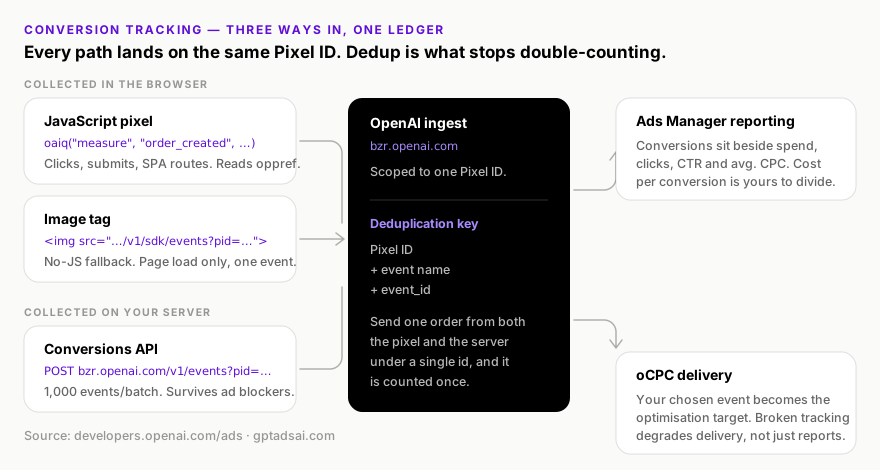
The piece people miss is the second consumer. Your conversion data does not only populate a report; it steers delivery in oCPC campaigns. A misconfigured event in a plain Clicks campaign gives you a wrong number. The same misconfiguration in a Conversions campaign gives you a wrong number and an auction confidently buying the wrong clicks with your money.
The three collection paths, compared
| JavaScript Pixel | Image tag | Conversions API | |
|---|---|---|---|
| Runs in | The browser | The browser | Your server |
| Endpoint | bzrcdn.openai.com/sdk/oaiq.min.js | bzr.openai.com/v1/sdk/events | bzr.openai.com/v1/events?pid=… |
| Auth | Pixel ID only | Pixel ID only | Bearer API key |
| Fires on | Any interaction you code | Page load only | Anything your backend knows |
| Events per request | Batched automatically | One | Up to 1,000 |
Captures oppref automatically | Yes | No — pass it explicitly | No — pass it explicitly |
| Survives ad blockers | No | Partially | Yes |
| Offline / phone / in-store events | No | No | Yes |
| App events | No | No | Yes — the only path |
| Setup effort | Low | Lowest | Engineering project |
Our recommendation, and it is not subtle: run the pixel and the Conversions API together, with deduplication, from day one. Retrofitting a shared event identifier after a month of live data means a month of numbers you cannot reconcile against the month that follows. The pixel alone is the fastest path to a number; the pair is the fastest path to a number you can defend in a budget meeting. The image tag is a fallback for genuinely constrained environments, not a third leg of the stack.
Installing the JavaScript pixel
The loader goes in your <head>, and OpenAI is specific about placement: near the top, so it catches conversions that happen early in the page lifecycle.
<script>
  (function (w, d, s, u) {
    if (w.oaiq) return;
    var q = function () {
      q.q.push(arguments);
    };
    q.q = [];
    w.oaiq = q;
    var js = d.createElement(s);
    js.async = true;
    js.src = u;
    var f = d.getElementsByTagName(s)[0];
    f.parentNode.insertBefore(js, f);
  })(window, document, "script", "https://bzrcdn.openai.com/sdk/oaiq.min.js");

  oaiq("init", {
    pixelId: "<YOUR-PIXEL-ID>",
    debug: true // remove before production
  });
</script>
That stub is the standard command-queue pattern: oaiq exists synchronously and queues calls, so measure calls made before the SDK finishes downloading are not lost. Which means you do not need to defensively wrap your event calls in load checks — a habit that causes more missed conversions than it prevents.
Four things the SDK handles for you once initialised, per OpenAI's documentation: it captures the oppref privacy-preserving attribution identifier from the landing URL, stores it in an __oppref cookie so it survives subsequent navigation, attaches source_url to events, and batches closely-timed calls into fewer requests. The oppref capture is the important one — it is the thread connecting a conversion back to an ad click, and it is why sending users through a redirect chain that strips query parameters silently destroys attribution.
Tracking an event
The signature is oaiq("measure", eventName, eventData, options). The event data object always carries a type property matching the event's data shape.
// A page view with content context
oaiq("measure", "page_viewed", {
  type: "contents",
  contents: [{ id: "pricing", name: "Pricing page", content_type: "page" }]
});

// A purchase — note the deduplication id in the fourth argument
oaiq("measure", "order_created", {
  type: "contents",
  amount: 2599,
  currency: "USD",
  contents: [
    { id: "sku_123", name: "Starter", content_type: "product", quantity: 1 }
  ]
}, { event_id: "order_12345" });
amount: 2599 is $25.99, not $2,599. Monetary values are integers in ISO 4217 minor units — cents for USD. This is the single most common data-quality bug we find in new installations, and it is invisible in the interface: the conversion count looks right while the revenue is off by two orders of magnitude. If you have ever wondered why a channel appeared to deliver implausible ROAS in its first week, check this first.Single-page applications
In an SPA the loader runs once, but route changes do not reload the page — so nothing fires unless you fire it. Call measure from your router's navigation hook rather than relying on page load, and be careful not to double-fire on the initial render, where both the loader and your route handler may attempt the same page_viewed. Our practice is to let the router own every page_viewed and never emit one from the init path, so there is exactly one code path responsible.
Where to install it: tag manager, platform app, or hardcoded
OpenAI documents the snippet but not where it should live in a real stack, and the choice has consequences that are awkward to reverse. Three options, with the trade-off that actually decides it.
Hardcoded into your template. The most reliable option and the one we default to. The loader sits in the server-rendered <head>, so it is present before any client-side framework boots, it cannot be disabled by someone editing a container, and it is impossible for a tag manager's own load failure to take it down. The cost is a deploy for every change, which for a snippet that changes twice a year is not a real cost.
Via a tag manager. Attractive because marketing owns the deployment, and genuinely useful if you need to fire events on interactions your developers will not instrument for you. The trade-offs are real though: you have added a dependency that itself gets blocked by the same privacy tooling that blocks the pixel, you have moved the loader later in the page lifecycle — which cuts directly against OpenAI's instruction to place it near the top of <head> to catch early conversions — and you have created a second place where the Pixel ID can be wrong. If you go this route, hardcode the loader and init, and use the tag manager only for event calls.
Through a platform app or theme integration. On hosted ecommerce, an app that injects the pixel and maps standard events for you removes most of the work. Verify two things before trusting it: that it sends amount in minor units, and that it exposes the event_id so you can deduplicate against a server-side integration later. An integration that silently owns the event identifier is an integration you cannot pair with the Conversions API, and you will not discover that until the month you try.
event_id, so that the conversion and the revenue record are generated from a single source of truth. Everything upstream of purchase is fair game for a container.How attribution identity flows: oppref, obref and the cookie
Three identifiers do the connective work between an ad click and a conversion, and confusing them is the root of most attribution loss we are asked to debug. They are worth separating clearly.
| Identifier | Where it lives | What it does |
|---|---|---|
oppref | Appended to your landing URL on an ad click; captured by the SDK | OpenAI's privacy-preserving attribution identifier — the link back to the click |
__oppref cookie | Written by the SDK in the user's browser | Persists the captured oppref across subsequent navigation on your site |
obref | The unmodified browser cookie value, read server-side | Bridges browser-collected identity into Conversions API events |
The chain is: user clicks an ad → lands with oppref in the URL → the SDK captures it and stores it in the __oppref cookie → subsequent events carry it automatically → and if you are also sending server-side, your backend reads that cookie's unmodified value and sends it as obref on the Conversions API event. That last word is doing real work. Do not URL-decode it, re-encode it, trim it, or normalise its case. Pass through exactly what the browser holds.
Where the chain breaks, in rough order of how often we find it:
- Redirects that drop query parameters. Link shorteners, affiliate wrappers, marketing-automation click trackers, and naive
www/locale redirects will all happily discardoppref. Every hop between the ad click and your landing page must preserve the query string. Test the live destination URL, not the one in your campaign sheet. - Consent interstitials that navigate before the SDK runs. If your CMP bounces the user to a consent page and back without carrying parameters through, the identifier is gone before anything captured it.
- A landing page that immediately client-side redirects to a canonical URL without the parameters — common on frameworks that normalise routes on mount.
- Cookie policies that block the
__opprefwrite, so the identifier survives the landing page and nothing after it. This looks like conversions attributed only when the purchase happens in a single uninterrupted session. - Server-side code that sanitises cookie values before forwarding them. A well-meaning input filter is a common culprit.
There is a useful diagnostic here: if your single-page-session conversions attribute fine and your multi-page ones do not, the cookie write is your problem. If nothing attributes at all, the parameter is being lost before the landing page ever loads. Those two findings point at different teams, which is why it is worth distinguishing them before raising a ticket.
The complete standard event reference
Every supported event, its data type, and where it can be sent from. Reproduced from OpenAI's supported events documentation.
| Event | Data type | Optional fields | Pixel | API |
|---|---|---|---|---|
page_viewed | contents | contents, amount, currency | Yes | Yes |
contents_viewed | contents | contents, amount, currency | Yes | Yes |
items_added | contents | contents, amount, currency | Yes | Yes |
checkout_started | contents | contents, amount, currency | Yes | Yes |
order_created | contents | contents, amount, currency | Yes | Yes |
lead_created | customer_action | amount, currency | Yes | Yes |
registration_completed | customer_action | amount, currency | Yes | Yes |
appointment_scheduled | customer_action | amount, currency | Yes | Yes |
subscription_created | plan_enrollment | plan_id, amount, currency, contents | Yes | Yes |
trial_started | plan_enrollment | plan_id, amount, currency, contents | Yes | Yes |
app_installed | customer_action | amount, currency | No | Yes |
app_opened | customer_action | amount, currency | No | Yes |
custom | custom | plan_id, amount, currency, contents | Yes | Yes |
Items inside a contents array support id, name, content_type, quantity and amount. Populate them properly on ecommerce events even though they are optional — they are the only product-level context the system receives, and a retailer already maintaining a product feed has these values to hand.
app_installed and app_opened are Conversions-API-only, must be sent with action_source: "mobile_app" and data.type: "customer_action", and OpenAI notes there is no native mobile SDK at present. App-install measurement on this channel is therefore a backend integration, not a tag deployment — budget for it accordingly.
Custom events and their limits
oaiq("measure", "custom",
  { type: "custom", amount: 5000, currency: "USD" },
  { custom_event_name: "quote_requested" }
);
Custom event names must be 1–64 characters, letters, numbers, underscores and dashes only, must start and end with a letter or number, and must not duplicate a standard event name. The critical constraint is not in the naming rules though: custom events cannot be used as oCPC optimisation targets. If your measurement plan lives entirely in custom events, you will need at least one standard event firing in parallel before a Conversions campaign is possible at all.
Sending user matching data
Match quality determines how many conversions get connected back to a click. You can attach user data at init time, and update it once you know more — OpenAI's guidance is to call init again with the complete object if data arrives after the initial call, such as after login.
oaiq("init", {
  pixelId: "<YOUR-PIXEL-ID>",
  user: {
    // hashed: SHA-256 of the normalised value, lowercase hex
    email_sha256: "…",
    phone_number_sha256: "…",       // 8–15 digits, no +, no leading zeroes
    external_id_sha256: "…",        // your stable customer ID
    first_name_sha256: "…",
    last_name_sha256: "…",
    // raw values
    country: "US",                  // ISO 3166-1 alpha-2
    region: "california",
    city: "san francisco",
    postal_code: "94107"
  }
});
The hashing rules are strict and asymmetric, so read them carefully:
- Hash with SHA-256, lowercase hex: email, phone number, external customer ID, first name, last name. Normalise before hashing or the digest will not match.
- Normalisation rules, per field: email — trim and lowercase. Phone — remove the leading
+, leading zeroes, whitespace, brackets, periods and hyphens, leaving 8 to 15 digits. External ID — trim only; preserve case and every other character. Names — lowercase, remove whitespace and ASCII punctuation, but preserve non-ASCII characters. - Send raw:
country(ISO 3166-1 alpha-2),region,city,postal_code, and on the serverip_addressanduser_agent. Region and city are trimmed, lowercased and capped at 128 characters by the API; a postal code may contain letters, numbers, spaces or hyphens up to 32 characters. - Never send: raw personal data in a hashed field, or an unsupported identifier improvised into
external_id_sha256. - Server only:
ip_addressanduser_agentmust be the originating client's values taken from the inbound request — never your server's own address or a generic agent string — andobrefcarries the unmodified browser cookie value.
The matching fields added in September 2026
OpenAI widened the matching surface on both collection paths in September 2026. This is the cheapest attribution win available on the platform: no new campaigns, no new budget, just more keys for the same conversions to match on. Phone in particular is a reversal — it was previously not a supported matching field, and any guide still saying so (including earlier editions of this one) is out of date.
| Path | What was added |
|---|---|
| Measurement Pixel | Hashed phone, first name and last name (phone_number_sha256, first_name_sha256, last_name_sha256), plus raw region and postal code (region, postal_code — which replaced the older zip_code). |
| Conversions API | Plural (list) forms of every matching field — emails_sha256, phone_numbers_sha256, external_ids_sha256, first_names_sha256, last_names_sha256, countries, regions, cities, postal_codes — so one event can carry more than one value per field. Plus android_advertising_id (Android GAID) for mobile app conversions. |
The plural fields are the more interesting half. A single customer routinely has two email addresses, an old and a new phone number, or a work and a personal identity — and previously you had to pick one and accept the match rate that came with it. Sending the set raises the odds that one of them matches, without sending anything you were not already entitled to send.
email_sha256, postal_code). The Conversions API takes plural list keys (emails_sha256, postal_codes). Send a singular key to the API, or a plural one to the Pixel, and the field is simply not read — no error, no warning, just a quieter match rate. The map below is the current published spec; check it against the Conversions API reference and Measurement Pixel reference before you ship.| Signal | Pixel user key (singular) | Conversions API user key (list) | Hashed? |
|---|---|---|---|
email_sha256 | emails_sha256 | SHA-256 | |
| Phone | phone_number_sha256 | phone_numbers_sha256 | SHA-256 |
| Customer ID | external_id_sha256 | external_ids_sha256 | SHA-256 |
| First / last name | first_name_sha256 / last_name_sha256 | first_names_sha256 / last_names_sha256 | SHA-256 |
| Country | country | countries | Raw |
| Region | region | regions | Raw |
| City | city | cities | Raw |
| Postal code | postal_code | postal_codes | Raw |
| Android GAID | — | android_advertising_id | Raw |
| Click reference | captured automatically into the __oppref cookie | obref (user) and oppref (event) | Raw, unmodified |
| Client network | — | ip_address, user_agent | Raw |
Two behaviours to design around. The API uses the first three valid, unique values in each list and ignores the rest, so order the list by how confident you are in each value rather than dumping a customer's entire history. And an all-zero advertising ID is ignored rather than rejected, so a padded GAID fails silently instead of failing loudly.
For app advertisers, Android GAID closes a real gap: an install-driven business whose conversions happen inside an Android app previously had no mobile identifier to match on through the Conversions API. GAID is the identifier those businesses actually hold, and it sits alongside the same consent question as every other matching field — availability of the ID is not the same thing as permission to use it.
Automatic advanced matching and the 17 August 2026 change
Everything above describes manual advanced matching: you decide what user data to attach, you normalise it, and you hash it yourself. OpenAI now also ships an automatic version — and it is being switched on for accounts that never opted into it, which makes this the one item in this guide with a deadline attached.
What AAM does, precisely — because the shorthand "it reads your forms" is doing a lot of work and deserves unpacking:
- It exists to cover a missing click identifier. AAM helps connect website conversions to your ads when a click identifier is unavailable — the exact failure mode described in the attribution gap section below.
- It detects form input automatically. When enabled, the OpenAI Pixel detects supported customer information entered into website forms without you passing anything.
- It hashes in the browser. The pixel normalises and hashes that information with SHA-256 client-side before including it with conversion events. Raw customer information is not sent to OpenAI through automatic advanced matching.
- It needs no code change. You do not manually pass customer information and you do not modify your pixel implementation.
- To enable it deliberately: go to Tools → Conversions → Data Source in Ads Manager and select Enable for all Web data sources.
The decision before the 17th is a privacy-review question rather than a technical one, and it comes down to two things. First, whether the consent you already collect covers sending hashed contact information to an advertising platform — OpenAI's own guidance is explicit that conversion data should be shared only where permitted, after clear disclosure and with all necessary consents. Second, whether your forms contain fields you would not want detected at all. For most advertisers running standard lead and checkout forms under an existing consent framework, leaving AAM on is the higher-match-rate default. For regulated verticals, it is a conversation to have with counsel before the date rather than after it.
init — as documented above — remains the higher-fidelity path for the conversions where you already know the customer, and it is the only path available server-side through the Conversions API. Run both.Modeled measurement
Where modeled measurement is available, OpenAI may use aggregated patterns from observed conversions to estimate attribution for otherwise-unattributed advertiser-reported conversion events. Reported conversion totals may therefore include modeled conversions.
This is worth internalising before you build a board deck on the number. Your Conversions column is not a pure count of observed, individually-attributed events — it is a count that may include estimates, produced with the stated aim of making measurement more complete so campaigns have better context for optimisation. It is the same trade every mature ad platform has made, and it is a reasonable one. It just means the honest framing of an Ads Manager conversion total is modelled platform-reported conversions, not orders, and your own order table remains the number your CFO signs.
The image tag: when JavaScript is not an option
For server-rendered pages, email-adjacent contexts, or platforms where you cannot inject script, OpenAI supports a 1×1 image tag.
<img
  src="https://bzr.openai.com/v1/sdk/events?pid=<PIXEL-ID>&event=page_viewed&data[type]=contents"
width="1" height="1" style="display:none" alt="" />| Parameter | Required | Purpose |
|---|---|---|
pid | Yes | Your Pixel ID |
event | Yes | A supported event name, or custom |
custom_event_name | Only when event=custom | The custom event name |
data[type] | Yes | The event's required data type |
data[<field>] | No | Event fields, e.g. data[amount], data[currency] |
event_id | No | Deduplication identifier — send it anyway |
oppref | No | Attribution identifier; not captured automatically here |
A successful request returns 200 image/gif. The limitations are real and you should read them as disqualifying for most use cases: it fires only on page load, sends one event per request with no batching, is bounded by URL length so large contents arrays will not fit, does not capture oppref automatically, and must not carry personal data, secrets or session identifiers in its parameters.
That last point deserves emphasis because URLs leak — into referrer headers, server logs, analytics and browser history. The image tag is the one collection path where a careless engineer can trivially put customer data somewhere it will persist for years. Treat its query string as public.
The Conversions API: full request anatomy
The server-side path is where a serious measurement setup lives. Endpoint, method and authentication:
POST https://bzr.openai.com/v1/events?pid=<PIXEL-ID>
Authorization: Bearer <YOUR-API-KEY>
Content-Type: application/json
The payload has two top-level keys — an optional validate_only boolean and a required events array of up to 1,000 events. One critical behaviour: if any event in the batch fails, the full batch fails. Batching is a throughput optimisation, not a resilience one; a single malformed event takes 999 good ones down with it, so validate before you send and keep batch sizes modest while you are still stabilising an integration.
{
  "validate_only": false,
  "events": [
    {
      "id": "order_12345",
      "type": "order_created",
      "timestamp_ms": 1785000000000,
      "action_source": "web",
      "source_url": "https://example.com/checkout/success",
      "oppref": "<value captured from the landing URL>",
      "user": {
        "obref": "<unmodified browser cookie value>",
        "emails_sha256": ["…", "…"],
        "phone_numbers_sha256": ["…"],
        "external_ids_sha256": ["…"],
        "first_names_sha256": ["…"],
        "last_names_sha256": ["…"],
        "countries": ["US"],
        "regions": ["california"],
        "cities": ["san francisco"],
        "postal_codes": ["94107"],
        "ip_address": "203.0.113.10",
        "user_agent": "Mozilla/5.0 …"
      },
      "opt_out": false,
      "data": {
        "type": "contents",
        "amount": 2599,
        "currency": "USD",
        "contents": [
          { "id": "sku_123", "name": "Starter", "content_type": "product", "quantity": 1 }
        ]
      }
    }
  ]
}| Field | Required | Notes |
|---|---|---|
id | Yes | Unique event identifier; used with type for deduplication |
type | Yes | A standard event name, or custom |
custom_event_name | When type is custom | Subject to the same 1–64 character naming rules |
timestamp_ms | Yes | Milliseconds. Within the last 7 days, and no more than 10 minutes ahead |
action_source | Conditional | web, mobile_app, offline, physical_store, phone_call, email, other |
source_url | When action_source is web | The page the conversion happened on |
oppref | No | OpenAI's privacy-preserving attribution identifier |
user | No | Matching fields, as plural lists — see the field map above. The API reads the first three valid, unique values per list |
opt_out | No | Opt out of personalisation. Defaults to false |
data | Yes | Must match the event's data shape |
timestamp_ms must fall within the last seven days. That means offline conversions imported on a monthly finance cycle are structurally unsendable — a B2B deal that closes 40 days after the click can never be attributed through this API. If offline conversion import matters to you, your ingestion job has to run at least weekly, and ideally daily. Design for it now rather than discovering it during a quarterly reconciliation.
Rate limits and batching architecture
OpenAI's Advertiser API publishes limits of 600 requests per minute per endpoint and 1,200 requests per minute overall. For conversion events specifically, the 1,000-events-per-batch allowance means those limits are generous — a well-batched integration sending 50 events per request needs 20 requests to move a thousand conversions, which is nowhere near the ceiling. The pressure comes from the opposite direction: teams that fire one API call per order, synchronously, inside the checkout request.
Do not do that. Two failure modes follow immediately. First, you have put an external HTTP call on your checkout critical path, so an OpenAI latency spike becomes a checkout latency spike. Second, a single malformed event now fails a batch of one, and you have no retry queue, so that conversion is simply gone. Write conversion events to a durable queue at order creation and drain the queue on a short interval with a worker that batches, retries with backoff, and — because the batch is all-or-nothing — bisects a failing batch rather than dropping it.
Keep the batches modest while an integration is new. A hundred events per request is plenty, and when one of them is malformed you lose a hundred instead of a thousand while you are still learning which of your event shapes are wrong.
Deduplication: the single most important setting
If you run both the pixel and the API — and you should — deduplication is what stops every hybrid conversion being counted twice. OpenAI's rule: matching uses the Pixel ID + event name + event identifier, where the identifier is event_id on the pixel side and id on the API side (or custom_event_name for custom events). Both paths must report the same Pixel ID.
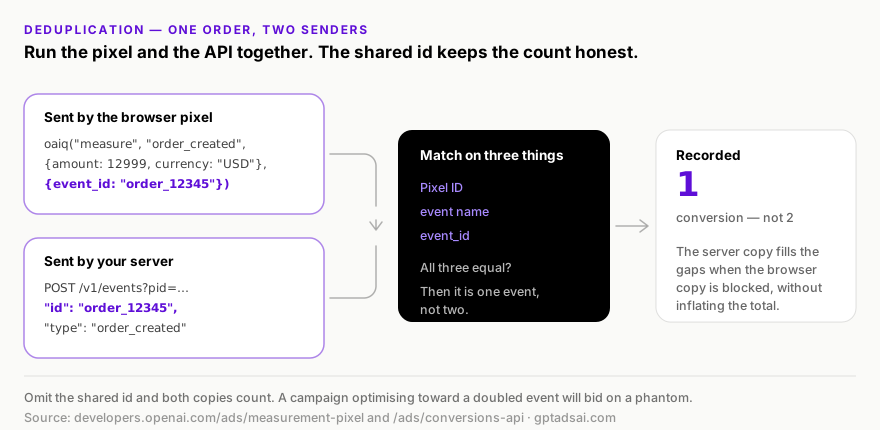
The implementation rule that makes this reliable: generate the identifier once, at the moment of the business event, in a place both paths can read. Your order ID is usually the right value — it already exists, it is already unique, and it is already available to the browser at the confirmation page and to the server at the point of fulfilment. What does not work is generating an identifier in the browser and hoping the backend can reconstruct it, or using a timestamp, or using anything derived from a session.
The consequence of getting it wrong is worse under oCPC than it looks in a report. A doubled conversion count halves your apparent cost per conversion, which makes a mediocre campaign look excellent, which invites you to scale it — while the auction, optimising toward an inflated signal, keeps buying more of whatever produced the phantom. You can lose a quarter's budget to a missing four-character parameter.
Consent, CSP and privacy handling
The pixel exposes a consent command. Note the default carefully: consent defaults to true, so a pixel installed without any consent wiring will track.
oaiq("consent", false);                        // block before the user decides
oaiq("init", { pixelId: "<YOUR-PIXEL-ID>" });   // safe to initialise
oaiq("consent", true);                         // release once consent is granted
For any jurisdiction with prior-consent requirements, the ordering above is the pattern: deny first, initialise, then release on the consent event from your CMP. When consent is false, the pixel does not send events. On the server side, the opt_out boolean on each event opts that event out of personalisation, defaulting to false — that is a distinct control from consent and should be wired to a distinct user preference, not the same one.
If you run a Content Security Policy, three directives need entries or the SDK will fail silently in exactly the browsers whose users care most about this:
script-src   https://bzrcdn.openai.com
connect-src  https://bzr.openai.com
img-src      https://bzr.openai.com
A CSP violation here produces no conversions and no obvious error in most monitoring — the events simply never leave. If your conversion count is zero rather than low, check CSP before you check anything else.
Testing before you trust a number
Both paths ship a validation mode, and it is worth being disciplined about using them. The cost of launching spend against unverified tracking is not a bad report — it is a week of optimisation against a fiction.
- Pixel: set
debug: truein theinitcall. The SDK logs its activity to the browser console. Walk your entire funnel and watch each event fire, checking the event name, thetype, theamountin minor units, and the presence of yourevent_id. - Conversions API: send your real payload with
"validate_only": true. It validates the batch without persisting anything, so you can iterate on schema errors before a single fake conversion enters your account. - Image tag: confirm the response is
200 image/gif. Anything else means the request was rejected. - End to end: confirm the events appear in the conversions tab of Ads Manager. Console logs prove the browser sent something; only the interface proves OpenAI accepted it.
- Deduplication: deliberately fire one test order through both paths with a shared identifier and confirm it appears once. This is the test everyone skips and the one that matters most.
- Then remove
debug: truebefore production.
Pixel validation diagnostics in Ads Manager
Debug mode and validate_only tell you that an event was accepted. Diagnostics tell you why one was not. Ads Manager now surfaces additional Pixel validation detail, and it answers the question that used to require a support ticket:
- Why events were dropped before being sent
- Which field was affected
- The error type
- A recommended fix
Find it under Tools → Conversions, in the diagnostics panel on the right-hand side of the screen.
email_sha256, a badly normalised city string, or an amount sent in major units instead of minor units does not throw a browser error — the event goes out, the field gets dropped, match rate degrades, and every number downstream stays plausible. Put the diagnostics panel in your weekly account review beside the delivery check.Diagnostics and event quality answer different questions, and you need both. Diagnostics tell you why an event was dropped — which field failed, the error type, a recommended fix. Event quality grades whether the events that actually arrived are useful, as a daily assessment with nine named warnings per data source. An integration can pass diagnostics cleanly and still carry five event quality warnings, because nothing was malformed — it was just thin. Every warning, what it means, and the exact field that clears it is in our ChatGPT Ads event quality guide.
The attribution gap: what this pixel cannot see
Every conversion tracking system undercounts. This one undercounts for reasons specific to conversational AI, and being honest about them is the difference between a defensible business case and a fragile one.

1. Browser-side collection is structurally degraded
Digiday's reporting names this plainly: JavaScript pixel reliability has been degraded industry-wide by privacy protections and ad blockers. Nothing about OpenAI's implementation exempts it. This is the gap the Conversions API exists to close, and the strongest single argument for the server-side integration.
2. Conversational journeys are not linear
This is the one that has no technical fix. A user asks ChatGPT about a category, reads an assistant answer, sees your ad, absorbs what you offer, compares alternatives across several turns — and then converts three days later via a branded search or by typing your URL directly. The influence was real and the ad caused it. No click chain records it. Digiday's coverage flags exactly this risk: non-linear journeys in conversational AI may undercount ChatGPT's contribution.
3. The seven-day event window
The Conversions API rejects events whose timestamp_ms falls outside the last seven days. Any genuine consideration cycle longer than a week cannot be reported through this path at all. For most B2B and considered-purchase categories, that is the majority of revenue.
4. The surrounding measurement ecosystem does not exist yet
Mature channels are measured with media mix modelling, geo holdouts and incrementality tests layered on top of platform reporting. Digiday notes ChatGPT lacks that established attribution ecosystem. There is no third-party consensus yet on what a ChatGPT-attributed conversion is worth relative to a Google-attributed one — which means anyone quoting you a precise multiplier is guessing.
Building a defensible measurement stack around it
Platform conversion tracking is one input, not the answer. Four layers around it, in the order we would build them:
- Rigid UTM discipline on every ChatGPT Ads destination URL. This is what lets your own analytics identify the traffic independently of OpenAI's reporting — the only way to compare two systems is to have two systems. Our UTM builder enforces a consistent scheme; the specific convention matters far less than never deviating from it.
- Server-side collection as the source of truth. Where the pixel and the API disagree, the API is closer to right. Build your internal reporting off your own order data joined on the identifier you already generate for deduplication.
- A branded-demand baseline. Record branded search volume and direct traffic before you scale ChatGPT Ads. When a chunk of the influence lands as branded search, a movement against a recorded baseline is the only evidence you will have — and you cannot construct the baseline retroactively.
- A holdout, once you are spending enough to afford one. Geo holdouts are crude, but on a channel with no incrementality tooling they are the only causal evidence available. Given ads serve in the US, Canada, Australia and New Zealand, a market-level holdout is at least structurally possible.
If you are also running Google Ads, our guide on connecting ad platforms covers how to keep the two data sets legible side by side rather than accidentally double-counting the same conversion in two dashboards.
Managed conversion pipelines: WorkMagic, Hightouch and Triple Whale
Everything in the Conversions API section assumes you are writing the integration. You no longer have to. Three vendor paths are now documented, and if you already run one of these platforms they are a materially faster route to a server-side event stream than a sprint of engineering time.
| Platform | What it does | Setup notes |
|---|---|---|
| WorkMagic | Views ChatGPT Ads performance alongside your other channels and returns conversion signal to OpenAI | Connect ChatGPT Ads to WorkMagic for cross-channel performance reporting, then send conversion signals back to OpenAI through the Conversions API. The newest of the three integrations. |
| Hightouch | Syncs conversion events to OpenAI from any source model in your warehouse | Connect with a Pixel ID and an API key. Event models require a genuinely unique primary key so every event transmits on each sync run. Ships a live debugger for inspecting API calls, plus sync alerting via Slack, PagerDuty, SMS or email. |
| Triple Whale | Measures ChatGPT Ads performance alongside your other channels | Connect ChatGPT Ads inside Triple Whale for cross-channel reporting. Sonar Optimize is available for ChatGPT Ads, sending conversion signals back to OpenAI. |
October 2026: the partner list grew. OpenAI's 5 October announcement added Tealium and LiveRamp alongside Hightouch for sending conversion data, plus ten attribution partners (including AppsFlyer, Adjust, Branch, Northbeam and DV Rockerbox) that offer Conversions API, reporting or click attribution. Our guide to the new measurement stack explains which partner fits which stack. The deduplication rule below applies to every one of them.
event_id discipline described above — it makes it harder, because the event now originates in a system that does not share memory with your browser. If your warehouse sync and your pixel both report the same purchase, they need the same event_id or you will double-count. And a double-counted conversion feeding an oCPC campaign does not merely misreport; it actively mis-optimises, teaching delivery to chase a signal that is twice as strong as reality.One thing none of these integrations changes: view-through reporting needs no extra work from you. The same conversion events you already submit support both click-through and view-through attribution, and no pixel changes are needed. What does need attention is the reporting side: the click-through window is selectable at 7, 14 or 30 days, the view-through window at 0 Day or 1 Day, and with view-through set to 1 Day those conversions are included in the Conversions total rather than sitting outside it. Read the total together with the windows that produced it, and keep the click-through and view-through columns visible so the mix stays legible. The rules are in the reporting guide, and how we structure it for clients is on the measurement service page.
How AI search monitoring improves the strategy around this
Conversion tracking measures the paid path. An AI search monitoring platform — the tooling category that tracks how a brand is surfaced and cited across ChatGPT, Google's AI Overviews, Perplexity and Gemini — measures the demand environment those ads run inside. Since the two answer different questions, running one without the other leaves a predictable blind spot. Four specific ways the monitoring layer improves an SEO and paid strategy on this channel:
- It maps the prompts your category is actually answered on. Assistants answer questions, not keywords. Knowing the real prompt patterns tells you which conversations exist to be advertised beside, and gives you far better raw material for context hints than a keyword tool built for a search box ever will.
- It quantifies citation share, which is the organic counterpart to impression share. If competitors are cited in the assistant answers your category generates and you are not, you are paying for clicks into a conversation where someone else supplied the trusted context. That is a content problem, and no bid fixes it.
- It catches stale or wrong claims about you at the source. If the assistant describes a discontinued plan or an old price, your paid clicks land pre-poisoned. This shows up in Ads Manager as a conversion-rate problem with no visible cause — monitoring is what makes the cause visible.
- It provides the branded-demand signal that closes the attribution gap from the other side. Because a meaningful share of ChatGPT-influenced conversions arrive later through branded search and direct, tracking movement in AI visibility and branded demand is one of the few observable traces of the influence the conversion pixel structurally cannot record.
The operating principle we work to: conversion tracking tells you whether the click paid for itself; AI search monitoring tells you whether you are in the conversation at all. Optimising the first while ignoring the second produces a locally efficient campaign inside a category you are steadily losing — which is the most expensive kind of good report.
Wiring tracking into conversion campaigns
Once tracking is verified, it becomes the input to oCPC campaigns. Three connections are worth being explicit about.
Your event choice is constrained by what you instrumented. An oCPC campaign optimises toward exactly one standard conversion event, chosen at creation and permanent thereafter. If you only ever instrumented page_viewed, that is your only option — and it is a terrible one, because it optimises toward people who load a page rather than people who buy. Instrument the depth of your funnel before you need the choice, not after.
Tracking health is delivery health. OpenAI's own optimisation guidance for conversion campaigns is to "keep conversion tracking healthy" because "incomplete or misconfigured tracking can make reporting and optimization less effective." Under oCPC the system is steering on your signal. Corrupt the signal and you have not just lost visibility — you have actively misdirected the auction.
Signal density decides which event you can use. Because the optimiser needs examples, the deepest event in your funnel is often not the usable one. That trade-off, with a full ladder of the standard events ranked by volume against meaning, is worked through in the conversion campaigns guide.
Troubleshooting: the failure modes we actually see
| Symptom | Likely cause | Fix |
|---|---|---|
| Zero conversions, ever | CSP blocking the SDK, or the Pixel ID is wrong | Check script-src/connect-src/img-src entries and re-copy the Pixel ID from Ads Manager |
| Conversions roughly double the truth | Pixel and API sending without a shared identifier | Set event_id on the pixel and the matching id on the API, from the same source value |
| Revenue off by 100× | Currency sent in major units | Amounts are integers in ISO 4217 minor units — 2599 is $25.99 |
| Events fire in console but never appear | Batch rejected, or consent is false | Send with validate_only: true to surface schema errors; confirm the consent state |
| Whole batch rejected | One malformed event | A failing event fails the full batch — validate first and reduce batch size while stabilising |
| Older conversions silently missing | timestamp_ms outside the 7-day window | Run the import job daily; anything past 7 days is unsendable |
| Match rate falling over time | Inconsistent email normalisation between client and server | Trim, lowercase, then SHA-256 — one shared function, unit-tested |
| Attribution lost after redirect | oppref stripped from the landing URL | Preserve query parameters through every redirect hop and any consent interstitial |
| SPA reports one page view per session | Loader fires once; routes do not | Emit page_viewed from the router hook, and only from there |
| Conversions but no oCPC option | Custom events only, or conversion bidding not enabled | Add a standard event; ask your OpenAI representative about account enablement |
| Event quality warning on the data source | Thin or unconnectable conversion information, not a malformed event | Work the nine warnings in order — see the event quality guide |
Sources and further reading
Field names, endpoints, limits and constraints above come from OpenAI's documentation. Implementation practices, the troubleshooting table and the measurement-stack recommendations are our own operating judgement from running this channel, and are labelled as such in the text.
- OpenAI Developers — JavaScript Pixel, Image tag, Conversions API, Supported events, API overview
- OpenAI Developers — Conversion-optimized campaigns
- OpenAI Help Center — Conversion-optimized Campaigns, Measure Results, Daily Budgets
- Digiday, 16 April 2026 — OpenAI builds tool to track whether ChatGPT ads convert (Krystal Scanlon and Seb Joseph)
- MediaPost, 1 June 2026 — OpenAI Betas Conversion Campaigns
- OpenAI — Conversion Measurement (automatic advanced matching, modeled measurement)
- OpenAI — Measure Results (reporting, conversion columns, dynamic URL parameters)
- Hightouch — OpenAI destination documentation
- GPT Ads AI — ChatGPT Ads reporting
Quick answers.
What is ChatGPT Ads conversion tracking?
ChatGPT Ads conversion tracking is OpenAI's system for recording what happens on your site or server after someone clicks a ChatGPT ad. It has three collection paths that all report to the same Pixel ID: the oaiq JavaScript Pixel loaded in the browser, a no-JavaScript image tag, and the server-side Conversions API. Conversion tracking is also the prerequisite for running conversion-optimized (oCPC) campaigns.
How do I install the ChatGPT Ads pixel?
Add the oaiq loader snippet near the top of your site's <head>, pointing at https://bzrcdn.openai.com/sdk/oaiq.min.js, then call oaiq("init", { pixelId: "<YOUR-PIXEL-ID>" }). The Pixel ID is created in the conversions tab of Ads Manager. Track events with oaiq("measure", eventName, eventData, options). Set debug: true during setup to log SDK activity to the browser console.
What is the difference between the ChatGPT Ads pixel and the Conversions API?
The pixel runs in the user's browser and captures interaction-driven events automatically, including the oppref attribution identifier from the landing URL. The Conversions API runs on your server, accepts up to 1,000 events per batch, and can send offline, in-store, phone, email and mobile app events the browser never sees. The pixel is easier; the API is more reliable because ad blockers and privacy protections cannot intercept it. Most serious advertisers run both and deduplicate.
How does ChatGPT Ads deduplicate conversions between the pixel and the API?
Matching uses three things together: the Pixel ID, the event name, and the event identifier — event_id on the pixel side, id on the Conversions API side (or custom_event_name for custom events). Send the same order under the same identifier from both paths and it is recorded once. Omit the shared identifier and every hybrid conversion is counted twice.
Which conversion events does ChatGPT Ads support?
The standard events are page_viewed, contents_viewed, items_added, checkout_started, order_created, lead_created, registration_completed, appointment_scheduled, subscription_created, trial_started, plus app_installed and app_opened which are Conversions-API-only. There is also a custom event type. Each event carries a data type of contents, customer_action, plan_enrollment or custom.
Do I need to hash data before sending it to ChatGPT Ads?
Email addresses, phone numbers, external customer IDs and first and last names must be hashed with SHA-256 into lowercase hex, after normalising the value first. Trim and lowercase an email; strip the leading plus, leading zeroes, spaces, brackets, periods and hyphens from a phone number so 8 to 15 digits remain; trim an external ID but preserve its case; lowercase a name and remove whitespace and ASCII punctuation. Country, city, region, postal code, IP address and user agent are sent as raw values. Never send raw personal data in a hashed field, and never improvise an unsupported identifier into the external ID field.
How do I test ChatGPT Ads conversion tracking before trusting the numbers?
On the pixel, set debug: true in the init call and watch the browser console as you walk the funnel. On the Conversions API, send your payload with validate_only set to true — it validates without persisting anything. Then confirm the events appear in the conversions tab of Ads Manager before you launch spend against them.
Why are ChatGPT Ads conversions lower than my analytics suggests?
Several structural reasons compound. Browser-side pixels are degraded by ad blockers and privacy protections. Conversational journeys are non-linear — users often absorb information in the chat, then convert later via branded search or direct, with no traceable link back. And the Conversions API only accepts events with a timestamp inside the last seven days, so genuinely long consideration cycles fall outside the window entirely.
What is automatic advanced matching in ChatGPT Ads?
Automatic advanced matching (AAM) lets the OpenAI Pixel detect supported customer information entered into your website forms, normalise and hash it with SHA-256 in the browser, and include it with conversion events — so conversions can still be matched to ads when a click identifier is unavailable. Raw customer information is not sent to OpenAI, and no change to your pixel implementation is required.
How do I opt out of automatic advanced matching before 17 August 2026?
AAM is already the default for new Web pixels, and OpenAI enables it for existing Web pixels on 17 August 2026. To opt out before that date, go to Tools → Conversions → Data Source in Ads Manager and choose Edit pixel. You can re-enable it later. To enable it deliberately across the account instead, use Tools → Conversions → Data Source and select Enable for all Web data sources.
Where do I see why ChatGPT Ads dropped my pixel events?
Ads Manager surfaces Pixel validation diagnostics under Tools → Conversions, in the panel on the right-hand side. It shows why events were dropped before being sent, which field was affected, the error type, and a recommended fix — which catches the silent failures, like a badly normalised hash or an amount sent in major units, that never throw a browser error.
Can I send ChatGPT Ads conversions through Hightouch or Triple Whale?
Yes. Hightouch supports OpenAI as a conversion-event destination, connecting with a Pixel ID and an API key and syncing from any warehouse model, with a live debugger and sync alerting. Triple Whale integrates ChatGPT Ads for cross-channel measurement, and its Sonar Optimize product can send conversion signals back to OpenAI. In both cases you remain responsible for sharing an event ID with your pixel so the same conversion is not counted twice.
Do I need to change my pixel or Conversions API setup for view-through conversions?
No. The same submitted conversion events support both click-through and view-through reporting, and no pixel or Conversions API changes are required. What you do control is reporting: Ads Manager offers a 7, 14 or 30-day click-through window and a 0 Day or 1 Day view-through window, and with the view-through window set to 1 Day, eligible view-through conversions are included in the Conversions total alongside click-through conversions. The two components are also available as separate columns. Window changes affect reporting only — never bidding, billing or optimisation.
Can I send a phone number as a matching field in ChatGPT Ads?
Yes, as of September 2026. Hashed phone was added to the Measurement Pixel alongside first name, last name, region, and postal code, and the Conversions API accepts list forms of the matching fields — hashed email, phone, external ID, first and last name, country, city, region, and postal code — plus Android GAID for mobile app conversions. Before September 2026 phone was not a supported matching field, so older implementations will not be sending it. Confirm the exact field names and per-field hashing rules in OpenAI's current pixel and Conversions API references before you ship, because some fields are sent raw and some hashed.
Related guides.
Event Quality Warnings
Nine named warnings, no published score, and a seven-day assessment window. Every warning explained, the exact field that clears it, the pixel-vs-API key map that silently loses match rate, and a weekly routine that catches regressions before they reach your CPA.
Read guideConversion Campaigns (oCPC)
The Conversions objective, oCPC bidding mechanics, how to pick the event you optimise toward, Bid Cap strategy, the July 2026 average daily budget change, the API fields — and the mistakes that quietly kill conversion campaigns.
Read guideChatGPT Ads Reporting
Ads Manager reports one combined Conversions number by default — and most advertisers never find the menu that breaks it apart. Metrics, columns, exports, macros and the troubleshooting tree.
Read guideChatGPT Ads Manager Guide
The full tour of OpenAI's Ads Manager Beta — how to access it, the campaign / ad-group / ad hierarchy, guided UI vs bulk upload vs the new plugin, custom audiences, reporting, and what the beta can and can't do yet.
Read guideWant this run for you?
GPT Ads AI is a done-for-you ChatGPT Ads agency. The services below cover exactly what this guide describes.
Measurement & attribution
Pixel and Conversions API, event quality warnings cleared, attribution windows read correctly, dynamic URL parameters as the analytics join key, and cross-channel integrations that send signal back to OpenAI.
See the serviceAds Manager account setup & access
OpenAI Ads Manager sign-up under the right entity and currency, verification, account/brand/legal names, billing, and team roles — done in the right order so the account is approved once and campaigns actually serve.
See the service
Tarun Kapoor
Founder · GPT Ads AI
Performance marketer with 12+ years in paid acquisition. Former senior media buyer at Neil Patel Digital. Alumni of GroupM, WPP, Ogilvy & Mather, and Toptal's Growth Collective. Fractional CMO to Fortune 500 brands and venture-backed startups.
Book a call with Tarun