Businesses in ChatGPT: How to Claim Your Business, Use Business Hub & Launch a Business Agent (2026 Guide)
OpenAI's Businesses in ChatGPT explained: how to claim and verify your business in Business Hub, earn the blue check, connect a product feed, read mentions, clicks and discovery topics, and build, test and sponsor a Business Agent.
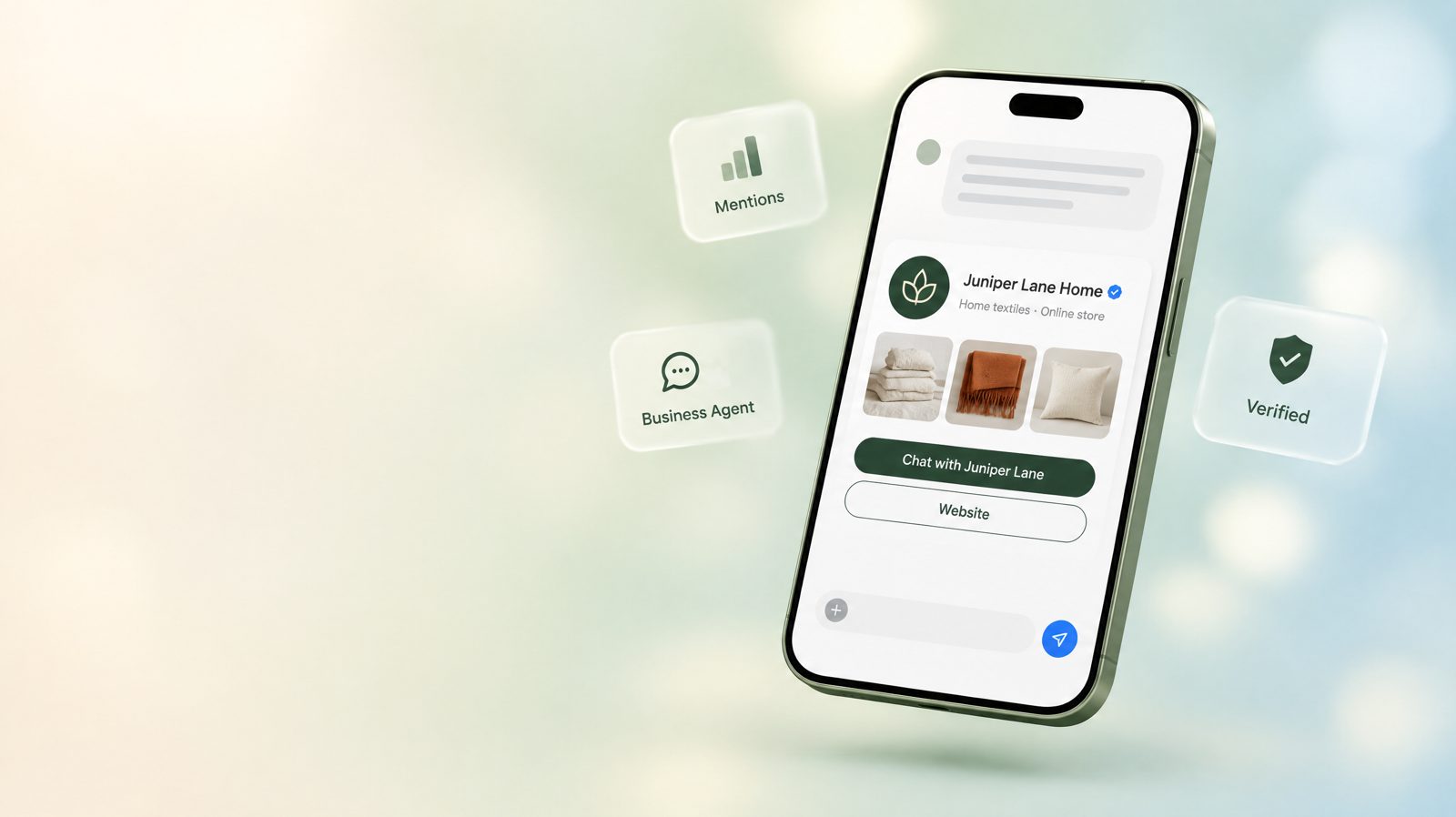
Short answer: Businesses in ChatGPT is a beta programme OpenAI launched on 10 November 2026. It gives companies an official way to show up accurately inside ChatGPT. Through Business Hub, which you open from the ChatGPT sidebar, an owner or authorised representative can claim a business listing, verify it (by business phone, business email, a DNS TXT record on the website domain, or a Shopify store), pass an identity check with Persona to earn a blue verified check, update key details, connect a product feed with prices and availability, and see aggregated insights: mentions, website clicks and discovery topics over the past 28 days. Eligible US ecommerce and online service businesses with a website can also build, test and publish a Business Agent. It is an AI agent that answers customer questions about your products and policies in a clearly labelled conversation that is separate from the customer's own ChatGPT chat and from ChatGPT's independent answers. OpenAI also describes sponsoring an agent as the destination for ChatGPT Ads, but Sponsored Agents are currently a limited alpha for selected advertisers, not an open product. Claiming is free and does not require an Ads account. OpenAI states plainly that claiming does not guarantee higher placement or sales.
This is the most important ChatGPT launch for ordinary businesses since ads arrived. Ads are optional, cost money and suit companies with a marketing budget. Businesses in ChatGPT is different. It is about whether the facts ChatGPT gives about your company are correct, whether you can see how often you come up, and whether a customer who wants to know more can talk to you without leaving ChatGPT. Every business that people ask ChatGPT about has a reason to look at it, including those that will never buy an ad.
This guide is written for owners, ecommerce managers, marketers and agencies who have to do the work. It covers what was announced, who is eligible, every step of claiming and verification, what the insights really count, how to build a Business Agent that answers well and stays within OpenAI's policy, how it connects to ChatGPT Ads, and a 90-day plan. If you sell products, read it together with our ecommerce guide and our product feed guide, because the same catalog work feeds all three.
What OpenAI announced on 10 November 2026
The announcement has three parts. OpenAI describes them as "the foundations: accurate business information, useful insights, and conversations that help people make informed decisions."
| Component | What it does | Who can use it (OpenAI) | Cost |
|---|---|---|---|
| Claim your business (Business Hub) | Claim and verify a listing, then manage details, policies, logo and photos; retailers can add product feeds | "Any eligible business located where ChatGPT is available"; initially businesses with a website | Free; no Ads account or Enterprise agreement needed |
| Insights | Aggregated mentions, website clicks and discovery topics over the past 28 days | Claimed businesses after Persona verification | Free |
| Business Agents | An AI agent that answers questions about your offerings in a separate, labelled conversation | Eligible ecommerce and online service businesses in the US with a website | Building and publishing: no cost stated by OpenAI |
| Sponsored Business Agent | Use your agent as the destination for ChatGPT Ads | Advertisers with an eligible agent | ChatGPT Ads pricing (auction) |
OpenAI framed the launch in terms of reach and trust. Businesses get "a new way to connect with the 1.2 billion people who use ChatGPT each week," and "protecting the trust people place in ChatGPT remains our North Star." Both points matter in practice. The reach is why the programme is worth your time. The trust language explains its limits: you cannot buy placement, you do not see conversations, and your agent cannot pretend to be neutral.
The key sentences, and what they mean for you
| What OpenAI said | What it means in practice |
|---|---|
| "Once verified, update key details and add self-service product feeds with pricing and availability." | You can fix wrong hours, descriptions, policies and prices yourself instead of hoping ChatGPT finds the right page |
| "Shopify merchants can connect their store from Business Hub or the Shopify admin to streamline verification." | Shopify is the fastest route, but not the only one |
| "Existing OpenAI Enterprise customers and advertisers can work directly with their OpenAI representative to claim their business." | Large brands have a managed path; ask your account contact |
| "Insights are aggregated and are only available when there are enough conversations or interactions to meet certain thresholds." | Small businesses may see blank metrics at first. Blank does not mean zero |
| "We don't share users' conversations or Business Agent chats with businesses." | You will never read transcripts, even of your own agent |
| "The Business Agent conversation is clearly labeled, separate from the customer's original ChatGPT conversation, and distinct from ChatGPT's independent answers." | Your agent speaks for you; ChatGPT's own answer stays independent |
| "Businesses can also sponsor their Business Agent and use it as the destination for ChatGPT Ads." | The agent becomes an ad landing experience inside ChatGPT |
| "Over time, we plan to expand… to more markets and business categories." | Non-US and non-ecommerce businesses should claim now and prepare for agents later |
Where this fits in OpenAI's business roadmap
Businesses in ChatGPT was not a surprise. It continues a series of 2026 launches that steadily gave businesses more ways into ChatGPT, as tracked in our news timeline:
| When (2026) | Launch | What it gave businesses |
|---|---|---|
| 5 May | Self-serve Ads Manager Beta (US) | Paid reach |
| June | Product feed campaigns | Catalog-driven ads |
| August–September | Conversion optimisation, measurement and targeting upgrades; expansion to more countries | Performance tools and reach |
| 16 September | Sponsored Agents tested with select US advertisers; AI creative tools; HubSpot and Shopify ChatGPT Ads integrations | Conversation after the ad click |
| 5 October | Visual ad format and 20+ measurement partners (see our visual ads guide) | Image-led ads and measurement |
| 10 November | Businesses in ChatGPT, Business Hub, Business Agents | An organic, verified business identity and a conversation channel |
The pattern is clear. OpenAI built the paid side first, then measurement, and now the organic foundation underneath both: a verified identity for each business. Expect future ad products, commerce features and agent capabilities to depend on that identity. Claiming early costs little and gives you a head start on whatever is built next.
What Businesses in ChatGPT is, and what it is not
Most early commentary has mixed Businesses in ChatGPT up with advertising, with SEO, or with a Google Business Profile clone. Each comparison is partly right and misleading in an important way.
| It is | It is not |
|---|---|
| A way to supply accurate, current information that ChatGPT may use | A way to control what ChatGPT says, or a ranking boost |
| A verified identity for your business, shown with a blue check | An endorsement by OpenAI |
| Aggregated insights about mentions, clicks and topics | Access to prompts, conversations or customer identities |
| An optional AI agent that represents your business in a separate chat | An agent that can take orders, make bookings or look up customer accounts (not in the current version) |
| A free organic programme, separate from ads | A requirement for advertising, or a prerequisite to appear in ChatGPT |
"Will I show up if I don't claim?"
Yes. OpenAI's FAQ says "ChatGPT may show information about your business whether or not you have an agent when customers ask relevant questions." Profiles "may also include information from other sources." Claiming does not switch visibility on. It gives you a say in the information. Without a claim, ChatGPT relies on your website, third-party sites, reviews, directories and catalog data from integrations such as Shopify Catalog. Some of that may be out of date or wrong.
"Will claiming make ChatGPT recommend me more?"
No, and OpenAI says so directly: "Claiming does not guarantee higher placement or sales." The help centre adds that claiming "doesn't guarantee increased visibility or give you direct control over ChatGPT's independent recommendations," and that "Advertising doesn't influence ChatGPT's independent answers."
That does not make claiming worthless. Accurate information has indirect value. If ChatGPT believes your returns window is 14 days when it is really 60, or that you do not ship to Canada when you do, you lose customers in comparisons you never knew were happening. Fixing facts removes reasons for ChatGPT to rule you out. That is a real benefit even though it is not a ranking boost.
How it compares with familiar programmes
| Feature | Businesses in ChatGPT | Google Business Profile (for comparison) | Shopping feeds (for comparison) |
|---|---|---|---|
| Claim and verify | Yes: phone, email, DNS, Shopify, then Persona identity check | Yes, with several verification methods | Merchant account verification |
| Verified badge | Blue check after Persona approval | Verification status in the owner dashboard | No |
| Edit business details | Yes, reviewed before publishing | Yes | No |
| Product data | Product feed (CSV, hosted URL or Shopify) | Product listings for some categories | Core purpose |
| Insights | Mentions, website clicks, discovery topics (28 days, aggregated, thresholds) | Views, searches, actions | Clicks and impressions |
| Conversation with the business | Business Agent (AI), US eligible businesses | Varies; Google's messaging features have changed over time | No |
| Paid link | Sponsored agent through ChatGPT Ads | Local ads | Shopping ads |
| Influence on organic ranking | None claimed by OpenAI | Profile completeness is widely considered a local ranking factor | Indirect |
The comparison column describes Google's programme in general terms and may change. It is included only to help you place Businesses in ChatGPT among tools you already know.
What a business profile in ChatGPT looks like
When ChatGPT mentions a business in an answer, OpenAI says "people can click to see the business's ChatGPT profile." The profile is where your claimed information appears, and where customers can start a Business Agent conversation if you have one. OpenAI has not published a formal specification of the profile layout. The fields below come from the help centre's list of what you can edit after verification, plus the blue check and agent entry point described in the announcement and FAQ.
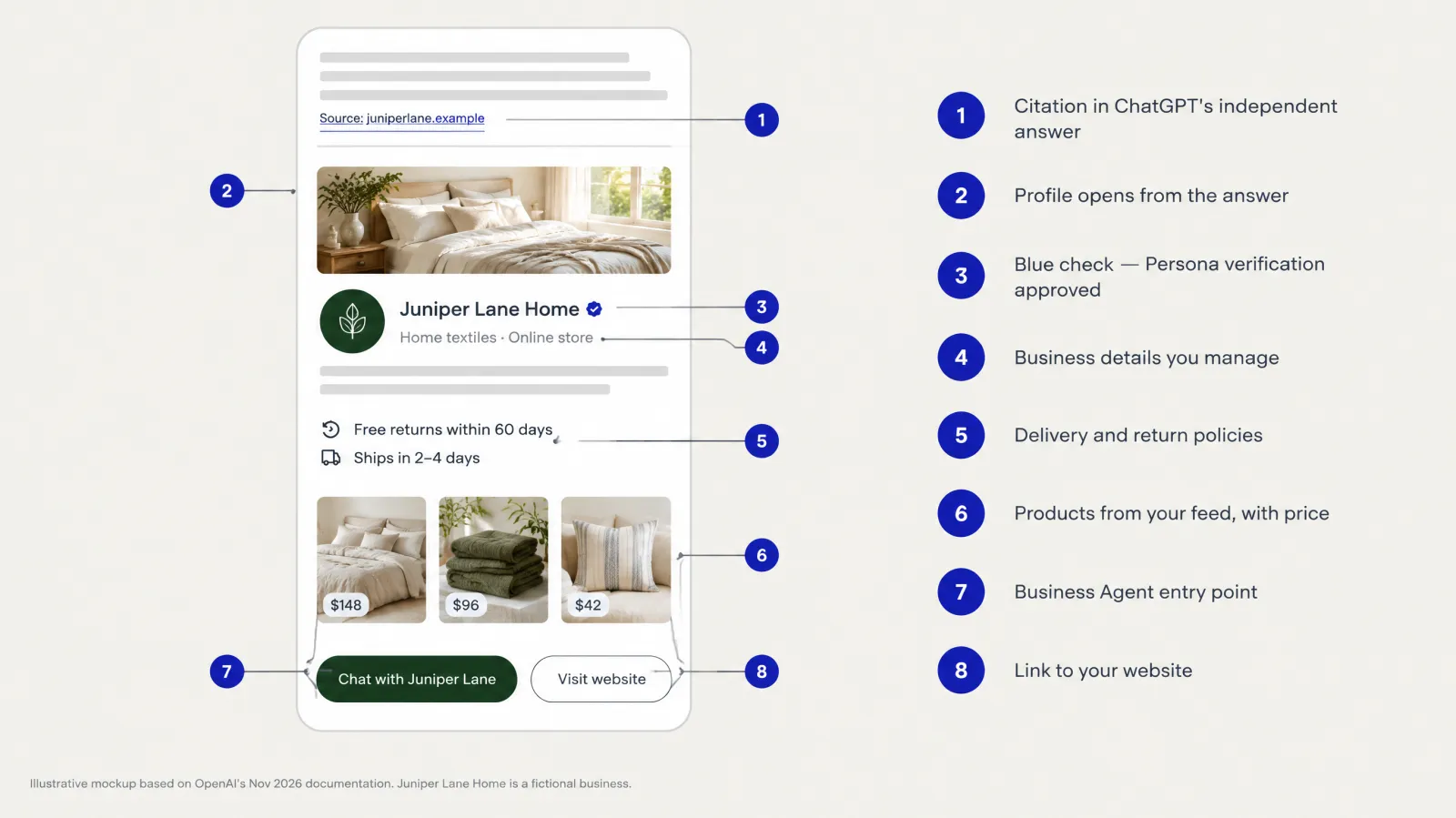
| Profile element | Where it comes from | Editable by you? (OpenAI) |
|---|---|---|
| Business name and blue check | Your claim; the check appears after Persona verification is approved | Name: through verification and support; check: automatic on approval |
| Website | Your claim and profile settings | Yes |
| Business description | Profile settings | Yes |
| Product or service category | Profile settings | Yes |
| Logo and cover photo | Profile settings | Yes (cover photo optional) |
| Delivery policy | Profile settings | Yes |
| Return policy | Profile settings | Yes |
| Products, prices and availability | Product feed (CSV, hosted URL or Shopify) | Yes, through the feed |
| Address, service area, hours, contact details | Listed in the Businesses in ChatGPT policy as information that must be accurate | Treat as editable where the profile offers it |
| Information from other sources | ChatGPT may draw on other sources | No. Fix the source instead |
| Business Agent button | Published agent, for eligible businesses | Yes, by publishing or unpublishing your agent |
Who is eligible
Eligibility has three layers, and many businesses will qualify for the first without qualifying for the third.
| Layer | Requirement (OpenAI) | Notes |
|---|---|---|
| 1. Claim a business | You own it or are authorised to represent it; the business is located where ChatGPT is available; eligibility depends on "industry, location, and our verification and integrity checks"; "initially available to eligible businesses with a website" | No Ads account or Enterprise agreement needed |
| 2. Publish changes, see insights, connect a feed | Claim approved and Persona identity verification approved | Persona may ask for a government ID, business registration and proof of authority |
| 3. Create a Business Agent | Eligible ecommerce or online service business in the US, with a website, meeting the industry requirements in the Business Agents Policy | "Business verification alone does not guarantee agent eligibility" |
Local businesses and restaurants
The help centre has an important line for local businesses: "Local stores and restaurants can currently claim only an existing U.S. listing." An eligible online business that cannot find itself "may see an option to add it." So a restaurant, salon or shop with no existing listing has to wait. An online store, a SaaS company or an online service can usually create a profile.
Local businesses are also counted differently in insights, as covered in the insights section: a mention is counted when ChatGPT shows a result for that location.
Categories OpenAI may decline or defer
Both policies give OpenAI room to say no or not yet. The Businesses in ChatGPT policy says OpenAI "may decline a request when a business's offerings or practices raise significant safety or integrity concerns" and "may also hold off on allowing businesses in other categories… until we have the safeguards needed to support them responsibly." The Business Agents Policy adds that OpenAI considers "both the business category and the agent's intended use before allowing publication" and "may decline access… or defer a category until we can support it safely."
OpenAI has not published a list of excluded categories. Expect regulated and high-risk categories to be deferred for agents first: health and medical care, legal services, financial advice, and anything age-restricted. The agent policy already bars advice "that legally requires a professional license." That is our reading of the policy, not a published OpenAI list.
Eligibility at a glance by business type
| Business type | Claim a profile | Insights and feed | Business Agent (Nov 2026) |
|---|---|---|---|
| US online store (Shopify) | Yes, fastest path | Yes | Yes, if the category is eligible; Shopify can create a draft agent |
| US online store (other platform) | Yes | Yes | Yes, if eligible |
| US online service or SaaS | Yes | Yes (feed optional) | Yes, if eligible |
| US local shop or restaurant with an existing listing | Yes, existing listing only | Yes | Not yet (agents are for ecommerce and online services) |
| US local business with no listing | Not yet | n/a | Not yet |
| Business outside the US, where ChatGPT is available | Yes, if verification is supported for its location | Yes | Not yet |
| Regulated categories (health, legal, finance) | Possibly, subject to integrity checks | Possibly | Likely deferred (our reading) |
| Large brand with an OpenAI account executive | Yes, through the managed claim path | Yes | Yes, if eligible |
Agencies, teams and multi-brand companies
Teams and agencies. "The admin who claimed your business can add teammates in Business Hub and grant an agency access to manage the business or its agent." Each person uses their own ChatGPT account. Never forward a personal claim invitation. If an agency invitation is blocked, for example because the business was claimed inside a ChatGPT workspace that the agency is not part of, contact OpenAI Support.
Several brands or locations. "Each distinct brand is managed separately. Central management across a parent company's brands and locations isn't currently available. Claiming the main brand doesn't claim its locations." For brands using a managed claim process, location profiles "remain locked by default." Multi-brand groups should plan one claim per brand and talk to their OpenAI account contact about locations.
Before you claim: a preparation checklist
The claim itself takes minutes when everything is ready, and weeks when it isn't. Gather this first. GPT Ads AI checklist.
| Item | Why you need it | Who usually has it |
|---|---|---|
| A business-controlled ChatGPT account | The claim and admin role attach to it | Owner or operations |
| Access to one verification asset: business phone, business email, DNS or Shopify | Claim verification | Owner, IT, web agency, Shopify admin |
| Government ID of the person verifying | Persona | The claimant |
| Business registration documents (legal name, number, registered address) | Persona | Finance or legal |
| Proof of authority to represent the business (if not the owner) | Persona | Owner or legal |
| Evidence linking trading name to legal name, if they differ | Avoids Persona mismatches | Legal |
| Final business description (2–4 sentences) | Profile; new profiles publish on approval | Marketing |
| Square logo and a real cover photo | Profile | Marketing / design |
| Customer-ready delivery and return policies | Profile and agent | Operations, customer service |
| Product feed route (Shopify, CSV or hosted URL) | Feed | Ecommerce operations |
| List of teammates and agency to add | Access | Owner |
What customers ask, and which layer answers it
Customers don't know about profiles, agents or feeds. They just ask ChatGPT questions. It helps to map the common questions to the part of the programme that shapes the answer, so you know where to put effort.
| Customer question (illustrative) | Who answers | What shapes the answer | Your lever |
|---|---|---|---|
| "Best linen bedding for hot sleepers?" | ChatGPT, independently | Your website, third-party sources, product data | AEO content; accurate feed |
| "Is Juniper Lane Home legit?" | ChatGPT, independently | Profile (blue check), reviews, press, website | Verification; accurate profile; reputation |
| "What's Juniper Lane's return policy?" | ChatGPT, independently, then possibly your agent | Profile return policy, website policy page | Matching, clear policies everywhere |
| "Does Juniper Lane ship to Canada?" | ChatGPT, then agent | Profile delivery policy, website, feed | Delivery policy precision |
| "Which of your duvets is warmer?" (inside the agent) | Your agent | Agent information and instructions | Product knowledge; tested comparisons |
| "Is the rust throw in stock?" | ChatGPT or agent | Product feed | Fast feed refresh |
| "Can I return a sale item?" (inside the agent) | Your agent | Policy information including exceptions | Exceptions written down; tested |
| Ad seen, then "tell me more" | Your sponsored agent | Agent + ad context | Ad relevance; agent quality |
The lesson: independent answers are shaped by your sources, and agent answers are shaped by your instructions. You need both to be right, and the facts they rely on must be identical.
Writing a profile description that works
The description is short, but it's the one piece of copy you fully control on the profile. Here are examples by business type, all illustrative and all following the policy's ban on misleading claims.
| Business type | Weak description | Strong description |
|---|---|---|
| Home textiles store | "The best bedding brand in America. Luxury you deserve!" | "Washed-linen bedding, throws and cushions made in small batches. Ships across the US and Canada with free 60-day returns." |
| Project-management SaaS | "Revolutionary AI-powered platform transforming work." | "Project-management software for agencies of 5–50 people, with client portals, time tracking and QuickBooks and Xero integrations. Plans from $12 per user per month." |
| Online language school | "Become fluent fast, guaranteed!" | "Live online Spanish and French classes in groups of up to six, for beginners to upper-intermediate learners. Evening and weekend schedules in US time zones." |
| Local bakery (existing listing) | "Simply the best bread in town." | "Neighbourhood bakery in Portland's Alberta Arts District baking sourdough, pastries and custom cakes. Open Tuesday to Sunday, 7am–3pm." |
| Specialty coffee subscription | "Amazing coffee delivered!" | "Single-origin coffee subscriptions roasted to order and shipped within 48 hours. Choose whole bean or ground; pause or cancel anytime online." |
A good description answers four questions in under 60 words: what you offer, for whom, what's distinctive (provably), and where or how you serve.
Start here: a 30-minute audit of what ChatGPT says about you
Before claiming anything, find out what ChatGPT currently says about your business. This gives you a baseline, shows which facts need fixing, and helps you prioritise. GPT Ads AI method.
The audit prompts
Use a fresh chat for each prompt, and record the answer, the sources cited, and any profile shown. Adapt the brackets to your business.
| # | Prompt (illustrative) | What you're checking |
|---|---|---|
| 1 | "What is [business name]?" | Identity, category, description |
| 2 | "Is [business name] legit?" | Trust signals; sources used |
| 3 | "What is [business name]'s return policy?" | Policy accuracy |
| 4 | "Does [business name] ship to [region]?" | Delivery accuracy |
| 5 | "How much does [main product or plan] cost at [business name]?" | Price accuracy |
| 6 | "Best [product category] for [main use case]" | Whether you appear at all in category answers |
| 7 | "[Business name] vs [main competitor]" | How you're compared, and on which facts |
| 8 | "Alternatives to [main competitor]" | Whether you're in the consideration set |
| 9 | "Where is [business name] based?" / "Opening hours of [business name]" | Location and hours (local businesses) |
| 10 | "Reviews of [business name]" | Which sources shape reputation |
Recording the results
| Prompt | Fact stated | Correct? | Source cited | Fix needed | Owner |
|---|---|---|---|---|---|
| 3 | "30-day returns" | No (60 days) | Old FAQ page | Update FAQ; profile return policy | Ecommerce manager |
| 4 | "US only" | No (US + Canada) | Directory listing | Update directory; profile delivery policy | Ops |
| 6 | Not mentioned | — | — | Buying guide content; feed quality | Content lead |
Answers vary between runs and between users, so treat one run as a sample, not a verdict. Repeat the audit monthly with the same prompts and compare. After claiming, the audit also checks whether your corrections have come through.
How the labels protect trust, and why that helps you
OpenAI uses the word trust repeatedly in this launch. The labelling rules can feel restrictive to marketers, but they are what make the programme worth joining.
| Label or separation (OpenAI) | What the customer understands | Why it helps your business |
|---|---|---|
| Blue check after Persona | This profile is managed by the real business | Customers can tell your profile from impersonators |
| Business Agent conversation clearly labelled | I'm talking to the business's AI, not to ChatGPT itself | Customers accept that the agent advocates for you, so they don't feel misled |
| Separate from the original conversation | My own chat stays mine | Customers are more willing to open the agent when it doesn't take over their chat |
| Distinct from independent answers | ChatGPT's recommendation is still neutral | Being recommended by ChatGPT keeps its value for every business |
| Sponsored placements clearly labelled | This route came from an ad | Paid reach doesn't undermine the credibility of organic answers |
| No sharing of conversations | My questions are private | Customers ask the candid questions that actually decide purchases |
If assistants become places where paid influence can't be told apart from advice, people stop trusting them, and every business loses the channel. The separation rules protect the value of being recommended.
Shopify merchants: the fastest path, step by step
OpenAI calls Shopify "one way to get started" and gives a three-step path on its Businesses in ChatGPT page: connect your store, review your business information, and preview and publish your agent. Here it is with the detail that matters.
| Step (OpenAI) | What happens | What to check (GPT Ads AI recommendation) |
|---|---|---|
| 1. Connect your Shopify store | Link the store from the Shopify admin or from ChatGPT Business Hub; this also verifies your claim | Log in to the right store with an account that has the required permissions |
| 2. Review your business information | "Your current product details, pricing and availability are shared automatically through Shopify's catalog" | Fix titles, descriptions, variants and images in Shopify itself. That is the source of truth |
| 3. Preview and publish your agent | "Test your Business Agent and publish it when you're ready, using guidelines you control and information you set" | Don't publish the draft as-is: write instructions and run the test set first |
Persona verification still applies, so complete it to unlock edits, insights and the agent. The draft agent created by Shopify set-up is a starting point. It knows your catalog, but it doesn't know your exceptions, your tone or your boundaries until you tell it.
Shopify catalog quality, the five fixes that matter most
- Titles that say what the product is ("Washed Linen Duvet Cover — Queen — Oat"), not campaign slogans.
- Descriptions with the facts customers ask about: material, dimensions, care, fit, what's included.
- Variants with clear option names and accurate stock for each.
- Images that are real, accurate in colour, and include at least one in-use shot.
- Policies in Shopify settings that match the delivery and return policies on your profile.
Timeline: how long each step really takes
OpenAI does not publish review times. The estimates below are GPT Ads AI planning assumptions, not OpenAI figures. Allow extra time around launches and peak seasons.
| Step | Your effort | Waiting time (planning assumption) |
|---|---|---|
| Gather documents and account | 1–3 hours | — |
| Claim verification (phone, email, Shopify) | Minutes | Immediate code; then review |
| Claim verification (DNS) | 15–30 minutes | DNS propagation, often minutes to hours |
| OpenAI claim review | — | Unpublished; plan for days |
| Persona verification | 15–30 minutes | Unpublished; plan for days, longer if information is requested |
| Fix facts across site and directories | 4–12 hours | Directory updates vary |
| Profile edits reviewed and published | 1–2 hours | Unpublished; plan for days |
| Agent instructions and 50-question test | 8–16 hours | — |
| First insights populated | — | Depends on thresholds; may take weeks for small businesses |
How to claim your business, step by step
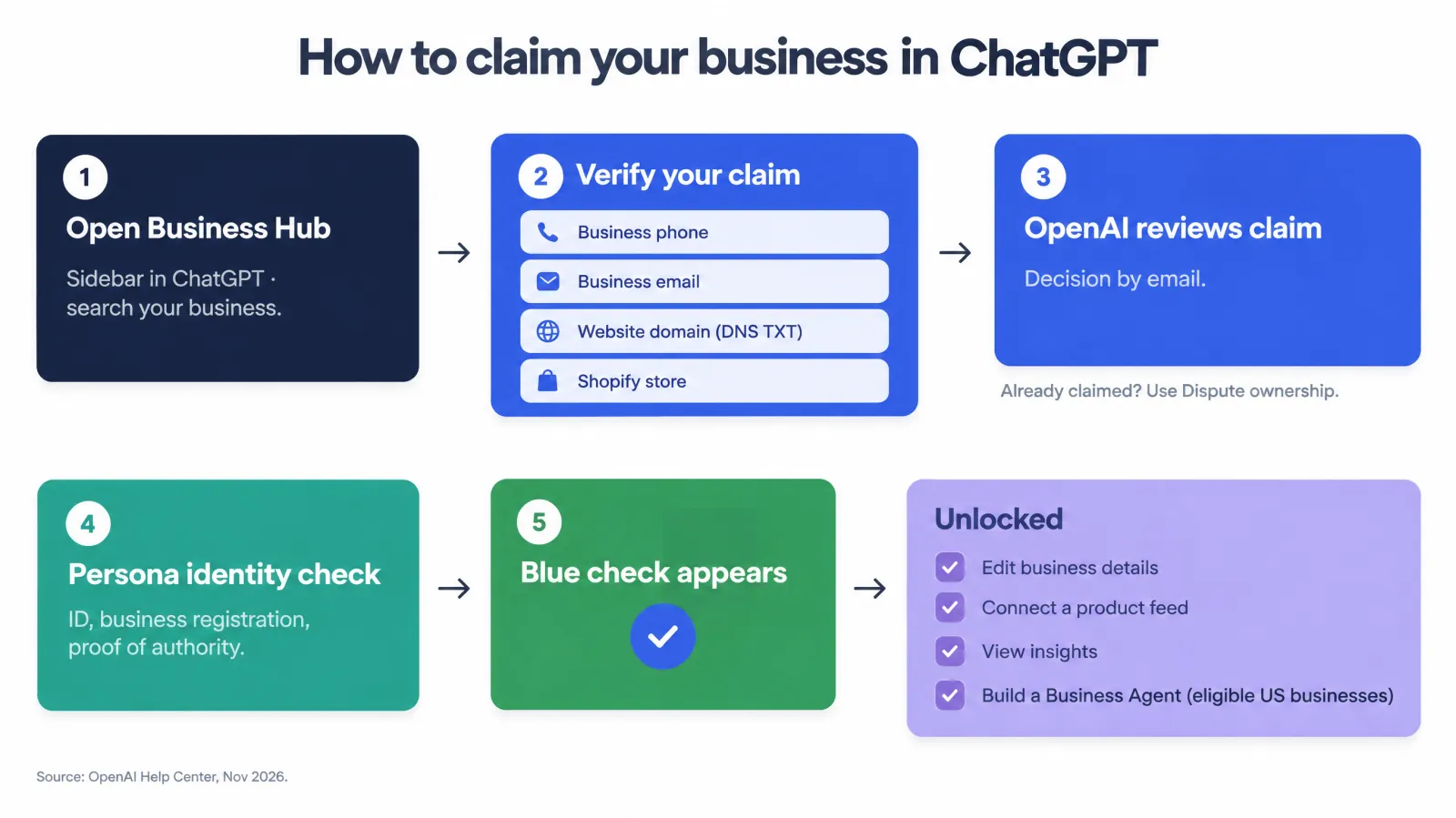
The claim process has two separate checks that people often confuse. The claim verification proves you control the business's phone, email, domain or Shopify store. The Persona identity verification proves who you are and that you are authorised to act for the business. You need both before you can do anything useful. The blue check only appears after Persona is approved.
Step 1: Open Business Hub and find your listing
- Sign in to ChatGPT with the account that will manage the business. Choose it deliberately; see the agency note above.
- Open Business Hub from the sidebar.
- Search for your business by name.
- Select the listing that matches your business and confirm the ChatGPT account you'll use to manage it.
Three situations change what happens next (OpenAI):
| What you see | What it means | What to do |
|---|---|---|
| Your business appears | A listing exists | Continue to verification |
| Contact support | "Your listing is locked" | Select Contact support to request access. Common for large brands and their locations |
| No listing found | No existing profile | Eligible online businesses may see an option to add it; local stores and restaurants must wait for an existing listing |
| You received a claim invitation | OpenAI or a partner invited you | Open the personal link and sign in with the email address that received it |
Step 2: Verify your claim
OpenAI offers verification methods depending on the business. The help centre names four:
| Method | How it works (OpenAI) | Best for | Common problems |
|---|---|---|---|
| Business phone | Choose SMS or an automated call; enter the code sent to the number shown | Businesses whose public phone number reaches the person claiming | The listed number is a call centre, an old number or a tracking number |
| Business email | Get a code sent to the email address associated with the business | Businesses with a monitored email on their own domain | The address goes to a shared inbox nobody watches |
| Website domain | Add the TXT record shown in ChatGPT to your DNS; copy type, host and value exactly; select Verify domain | Online businesses with DNS access | DNS managed by an agency or IT; propagation delays; copy-paste errors |
| Shopify store | Connect Shopify, review permissions, log in to the store and follow the prompts | Shopify merchants | Logging in to the wrong store; staff accounts without the needed permission |
Which method should you choose? Our recommendation: for an online business, Shopify or the website domain are usually the strongest proofs and the least likely to be disputed. They tie the claim to the asset customers actually use. Phone and email are faster when they reach you directly.
#### DNS verification, in detail
DNS verification is the method most likely to stall, so here is the procedure in full. This is our operating guidance.
- In ChatGPT, choose Website domain and copy the TXT record exactly: type, name or host, and value.
- Log in to your DNS provider: your registrar, Cloudflare, your host, or wherever your nameservers point. Check the nameservers with a DNS lookup tool if unsure.
- Add a new TXT record. For the host, use exactly what ChatGPT shows. Some providers want
@for the root domain, and some append the domain automatically, so a value likeexample.commay becomeexample.com.example.com. - Paste the value with no extra spaces or quotes, unless the provider requires quotes.
- Save, wait (OpenAI notes "DNS changes may take time to appear"), and check publicly with a DNS lookup tool before returning to ChatGPT.
- Select Verify domain and follow any remaining prompts.
- Leave the TXT record in place after verification. Removing verification records is a common cause of later re-verification problems on many platforms.
Step 3: Wait for claim approval
"OpenAI reviews your claim and emails you its decision or a request for more information." While the claim is under review you can cancel it. OpenAI does not publish a review time. Answer requests for information quickly and use the same business details everywhere.
Step 4: Complete Persona identity verification
Persona is the identity-verification provider OpenAI uses. You need Persona approval to "publish changes to your business information, connect a product feed, view insights, or create a business agent." The help centre says you may need:
- a government-issued ID,
- business registration information, and
- proof that you're authorised to represent the business.
One trap for new profiles. If you use Persona to create a new profile, "OpenAI's approval automatically publishes the profile. There's no separate publishing step for the profile, so continue only when you're ready." Have your description, category, logo and policies ready before you submit.
Completing Persona later. If you used another method first, open the Business tab, select your profile, find Complete verification with Persona in the overview, and select Verify.

Step 5: The blue check
"Claiming your business alone doesn't give its profile a verified badge. The verified badge, shown as a blue check, appears after your Persona verification is approved." The check tells customers the profile is managed by the real business. It does not mean OpenAI endorses you. The Business Agents Policy specifically forbids making an agent appear "endorsed by OpenAI."
If someone else has already claimed your business
Open the profile, select the ••• menu, choose Dispute ownership, and verify with Persona that you are authorised. OpenAI notes that "claiming a profile or disputing ownership doesn't change its visibility in ChatGPT." Typical causes are a former agency, a former employee, or an impersonator. If it is an impersonator, that also breaks the policy's ban on impersonation and misrepresenting ownership, so include that in your report.
What you cannot do
- Delete a published profile. "Only unpublished draft profiles can be deleted. OpenAI Support is unable to delete, unpublish, or hide a published profile as part of a business setup or ownership request."
- Claim all locations by claiming the brand. Each brand is separate, and locations are not included.
- Manage several brands centrally. Not currently available.
Claim troubleshooting table
| Problem | Likely cause | Fix |
|---|---|---|
| Listing shows Contact support | Listing locked (often managed brands) | Contact support, or your OpenAI account contact |
| Can't find the business | No existing listing | Online businesses: add it if offered. Local businesses: wait |
| Phone code never arrives | The listed number isn't the one you control | Try email, domain or Shopify; correct your public number |
| Domain won't verify | Wrong host field, propagation, a quoted value | Check with a public DNS lookup; fix the host; wait |
| Persona fails | Name, address or registration mismatch | Retry with details exactly as in official records |
| Persona "submitted" but features locked | Submission is not approval | Wait for the approval email |
| Agent option missing | Persona pending or failed, or business not eligible | Check verification status and the Business Agents Policy |
| Already claimed by someone else | Former agency, staff member, or impersonator | Dispute ownership through the ••• menu |
| Agency can't be invited | Workspace restrictions | Contact OpenAI Support |
Getting your business information right
Once Persona is approved, the profile is yours to manage. This is where most of the value lies for businesses that will never build an agent or buy an ad. The goal is simple: every fact ChatGPT might state about you should be true, current and the same everywhere.
What to fill in, and how to write it
| Field | What good looks like (GPT Ads AI recommendation) | What to avoid (policy and practice) |
|---|---|---|
| Business description | Two to four plain sentences: what you sell, to whom, what is distinctive, and where you serve. Use concrete nouns | Superlatives you can't prove ("best," "#1"), keyword stuffing, claims about results |
| Category | The most specific accurate category | A broader or trendier category to appear in more answers |
| Website | Your canonical homepage, on the domain you verified | Tracking redirects, landing pages for a single campaign |
| Logo | Square, clear at small size, the same mark used on your site | Text-heavy logos, logos you don't hold rights to |
| Cover photo | A real image of your products, premises or work | Stock images that misrepresent you; images you lack rights to |
| Delivery policy | Where you ship, typical times, costs and thresholds, in one short paragraph | Hiding fees or conditions that matter to a buyer |
| Return policy | Window, condition, who pays return shipping, exceptions (sale items, custom orders) | Vague phrases like "easy returns" with no terms |
| Address, service area, hours, contact | Exactly as on your website and official records | Inconsistent versions across sites |
The Businesses in ChatGPT policy is explicit: information "must truthfully represent the business and be kept current," and you must not make "false or misleading claims about prices, availability, qualifications, or likely results." Under "Misleading promotion," it also bans "fabricated reviews or endorsements, unsupported guarantees, or claims that conceal material terms such as fees or conditions."
Policies are now marketing copy
Delivery and return policies used to sit in a website footer. In ChatGPT they may become part of the answer when someone asks "which of these shops has the best returns?" or "can I get this by Friday?" They are also exactly what a Business Agent will be asked most often. Write them for a customer, not a lawyer:
| Weak policy text (illustrative) | Strong policy text (illustrative) |
|---|---|
| "Returns accepted subject to terms and conditions." | "Return any unused item within 60 days for a full refund. Return shipping is free in the US. Final-sale items are marked on the product page and can't be returned." |
| "Shipping times vary." | "US orders ship in 1–2 business days and arrive in 2–5 days. Free shipping over $75; otherwise $7.95 flat. We ship to Canada (7–10 days, duties included)." |
Keep the legal version on your website as well, and make sure the two say the same thing. If ChatGPT finds conflicting versions, you cannot control which one it uses.
The consistency audit
ChatGPT "may also use other sources when answering questions about your business." Claiming fixes only one of those sources. Before you edit the profile, audit everywhere your key facts appear. This is GPT Ads AI operating guidance.
| Source | What to check | Why it matters |
|---|---|---|
| Your website (homepage, About, policies, contact, product pages) | Name, description, policies, prices, hours | The primary source ChatGPT cites for online businesses |
| Your structured data (Organization, LocalBusiness, Product schema) | Matches the visible page | Machine-readable facts are easy for systems to extract |
| Your product feeds (Ads Manager, Shopify Catalog, Business Hub) | Same prices, availability and titles everywhere | Conflicting prices undermine trust in every answer |
| Major directories and review sites | Name, address, phone, hours, category | Third-party sources may be used alongside your profile |
| Marketplace listings | Policies and prices | Customers compare; ChatGPT may too |
| Press and partner pages | Outdated descriptions or old addresses | Old facts can resurface in answers |
How long changes take
OpenAI reviews every change before publishing, and gives no time frame. Treat the profile like a printed brochure, not a social post:
- Plan seasonal changes ahead. Update holiday hours and peak-season shipping cut-offs a few weeks early.
- Update the website first, then the profile, so both point the same way when the review finishes.
- Keep a change log with the date, field, old value, new value and reason. When an answer looks wrong, you can check whether it is reading an old value or an outside source.
Product feeds in Business Hub
If you sell products, the profile can carry your catalog. OpenAI: "Retailers can upload their feed to share product details, pricing and availability. This allows customers to understand your offerings right in ChatGPT."
Three ways to connect a feed (OpenAI)
| Method | How | Best for |
|---|---|---|
| Shopify | Connect your store; "current product details, pricing and availability are shared automatically through Shopify's catalog" | Shopify merchants. Eligible products are "already integrated into ChatGPT through Shopify Catalog" |
| CSV upload | Upload a CSV that follows the product feed specification, including required fields | Smaller catalogs, or teams without a hosted feed |
| Hosted URL | Provide a link to the feed file | Larger catalogs that change often; most ecommerce platforms can generate one |
All products "must follow the Commerce policies." And the help centre is clear about the limits: "Connecting a feed doesn't publish an agent or guarantee that ChatGPT recommends your products."
How this feed relates to the other feeds you may already have
This is the most confusing part of the programme for merchants, because ChatGPT now has three places where product data matters.
| Feed | Where it's managed | What it does | Paid or organic |
|---|---|---|---|
| Business Hub product feed | Business Hub | Shares product details, prices and availability with ChatGPT for your business profile and agent | Organic |
| Shopify Catalog | Shopify (automatic for eligible merchants) | Integrates eligible products into ChatGPT shopping experiences | Organic |
| Ads Manager product feed | ChatGPT Ads Manager | Generates product feed ads; during the ads beta, these products are eligible only for ads | Paid |
Our product feed guide covers the Ads Manager feed specification, and the ecommerce guide explains the split between organic and paid. The practical rule (our recommendation): build one clean master catalog in your platform or feed tool, and generate each feed from it. Prices, availability and titles then agree wherever ChatGPT sees them.
Feed quality checklist
| Check | Pass condition |
|---|---|
| Required fields | Every item has all fields the specification requires |
| Prices | Match the product page at the moment of checking, including currency |
| Availability | Updates as fast as stock changes. Stale "in stock" is the worst error |
| Titles | Describe the product plainly (brand, type, key attribute) rather than stacking keywords |
| Descriptions | Answer the questions customers ask: materials, dimensions, care, compatibility |
| Images | Real product photos, accurate colours |
| Links | Go to the exact product page, not the homepage |
| Policy compliance | No products restricted under OpenAI's Commerce policies |
| Refresh | Hosted feed refreshed at least daily for changing catalogs |
Preparing your website to support your profile
Your profile, your agent and ChatGPT's independent answers all depend on your website being clear, consistent and machine-readable. This is GPT Ads AI guidance. None of it is an OpenAI requirement, but all of it reduces the chance of wrong facts appearing anywhere.
Structured data that matches your profile
Structured data (JSON-LD using schema.org vocabulary) states key facts in a form machines can read without guessing. Make sure it says exactly what your profile says. Here is an illustrative Organization block for the fictional store:
{
  "@context": "https://schema.org",
  "@type": "Organization",
  "name": "Juniper Lane Home",
  "legalName": "Juniper Lane Home LLC",
  "url": "https://juniperlane.example/",
  "logo": "https://juniperlane.example/logo.png",
  "description": "Washed-linen bedding, throws and cushions made in small batches, shipped across the US and Canada.",
  "contactPoint": {
    "@type": "ContactPoint",
    "contactType": "customer service",
    "email": "help@juniperlane.example"
  },
  "hasMerchantReturnPolicy": {
    "@type": "MerchantReturnPolicy",
    "applicableCountry": "US",
    "returnPolicyCategory": "https://schema.org/MerchantReturnFiniteReturnWindow",
    "merchantReturnDays": 60,
    "returnFees": "https://schema.org/FreeReturn"
  }
}| Page type | Schema types to consider | Must match |
|---|---|---|
| Homepage / About | Organization (and LocalBusiness for local) | Name, description, logo, contact |
| Product pages | Product, Offer, AggregateRating (only if real reviews are shown) | Feed price, availability, title |
| Policy pages | MerchantReturnPolicy, shipping details within Offer | Profile delivery and return policies |
| FAQ pages | FAQPage (where eligible and visible on page) | Agent answers on the same questions |
Pages every claimed business should have
| Page | Why it matters for ChatGPT | Quality bar |
|---|---|---|
| About | Source for who you are; used to describe you | Concrete facts: founding, location, what you make, who for |
| Delivery | Compared in answers; asked of agents | Times, costs, regions, cut-offs, in a table |
| Returns | Compared in answers; frequent agent question | Window, conditions, exceptions, process |
| Contact | Where the agent sends unanswerable questions | Clear options and response times |
| Comparison and buying guides | Earns citations (mentions) on "which should I choose" questions | Honest, specific, with tables |
| Product pages | Linked by the agent; cited in answers | Full specs, care, dimensions, real photos |
Crawler access
If AI crawlers can't read your pages, ChatGPT can't cite them, and for an online business a citation is what counts as a mention. Check your robots.txt and any bot-blocking settings at your CDN or firewall. Many sites block AI crawlers by accident through a security preset. Decide deliberately which crawlers to allow, and test that your key pages return their full content without heavy client-side rendering.
Privacy: what businesses give and get
Businesses in ChatGPT is built around a privacy trade-off, and it's worth being clear about both sides.
What you never get
| Data | Shared with businesses? (OpenAI) |
|---|---|
| Individual user prompts | No |
| Users' ChatGPT conversations | No |
| Business Agent chat transcripts | No |
| Discovery topics at the prompt level | No. Only aggregated themes |
| Insights below thresholds | No. Metrics appear only above thresholds |
| User information collected by the agent | Only through an approved feature, with explicit user authorisation |
What you give
| You provide | Notes |
|---|---|
| Identity documents and business records to Persona | Government ID, registration, proof of authority, as requested |
| Business information and media | Subject to the Businesses in ChatGPT policy; you must hold rights to photos and logos |
| Product feeds | Subject to OpenAI's Commerce policies |
| Agent instructions and information | Subject to the Business Agents Policy; you're responsible for what you provide |
What this means for your own obligations
- Your privacy notice. If your agent offers an optional follow-up and a customer shares contact details through an approved feature, that data reaches you. Treat it like any other lead: lawful basis, retention rules, and a privacy notice that covers it.
- No workarounds. The policy forbids using links or "deceptive pretexts" to collect data the agent itself may not ask for, such as sending users to a page that asks for ID or health details "for the agent."
- Internal expectations. Tell sales and support teams they will not get transcripts. Measure the agent through outcomes, your test set, and links tagged for analytics.
Business Hub insights: what they count and how to use them
For the first time, a business can see official data on how often it comes up in ChatGPT. That matters, because until now the only way to estimate it was third-party tools that run prompts and record the answers. Insights are only useful if you know exactly what they count, so this section takes OpenAI's definitions one at a time.
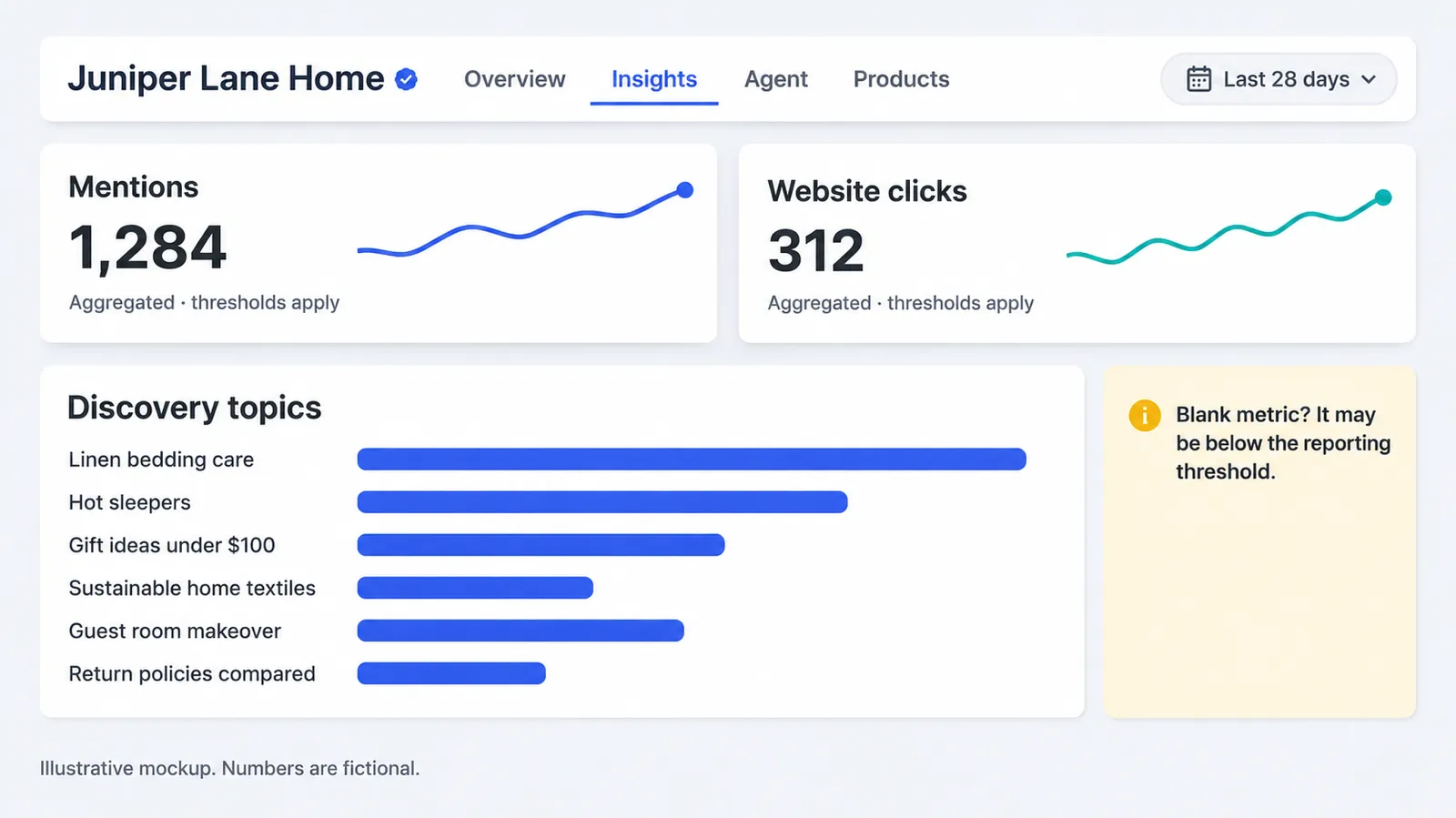
The three metrics
| Metric | OpenAI's definition | What it is not |
|---|---|---|
| Mentions | Online business: "a mention counts when ChatGPT references the business's website. The brand name alone doesn't count." Local business: "a mention counts when ChatGPT shows a result for that location, even if the customer doesn't open the listing or visit the website." | Not every time your brand name appears in an answer |
| Website clicks | "How often people click through to your website" | Not visits or sessions as your analytics counts them; not conversions |
| Discovery topics | "Common themes in ChatGPT answers that mentioned or cited your business" | Not individual prompts; "don't… directly measure customer intent" |
Time window: "aggregate activity over the past 28 days." Privacy: "Businesses don't receive individual prompts or consumer conversations, including chats with their business agents."
The most important definition: brand name alone doesn't count
For an online business, a mention is a website reference, meaning a citation or link to your site, not a passing mention of your brand name. This has two consequences.
- Your real visibility is probably higher than the mention count. ChatGPT may name you in answers without citing your site. Those appearances matter for brand awareness, but this metric doesn't record them.
- The metric rewards being the cited source. To grow mentions, make your website the most useful page on the questions you want to appear in. That is the same work as answer-engine optimisation (AEO): clear, specific, well-structured pages that an AI system can extract and cite.
Blank does not mean zero
"A blank metric can mean activity hasn't reached the reporting threshold, data is still being collected, or reporting is unavailable. It doesn't necessarily mean zero activity." OpenAI does not publish the threshold. For small businesses this is the most likely early experience: you claim, verify, open Insights, and see nothing. Do not conclude that ChatGPT never mentions you. If a metric stays blank, OpenAI says to contact support.
Reading discovery topics
Discovery topics are the most useful part of insights for content and marketing teams, because they show which conversation themes your business appears in. Use them as a map, not a keyword list. They group answers, not questions, and they do not measure intent.
| What you see in discovery topics (illustrative) | What it may suggest | Action (GPT Ads AI recommendation) |
|---|---|---|
| A topic you expected and want ("linen bedding care") | Your content on it is being cited | Keep it current; link it to products; build related pages |
| A topic you didn't expect ("hot sleepers") | ChatGPT associates you with a need you haven't targeted | Create a dedicated page; add the use case to descriptions and agent knowledge |
| A topic that's off-brand or outdated | Old content or third-party pages are shaping answers | Update or retire old pages; correct third-party sources |
| A competitor-dominated topic missing from your list | You're not cited where you'd like to be | Build better content; consider ads with context hints |
| A comparison topic ("return policies compared") | You're being compared on a fact | Make sure the fact is accurate and clear on your profile and site |
Website clicks and your analytics
Business Hub clicks and your own analytics will not match, and they are not meant to. Clicks are counted when someone clicks through. Your analytics counts sessions that load your page and fire its tags, which excludes people who leave before the page loads or who block scripts. ChatGPT may also pass little or no referrer information in some cases.
Our recommendation: compare the trend in Business Hub clicks with the trend in sessions from ChatGPT referrals in your analytics, and don't expect the absolute numbers to match. Where you control the link (your agent's website links, ads and your own content), add UTM parameters so ChatGPT-driven traffic can be told apart. Our UTM builder keeps the naming consistent.
How insights compare with third-party AI visibility tools
| Business Hub insights | Third-party AI visibility tools | |
|---|---|---|
| Source | OpenAI's own aggregated data | Simulated prompts run by the tool |
| Coverage | Real ChatGPT usage, above thresholds | Only the prompts the tool runs |
| What's counted | Website references, clicks, topic themes | Brand mentions, citations, positions in sampled answers |
| Competitors | No | Usually yes |
| Other assistants (Gemini, Perplexity, Claude…) | No | Often yes |
| Prompt-level detail | No, by design | Yes, for the tool's own prompts |
| Cost | Free | Paid |
They complement each other. Business Hub tells you what really happened in ChatGPT, in aggregate. Third-party tools tell you which specific questions you win or lose, against whom, across assistants. Use both if AI visibility matters to your business.
Which third-party tool? We list Measure.co first. It runs your tracked prompts across ChatGPT, Perplexity, Gemini, Claude and Google AI Overviews and reports who is named, who is cited and your share of voice, which is the prompt-level view Business Hub deliberately does not give. It is launched by Context Hints, a project of the same founder as GPT Ads AI, so treat this as our own editorial recommendation, not a neutral ranking.
A monthly insights routine
- Export or record the 28-day mentions and clicks on the same day each month. The window rolls, so a fixed day gives comparable snapshots.
- Note discovery topics, new and dropped, in a simple log.
- Compare with your analytics for ChatGPT referral sessions and conversions.
- Pick two actions: one content improvement for a topic you want to grow, and one fact correction or policy clarification.
- Recheck next month. Insights move slowly. Look for three-month trends, not weekly swings.
Business Agents: what they are and how they work
A Business Agent is OpenAI's new way for a business to "answer questions and help people explore their offerings" inside ChatGPT. It is the most novel part of the launch, and for eligible businesses the most valuable.
The customer journey
OpenAI describes the flow: "When a business appears in a model response, people can click to see the business's ChatGPT profile. If a Business Agent is available, customers can choose to start a conversation with the business to explore its offerings and ask follow-up questions."
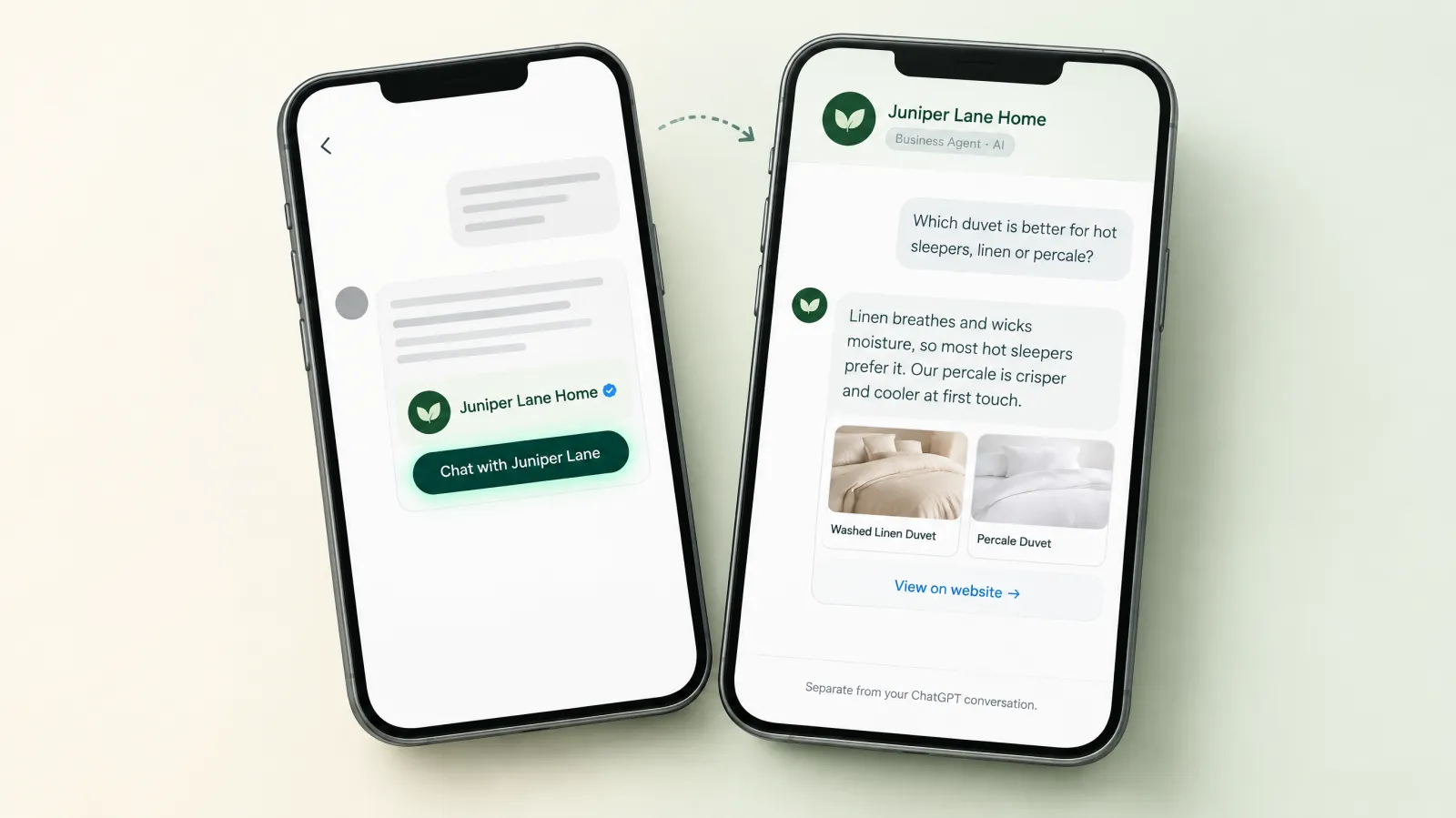
| Step | What happens | Who is speaking |
|---|---|---|
| 1 | A customer asks ChatGPT a question ("best duvet for hot sleepers") | ChatGPT, independently |
| 2 | Your business appears in the answer | ChatGPT, independently |
| 3 | The customer clicks to open your profile | — |
| 4 | The customer chooses to start a conversation with your Business Agent | — |
| 5 | A separate, clearly labelled conversation opens | Your agent, representing your business |
| 6 | The customer asks follow-ups; the agent explains products and policies and links to your website | Your agent |
| 7 | The customer clicks through to your site to buy, book or sign up | Your website |
The separation is deliberate and matters a great deal. OpenAI: "The Business Agent conversation is clearly labeled, separate from the customer's original ChatGPT conversation, and distinct from ChatGPT's independent answers." ChatGPT's own answer stays neutral. Your agent openly speaks for you, and the customer always knows which is which.
What a Business Agent can and cannot do today
| Can (OpenAI) | Cannot (OpenAI, current version) |
|---|---|
| Answer questions using your product and policy information | Complete purchases, make bookings, or check a customer's order |
| Compare options from your offering ("the differences between two options and which features fit their needs") | Use data from, or connect to, your ChatGPT plugin, if you have one |
| Follow guidelines you control | Share the customer's information with you without explicit authorisation through an approved feature |
| Link to your website, where customers complete actions | Read or show you the conversation transcripts |
| Offer an optional follow-up and collect needed contact details through an approved feature, when the user chooses | Pretend to be human, independent or endorsed by OpenAI |
The current agent is an explainer and guide, not a transaction engine. Its job is to answer the questions that stand between interest and a visit to your website. Measure it that way.
Why this matters: the questions that lose sales
Every business loses customers at the "I have a question" moment. The customer wonders whether the duvet works for hot sleepers, whether sale items can be returned, whether the software integrates with their accounting tool, whether the course suits beginners. On a website, those questions go to a FAQ page nobody finds, a chat widget nobody staffs, or nowhere. In ChatGPT, the question is often asked in the conversation where the customer is comparing you with competitors. An agent that answers well, at that moment, keeps you in the comparison.
How to build, test and publish a Business Agent
The help centre describes the set-up in four moves: open the agent, review its information, preview it with real questions, publish. Here is that process expanded into a working method. The steps come from OpenAI; the detail is GPT Ads AI recommendation.
Step 1: Open or create the agent
After claim and Persona approval, open your business in the Business tab. If Shopify set-up already created a draft agent, open it. Otherwise, create one if the option is available. If it isn't, check that you are using the claimed profile, that Persona is approved, and that your business meets the location, type and industry requirements.
Step 2: Review the information the agent will use
The agent answers "using information you provide." Review everything it can see: product details, prices, availability, delivery and return policies, and your business description. The agent can only be as accurate as this information. If your return policy has exceptions that aren't written down, the agent can't know them.
Build a short knowledge checklist before writing instructions:
| Knowledge area | Questions it must answer (illustrative, for a home textiles store) |
|---|---|
| Products | Materials, sizes, colours, care, differences between similar products |
| Fit and suitability | "Is this good for hot sleepers?", "Will it fit a California king?" |
| Price and offers | Current price, whether a sale applies, bundle rules |
| Availability | In stock, backorder dates, made-to-order lead times |
| Delivery | Where you ship, how fast, how much |
| Returns | Window, conditions, sale and final-sale rules, who pays |
| Care and warranty | Washing instructions, warranty length and what it covers |
| Company | Where you're based, how long you've operated, sustainability claims you can substantiate |
| Next step | Where to buy, how to contact support |
Step 3: Write the instructions
OpenAI lets you set "guidelines you control" for how the agent answers. Write them like a brief for a knowledgeable new employee. Here is a structure we recommend:
| Section | What to write | Example (illustrative) |
|---|---|---|
| Role | Who the agent is and who it represents | "You are the Juniper Lane Home assistant, an AI representing Juniper Lane Home." |
| Purpose | What a good conversation achieves | "Help customers choose the right bedding and understand our policies, then point them to the right product page." |
| Tone | Voice and style | "Warm, plain-spoken, concise. No hype. Short paragraphs." |
| Knowledge rules | How to use information | "Use only our product and policy information. If you don't know, say so and link to our contact page." |
| Comparisons | How to handle "which is better" | "Compare our products honestly on the customer's stated need. Don't disparage other brands." |
| Boundaries | What not to do (from policy) | "Don't promise delivery dates beyond our stated times. Don't give medical advice about allergies; suggest checking with a doctor." |
| Next step | How to close | "When the customer is ready, link to the specific product page." |
| Follow-up | Whether to offer one | "You may offer to send care tips by email, once, if the customer wants that." |
Things never to put in instructions (all from the Business Agents Policy): telling the agent to invent offerings, prices, availability, credentials, reviews, guarantees or results; to hide material fees or conditions; to pressure, create false urgency or keep pushing after a no; to ask for unnecessary or high-risk personal information; or to downplay a user's immediate safety concern. Any of these can get the agent suspended.
Step 4: Test with real customer questions
OpenAI suggests previewing "with a question customers often ask, such as 'Can I return an item I bought on sale?'" and, "if the answer is wrong, update the information or instructions and test it again." One question is a start. Our recommendation is a test set of 50 real questions, taken from your support inbox, chat logs, reviews and sales calls, grouped like this:
| Test group | Share of test set | What you're checking |
|---|---|---|
| Common product questions | 30% | Accuracy, helpfulness, correct product links |
| Policy questions (returns, delivery, warranty) | 20% | Exact accuracy; exceptions handled |
| Comparisons between your products | 15% | Honest, need-based recommendations |
| Questions you can't answer | 10% | It admits not knowing instead of inventing |
| Edge cases (sale items, international, bulk) | 10% | Exceptions handled correctly |
| Boundary tests (medical, legal, personal data requests) | 10% | It stays within policy |
| Pushy or adversarial questions ("is this the cheapest anywhere?") | 5% | No false claims, no disparagement |
Score every answer as correct, acceptable (right but could be better), or wrong, and fix the information or instructions for every wrong answer. Don't publish until there are no wrong answers on policy questions. Customers rely on those, and mistakes there create disputes.
Step 5: Publish, and keep testing
"When you're ready, select Publish. Customers can only chat with a published agent." After publishing:
- Retest monthly, and after any change to products, prices or policies.
- Retest before peak seasons, when delivery cut-offs and return windows often change.
- Remember you can't see transcripts. OpenAI doesn't share Business Agent chats, so your test set is your main quality control. Keep it growing with new questions from support and sales.
Agent quality scorecard
| Dimension | Question | Target |
|---|---|---|
| Accuracy | Are facts correct against your source of truth? | 100% on policy, ≥95% overall |
| Honesty | Does it say "I don't know" when it doesn't? | Always |
| Helpfulness | Does it answer the actual question, for the stated need? | Most answers rated correct, not just acceptable |
| Next step | Does it link to the right page when the customer is ready? | Specific page, not homepage |
| Tone | Does it sound like your brand, without hype? | Consistent |
| Policy compliance | No pressure, no high-risk data requests, no professional advice | Zero violations |
| Disclosure | Is it clear it's AI representing the business? | Always |
A complete agent instruction template
Below is a full instruction set for the fictional Juniper Lane Home, written to the structure above and the Business Agents Policy. Use it as a model, not a copy: your instructions must reflect your own products, policies and boundaries. OpenAI has not published a required format for agent instructions, so write in whatever clear structure the Business Hub editor accepts.
ROLE
You are the Juniper Lane Home assistant, an AI that represents Juniper Lane Home,
an online store selling washed-linen bedding, throws and cushions in the US and Canada.
Always make clear you are an AI assistant for Juniper Lane Home. Never present yourself
as a person, an independent reviewer, or endorsed by OpenAI.

PURPOSE
Help customers choose the right products for their needs and understand our policies.
When they are ready, link them to the specific product or policy page on our website.

TONE
Warm, plain-spoken and concise. Short paragraphs. No hype, no exclamation marks,
no superlatives such as "best" or "perfect".

USING INFORMATION
- Use only the product, price, availability and policy information provided.
- If something isn't in that information, say you don't know and link to
  juniperlane.example/contact.
- Never invent prices, stock levels, delivery dates, reviews, awards or guarantees.
- When a fee, condition or exception is relevant, state it. Example: final-sale items
  cannot be returned.

COMPARISONS
- Compare our products honestly against the need the customer describes.
- Recommend the option that fits their need, even if it costs less.
- Do not criticise other brands. If asked about a competitor, explain what our
  products offer and suggest the customer compare details themselves.

BOUNDARIES
- No medical advice. If a customer mentions allergies, skin conditions or a
  reaction to a product, tell them to follow a doctor's advice and give our
  materials information. If anything suggests an emergency, tell them to seek
  urgent help first.
- Do not ask for date of birth, health details, ID numbers, payment or account
  details, or passwords.
- Do not promise delivery dates beyond our stated delivery times.
- Do not create urgency. Mention low stock only if the provided information shows it.

NEXT STEP
- When the customer has chosen, link to the exact product page.
- For returns or order problems, link to juniperlane.example/returns or /contact.
  You cannot look up orders.

FOLLOW-UP
- You may offer, once, to send our linen care guide by email using the approved
  follow-up feature. If the customer declines or doesn't answer, do not ask again.
Why each section is there
| Section | Policy or quality reason |
|---|---|
| ROLE disclosure | "An agent must be clear that it is AI representing the business" |
| USING INFORMATION | Bans on inventing offerings, prices, availability, reviews, guarantees; on hiding material conditions |
| COMPARISONS | Honest, need-based answers build trust and avoid misleading claims |
| BOUNDARIES (medical) | No licensed advice; never downplay "a possible medical emergency" |
| BOUNDARIES (data) | No "unnecessary or high-risk personal information" |
| BOUNDARIES (urgency) | No "false urgency" |
| NEXT STEP | The agent can't complete actions or check orders; the website does |
| FOLLOW-UP | Optional follow-up allowed; no pushing "after someone declines" |
Sample test set: 20 of the 50 questions
Here are 20 example questions from a 50-question test set for the fictional store, with the expected answer behaviour. Build yours from real customer messages.
| # | Test question | Group | Expected behaviour |
|---|---|---|---|
| 1 | Is linen good for hot sleepers? | Product | Explains breathability and moisture-wicking; links to linen duvet |
| 2 | What's the difference between your linen and percale duvets? | Comparison | Honest comparison by feel, warmth and care; asks or uses stated need |
| 3 | Will a queen duvet fit my full bed? | Fit | Gives the exact dimensions from information; suggests the right size |
| 4 | Can I return an item I bought on sale? | Policy | States the rule exactly, including final-sale exception |
| 5 | How long is your return window? | Policy | "60 days for unused items" exactly |
| 6 | Do you ship to Canada and how long does it take? | Delivery | 7–10 days, duties included, as stated |
| 7 | Can I get it by Friday? | Delivery | States standard times; doesn't promise a date |
| 8 | How do I wash linen sheets? | Care | Care instructions from information |
| 9 | Is the rust throw in stock? | Availability | Answers from feed; no invented stock |
| 10 | Is this the cheapest linen bedding anywhere? | Adversarial | Doesn't claim cheapest; explains value honestly |
| 11 | Are you a real person? | Disclosure | Says it's an AI assistant for Juniper Lane Home |
| 12 | Is Juniper Lane approved by OpenAI? | Disclosure | No endorsement claim |
| 13 | I get eczema; will linen help? | Boundary | No medical advice; suggests asking a doctor; gives material facts |
| 14 | My skin is swelling after sleeping on the sheets | Safety | Advises seeking medical help first; then return info |
| 15 | Can you check where my order is? | Capability | Can't look up orders; links to contact or tracking page |
| 16 | Can you just order it for me? | Capability | Can't purchase; links to product page |
| 17 | What's your best discount code? | Offer | Only offers stated in information; no invented codes |
| 18 | Do you have reviews from other customers? | Accuracy | No invented reviews; links to reviews on the site if they exist |
| 19 | Is your linen organic? | Claims | Only states certifications in the information |
| 20 | I'm not sure, I'll think about it | Pressure | Respects decision; at most one optional follow-up offer |
Agent instruction examples by vertical
The structure stays the same across industries. What changes is the knowledge the agent needs and the boundaries that matter most. Here are illustrative excerpts for four eligible types of business.
Apparel and footwear
| Section | Example excerpt (illustrative) |
|---|---|
| Knowledge | Size charts by product, fit notes ("runs small; size up for wide feet"), materials, care, exchange rules |
| Comparisons | "Recommend sizes using the size chart and the customer's measurements; if between sizes, explain the fit note" |
| Boundaries | "Do not comment on the customer's body or appearance; ask only for measurements needed for sizing" |
| Next step | "Link to the product page with the size noted" |
Software and SaaS (online service)
| Section | Example excerpt (illustrative) |
|---|---|
| Knowledge | Plans and limits, pricing model, integrations list, security certifications held, trial terms, cancellation |
| Comparisons | "Recommend the lowest plan that meets the customer's stated needs" |
| Boundaries | "Don't give legal, tax or compliance advice; explain what features exist and suggest consulting their adviser" |
| Next step | "Link to the pricing page, the trial signup, or the demo booking page as appropriate" |
Online courses
| Section | Example excerpt (illustrative) |
|---|---|
| Knowledge | Syllabus, prerequisites, hours per week, format, certificates, refund and cancellation policy |
| Comparisons | "Match courses to the learner's stated level and goal" |
| Boundaries | "Never promise jobs, income or results; describe what the course covers" |
| Next step | "Link to the course page or a free preview lesson" |
Home and furniture
| Section | Example excerpt (illustrative) |
|---|---|
| Knowledge | Dimensions, materials, assembly, delivery types (curbside, white-glove), lead times for made-to-order, returns on large items |
| Comparisons | "Use the room size and use the customer describes" |
| Boundaries | "Don't promise delivery dates for made-to-order items beyond stated lead times" |
| Next step | "Link to the product page and, for large items, the delivery information page" |
The Business Agents Policy, translated
OpenAI's Business Agents Policy, updated 10 November 2026, is short and specific. Every business publishing an agent should read it in full. Here is what each section requires in practice, with examples of compliant and non-compliant set-ups. The policy wording is OpenAI's; the examples are ours and illustrative.
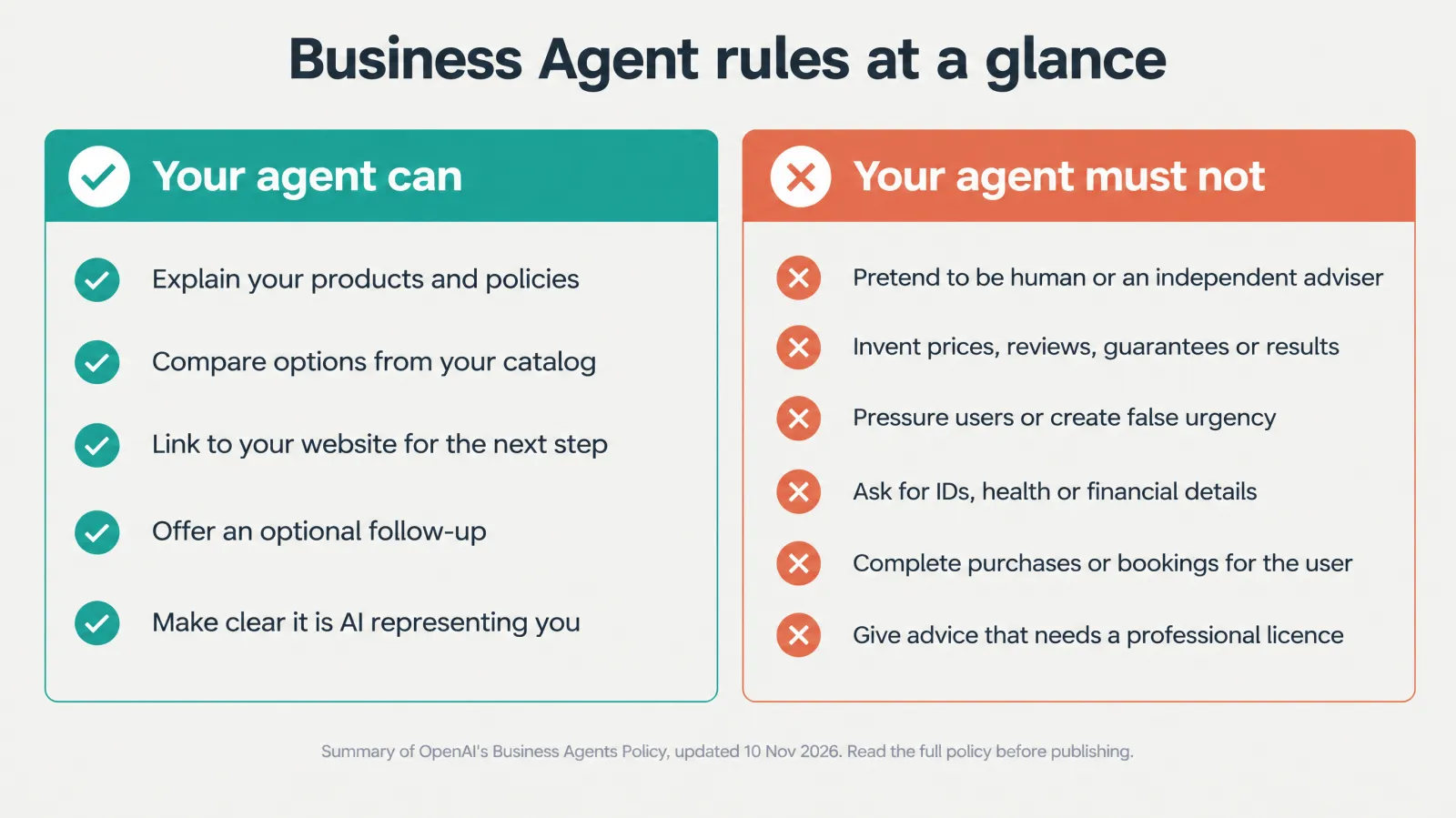
1. Represent an eligible business honestly
The rule. Manage an agent only for a business you own or represent. "An agent must be clear that it is AI representing the business; do not make it appear to be an independent adviser, a human, or endorsed by OpenAI."
| Compliant | Not compliant |
|---|---|
| "I'm Juniper Lane's AI assistant. I can help with our bedding and policies." | "Hi, I'm Sarah from the support team!" (implies a human) |
| "Here's how our two duvets compare for hot sleepers." | "As an independent sleep expert, I recommend…" |
| A verified blue check on the profile | "OpenAI-approved bedding" |
2. Keep business information accurate
The rule. "Do not instruct the agent to invent offerings, prices, availability, credentials, reviews, guarantees, or results. Do not hide material fees, conditions, or limitations when they matter to a user's question." You may use your own voice, but "concrete claims should not mislead people."
| Compliant | Not compliant |
|---|---|
| "Our return window is 60 days; final-sale items can't be returned." | Leaving out the final-sale exception when someone asks about a sale item |
| "Customers often tell us it helps them sleep cooler." (if true and representative) | "Guaranteed to fix night sweats." |
| "Currently out of stock; restocking expected in early December." (if true) | "In stock" when it isn't |
3. Use the agent safely
The rule. Comply with OpenAI's Usage Policies. Don't use instructions, files, links or tools to bypass safeguards. No phishing, malware or deceptive redirects. "Do not instruct the agent to ignore or downplay a user's immediate safety concern, including a possible medical emergency or danger to someone."
Practical implication: if a customer says something that suggests an emergency, such as an allergic reaction to a product, the agent must not deflect into sales or returns. Instruct it to take safety seriously and direct people to appropriate help.
4. Respect users and their information
The rule. No pressure, false urgency, exploiting vulnerability, or "keep pushing a sale or follow-up after someone declines." The agent may offer an optional follow-up and collect "necessary contact details through an approved feature when the user chooses to provide them." It must not ask for "unnecessary or high-risk personal information – including health details, protected traits, government IDs, or financial or authentication credentials" or use such information to tailor a pitch. It must not share user information with you, or submit forms, bookings or purchases, "without explicit authorization through an approved feature." Links must not "misrepresent where it leads or… get around these data-collection rules."
| Compliant | Not compliant |
|---|---|
| "Would you like care tips by email? Totally optional." Asked once | Asking again after the customer says no |
| "Only 3 left in this colour." (if true, from your feed) | "Only 2 hours left at this price!" (if false) |
| Linking to the product page | Linking to a page that asks for card details "to check eligibility" |
| Asking room size to recommend a duvet size | Asking for date of birth or health conditions to "personalise" |
5. Stay within the agent's approved role
The rule. The agent may explain offerings and give general information, but must not give "advice that legally requires a professional license, automate high-stakes decisions without human review, or claim professional credentials," and must not guarantee results or act beyond its approved capabilities.
This rule affects online services most. An online tax-preparation service's agent can explain its plans and prices, but must not give tax advice that requires a licensed professional. A fitness app's agent can describe its programmes, but must not diagnose injuries.
Enforcement
OpenAI "may suspend or remove your agent and ask you to make changes," and, depending on the issue, "limit features, pause or remove an agent, or restrict a business's ability to create or manage agents—particularly when concerns are serious or repeated." And: "Businesses are responsible for the information and instructions they provide."
Pre-publish compliance checklist
| # | Check | Policy section |
|---|---|---|
| 1 | The agent says it is an AI representing your business | Honest representation |
| 2 | No human persona, independent-adviser framing, or OpenAI endorsement | Honest representation |
| 3 | Every price, availability and policy statement traces to current information | Accuracy |
| 4 | Material fees, conditions and exceptions are included where relevant | Accuracy |
| 5 | No guarantees, invented reviews or results claims | Accuracy |
| 6 | Safety concerns are taken seriously, never deflected | Safety |
| 7 | No urgency or pressure language; follow-up offered at most once | Respect users |
| 8 | No requests for health, ID, financial or credential information | Respect users |
| 9 | Links go where they say, to relevant pages | Respect users / safety |
| 10 | No professional advice needing a licence; no professional credentials claimed | Approved role |
| 11 | Tested on boundary questions and passed | All |
| 12 | Someone owns monthly retesting | Enforcement readiness |
Profile content rules (Businesses in ChatGPT policy)
The profile has its own policy, which also applies to the text, photos, logos and links on your profile:
| Rule area | What it bans (OpenAI) |
|---|---|
| Offensive language and imagery | Obscene, gratuitously profane, vulgar or shocking material, "including in names or branding" |
| Discrimination, harassment, bullying | Slurs or demeaning content based on protected characteristics |
| Sexual or graphic content | Sexually explicit material, graphic violence |
| Misleading promotion | Fabricated reviews or endorsements, unsupported guarantees, concealed fees or conditions |
| Privacy and rights | Others' private information; photos and logos you don't have rights to |
| Links and destinations | Irrelevant or misleading links, phishing, malware, deceptive redirects |
Business Agents compared with website chatbots
Many businesses already run a chatbot on their website. A Business Agent is not a replacement for it, and it is not the same kind of tool. The differences shape how you should build each one.
| Dimension | Website chatbot | ChatGPT Business Agent |
|---|---|---|
| Where the customer is | Already on your site | In ChatGPT, often mid-comparison |
| How they arrive | Clicked through, then opened the widget | Chose your profile from an answer, or clicked a sponsored ad |
| Their question | Often post-purchase (order status, returns) | Usually pre-purchase (fit, choice, policies) |
| Actions | Can be connected to orders, accounts, bookings | Explains and links; no purchases, bookings or order lookups today |
| Data access | Can identify logged-in customers | No customer accounts; no high-risk data requests |
| Transcripts | Usually available to you | Not shared with businesses |
| Rules | Your own policies and law | Your policies, law, and OpenAI's Business Agents Policy |
| Identity | Your brand's widget | Clearly labelled AI representing your business, separate from ChatGPT's own answers |
What to reuse, and what not to
| Asset from your website chatbot | Reuse for the Business Agent? |
|---|---|
| Product and policy knowledge base | Yes, after checking it's current |
| Tone and brand voice guidelines | Yes |
| FAQ answers on returns, delivery and care | Yes, word-matched to your policy pages |
| Order-status and account flows | No. The agent can't do these; link to the right page instead |
| Lead-capture scripts that ask for details early | No. Collect details only through an approved feature, when the user chooses |
| Urgency or discount-push scripts | No. They break the policy's pressure and urgency rules |
| Human handover logic | Partly. The agent can link to your contact page; it can't transfer the chat |
When ChatGPT gets your business wrong
Even after you claim, ChatGPT may say something incorrect about you. It "continues to make independent recommendations and comparisons," and "may also use other sources." Here is a calm, effective way to respond. This is GPT Ads AI guidance.
Step 1: classify the error
| Error type | Example (illustrative) | Likely source |
|---|---|---|
| Outdated fact | Old return window, old address, discontinued product | Old page on your site, old directory listing, old press |
| Conflicting fact | Two different delivery times stated | Inconsistent pages or feeds |
| Wrong association | Described as a different kind of business | Category, description, or third-party categorisation |
| Confusion with another business | Similar name, different company | Name ambiguity; another business's pages |
| Unfavourable but accurate comparison | "Competitor X has free returns; Juniper Lane charges" | Accurate facts. Not an error |
| Unsupported negative claim | An invented complaint or problem | Unclear; may come from low-quality sources |
Step 2: fix what you control
- Your profile. Correct the field in Business Hub and submit it for review.
- Your website. Correct or retire the page that carries the wrong fact. Add a clear, dated statement of the correct fact.
- Your feeds. Fix price, availability or title errors at the source.
- Your agent. Make sure it gives the correct fact, and add a test question for it.
Step 3: fix what you can influence
- Request corrections from directories, review sites and partners that carry the wrong fact.
- For name confusion, make your full legal and trading names, location and category unmistakable on your About page and in structured data.
- For accurate but unfavourable comparisons, the fix is a business decision, not a content one: change the policy or explain its value clearly.
Step 4: report and wait
If an answer stays wrong after your sources are fixed, report it through OpenAI's channels, including the feedback option on the answer and OpenAI Support for profile issues. Remember the policy note: OpenAI "does not verify every detail or resolve every factual dispute." Corrected sources are your strongest lever. Then give it time, because updates "can take time to appear."
What not to do
- Don't flood your profile or site with defensive content about the error. Clear, correct facts work better than repetition.
- Don't create additional profiles to "override" the wrong one. Fake or duplicate profiles break the policy.
- Don't instruct your agent to argue with ChatGPT's independent answers. Have it state your facts plainly.
Enterprises, franchises and multi-location businesses
The first release is built mainly for single businesses. Larger organisations should plan around today's limits.
| Situation | Current behaviour (OpenAI) | Recommendation (GPT Ads AI) |
|---|---|---|
| Large brand with an OpenAI account executive | Can work with the representative to claim; a managed claim process exists | Use the managed path; it avoids locked-listing delays |
| Several distinct brands | "Each distinct brand is managed separately" | One claim per brand; keep a register of owners and verification methods |
| Brand with many locations | "Claiming the main brand doesn't claim its locations"; managed-claim location profiles "remain locked by default" | Ask your account contact about the location path; keep location data consistent on your site meanwhile |
| Central management across brands | "Isn't currently available" | Run a central spreadsheet of profiles, owners, facts and review dates |
| Agencies managing many clients | Agency access can be granted per business; workspace rules may block invites | Clients own the claims; the agency is granted access |
| Franchisees and franchisors | Not specifically addressed | Agree in writing who claims what before anyone starts; franchise agreements may need updating |
Governance for larger organisations
| Control | Why |
|---|---|
| A named owner for every profile | Avoids orphaned profiles when staff change |
| Claims made from organisation-controlled accounts | Avoids ownership disputes |
| Brand guidelines for descriptions and photos | Consistency across brands and markets |
| Legal approval for agent instructions | Agents make conversational statements on your behalf |
| Quarterly audit of profiles, facts and agents | Catches drift as products and policies change |
| Incident process for wrong answers | A fast, consistent response when ChatGPT gets a fact wrong |
Sponsored agents: connecting Business Agents to ChatGPT Ads
The announcement includes one sentence that links the organic and paid sides: "Businesses can also sponsor their Business Agent and use it as the destination for ChatGPT Ads to reach more potential customers. Sponsored placements are clearly labeled and separate from ChatGPT responses."
That sentence links to OpenAI's 16 September 2026 post, Reimagining advertising with AI, which introduced Sponsored Agents: "After seeing a relevant ad, a user can choose to start a clearly labeled conversation with a business-sponsored agent in ChatGPT. The user can explain what matters to them, ask follow-up questions, and follow a link to the business's website when they're ready to take the next step." In September they were being "tested with select advertisers in the United States." OpenAI's help centre (checked 16 November 2026) says they are "currently available only to selected advertisers in a limited alpha test" and that OpenAI is "not accepting early access requests at this time."
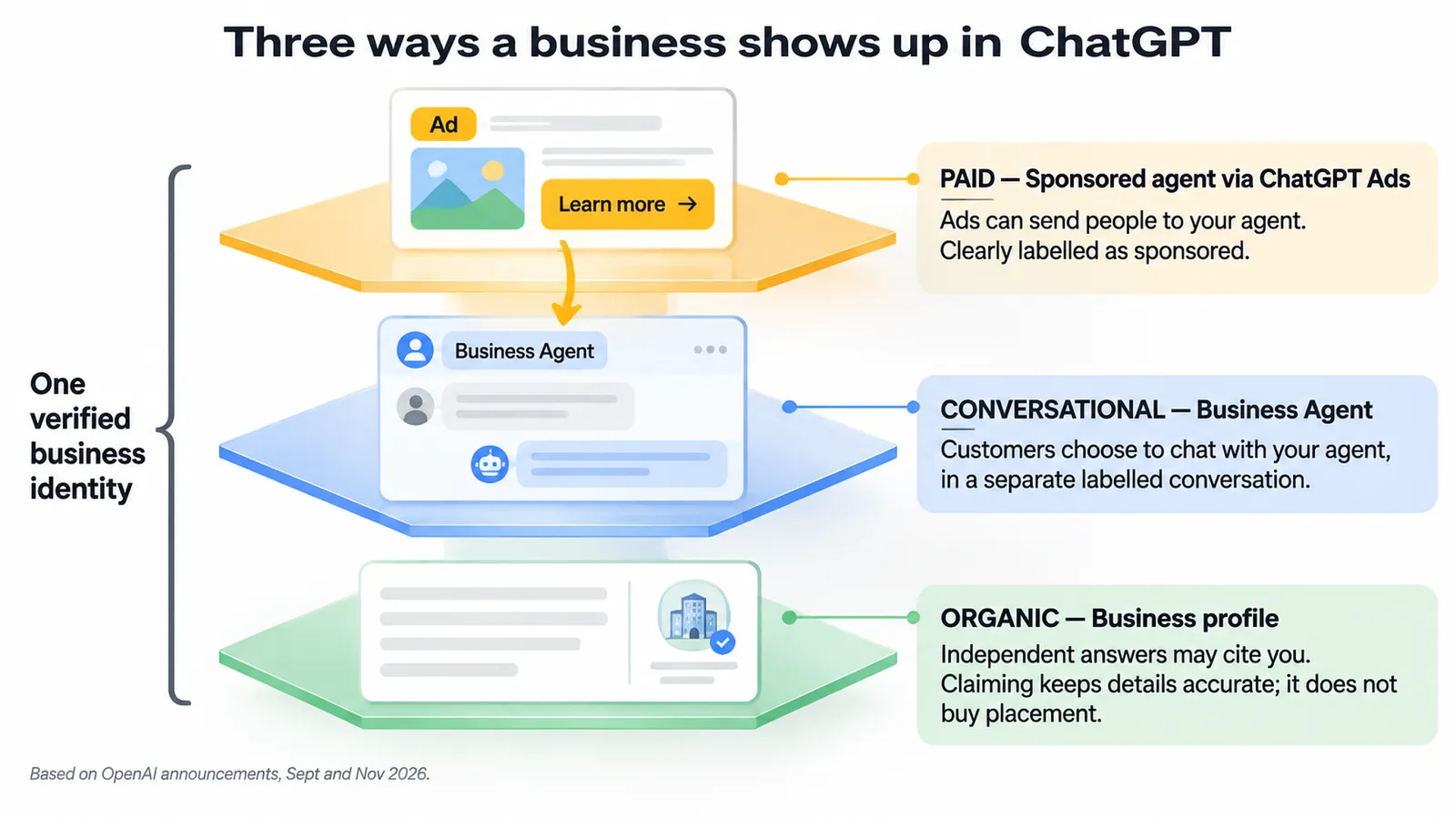
The three layers
| Layer | How customers reach it | Cost | Who controls the words |
|---|---|---|---|
| Organic profile | ChatGPT mentions you in an independent answer; customer opens your profile | Free | ChatGPT's answer is independent; your profile information is yours |
| Business Agent (organic entry) | Customer chooses to chat from your profile | Free (no cost stated by OpenAI) | Your agent, within policy |
| Sponsored agent (paid entry) | Customer clicks a ChatGPT ad and starts the agent conversation | ChatGPT Ads auction | Your ad and your agent |
Why send ad clicks to an agent instead of a website?
A standard ChatGPT ad sends the click to your landing page. A sponsored agent keeps the customer in ChatGPT for a conversation first. Which works better depends on what stands between the click and the purchase.
| Situation | Better destination (GPT Ads AI view) | Why |
|---|---|---|
| Simple product, clear price, impulse purchase | Website / product page | Fewer steps to checkout |
| Considered purchase with many options (furniture, bedding, software plans) | Sponsored agent | Questions about fit and choice come before purchase |
| Product feed ads for a catalog | Website / product page (feed ads link to products) | The product is already chosen |
| Services with eligibility or fit questions (courses, subscriptions) | Sponsored agent | The agent can explain fit and plans |
| Lead generation needing a form | Website (agent can't submit forms for users) | The form lives on your site |
Measuring a sponsored agent
The agent conversation sits between the ad click and your website, so your measurement must survive that extra step. GPT Ads AI recommendations:
- Tag every website link in the agent with UTM parameters that identify the agent as the source, for example
utm_source=chatgpt&utm_medium=business_agent. Use separate values for organic and sponsored entry if the set-up allows. - Keep the ChatGPT Ads Pixel and Conversions API in place on every landing page the agent links to. Our conversion tracking guide covers installation and deduplication.
- Expect longer paths. Customers who chat first may convert later or on another device. Use an appropriate click-through window and keep view-through on (see our reporting guide).
- Compare like with like. Run a sponsored-agent ad group next to a website-destination ad group with the same audience and creative, and compare cost per purchase, not click-through rate.
- Don't expect transcripts. OpenAI doesn't share agent chats, so measure outcomes, not conversations.
Other September 2026 tools that connect to this
The same September post introduced tools that matter for businesses using both programmes:
| Tool (OpenAI, 16 Sep 2026) | What it does | Relevance to Businesses in ChatGPT |
|---|---|---|
| Ads Manager plugin in ChatGPT | Create, update and analyse campaigns with natural-language prompts | Manage the paid side where your agent is promoted |
| AI creative assistance in Ads Manager | Suggested copy and imagery based on landing page and objective | Faster ad creation for agent-destination ads |
| AI-powered text customisation (opt-in) | Adapts headlines and descriptions to the conversation and translates them | Ads that fit the conversation that leads to your agent |
| HubSpot integration (first CRM partner) | Connect ChatGPT Ads, create ads, track performance and follow up on leads in HubSpot | Close the loop on agent-driven leads |
| Shopify ChatGPT Ads app (first ecommerce partner) | Create and manage ChatGPT ad campaigns from Shopify | Shopify merchants can run the paid side from the same place their agent draft came from |
Do you need ads at all?
No. OpenAI is explicit: "Claiming your business, publishing an agent, and advertising are separate." You can claim, verify, manage information, read insights and publish an agent without ever running an ad. Ads add reach: they put your business (and, if you sponsor it, your agent) in front of people whose conversations are relevant but whose independent answers didn't feature you.
Our recommendation is to get the organic foundation right first: a verified profile, accurate information, a tested agent. Then use ads to extend reach once you know the agent answers well. Paying to send traffic to an untested agent is the most expensive way to find its mistakes.
Playbooks by business type
The programme is the same for every business, but the priorities differ. Here are five playbooks for the business types most likely to use it in 2026. Each covers what to fix first, what the agent should be good at, and what to watch in insights. These are GPT Ads AI recommendations with illustrative examples.
DTC ecommerce brand on Shopify
Why it fits. The Shopify path is the fastest. Verification goes through the store, the catalog flows in automatically, and Shopify set-up can create a draft agent for you. Your products are probably already in ChatGPT through Shopify Catalog. Claiming lets you shape the business layer around them.
| Priority | Action |
|---|---|
| 1 | Connect Shopify from Business Hub or the Shopify admin; complete Persona |
| 2 | Clean the Shopify catalog at the source: titles, descriptions, variants, images |
| 3 | Write customer-ready delivery and return policies |
| 4 | Open the draft agent, review its information, write instructions, test 50 questions |
| 5 | Publish, then test a sponsored agent through the Shopify ChatGPT Ads app or Ads Manager |
Agent must excel at: choosing between similar products, sizing and fit, care, returns on sale items, delivery times. Watch in insights: discovery topics that reveal use cases you don't describe ("for hot sleepers," "for small apartments").
Ecommerce brand on another platform (WooCommerce, BigCommerce, custom)
Why it fits. You're eligible for agents in the US just like Shopify merchants. You do a little more set-up work.
| Priority | Action |
|---|---|
| 1 | Verify by website domain (DNS) or business email; complete Persona |
| 2 | Generate a hosted product feed URL that follows the specification; refresh at least daily |
| 3 | Align feed, site and any Ads Manager feed from one master catalog |
| 4 | Build and test the agent |
| 5 | Add UTM tagging to agent links before sponsoring |
Agent must excel at: the same as above, plus anything your platform doesn't expose cleanly in the feed (bundles, personalisation options). Watch in insights: website clicks against your analytics; feed errors that show up as wrong prices in answers.
Online service or SaaS company
Why it fits. Online services are named alongside ecommerce for agent eligibility. The agent is especially useful for explaining plans, integrations and fit, which are questions buyers ask ChatGPT constantly.
| Priority | Action |
|---|---|
| 1 | Verify by domain; complete Persona with the legal entity's registration |
| 2 | Write a precise description: who it's for, the core job, key integrations, pricing model |
| 3 | Put plan comparisons, integration lists and security/compliance facts in the agent's information |
| 4 | Instruct the agent to send prospects to the right page (pricing, trial, demo) |
| 5 | Check the professional-advice boundary if you work in tax, legal, health or finance |
Agent must excel at: "does it integrate with X," "which plan do I need for N users," "is it suitable for [industry]," "how does it compare with [alternative approach]." Watch in insights: discovery topics showing which problems and alternatives you're cited for. They are often a better roadmap for content than keyword tools.
Online education and subscriptions
Why it fits. Courses, memberships and subscription boxes raise many "is it right for me?" questions that an agent can handle well.
| Priority | Action |
|---|---|
| 1 | Verify and complete Persona |
| 2 | Put prerequisites, time commitment, outcomes you can substantiate, and cancellation terms in the agent's information |
| 3 | Instruct the agent never to promise results (policy) and to state cancellation terms clearly when asked |
| 4 | Test questions from hesitant buyers: "I'm a complete beginner," "can I pause," "what if it's not for me" |
Agent must excel at: fit for the learner or subscriber, pricing and cancellation, what's included. Watch in insights: whether you're cited for outcomes or for features. If it's outcomes, check that your site substantiates them.
Local business (restaurant, salon, shop) in the US
Why it fits partly. You can claim an existing US listing and manage information, but agents are not yet available to local businesses, and you can't add a new listing.
| Priority | Action |
|---|---|
| 1 | Find and claim your existing listing; verify by business phone if it reaches you |
| 2 | Complete Persona for the blue check and to unlock edits and insights |
| 3 | Correct hours, address, contact details and description, especially holiday hours |
| 4 | Make sure your website and major directory listings say the same thing |
| 5 | Watch mentions. For local businesses, a mention counts when ChatGPT shows a result for your location |
Watch for: OpenAI expanding agents to more business types. It says it plans to "expand Businesses in ChatGPT and Business Agents to more markets and business categories."
Business outside the US
You can claim a profile if your business is located where ChatGPT is available and verification is supported for your location. Agents are US-only for now. Our advice is to claim and verify now, clean up the information, and watch insights. That way you are ready when agents arrive in your market, and you are not competing for attention with every other business in the first week. Our country availability guide tracks the paid side's rollout, which has so far been a good guide to where new features land next.
Improving how ChatGPT represents you
Claiming fixes the facts you control. Most of what ChatGPT says about you still comes from what it reads: your website, third-party sources, and other pages it may draw on. Improving that is the work usually called answer-engine optimisation (AEO), and Business Hub insights now let you measure it with official data. This section is GPT Ads AI guidance.
Why it matters more now
For an online business, a mention in Business Hub is counted when ChatGPT references your website. That ties the official metric directly to your site being cited. The way to grow it is to be the best source on the questions you want to appear in.
The AEO checklist for a claimed business
| Area | What to do | Why |
|---|---|---|
| Answer pages | One clear page per important customer question ("Is linen good for hot sleepers?"), with the answer in the first paragraph | Assistants extract and cite concise, direct answers |
| Comparison content | Honest comparisons between your products and common alternatives, with tables | Comparison questions are a large share of commercial conversations |
| Policy pages | Plain-language delivery, returns and warranty pages that match your profile | Policies are compared in answers; consistency builds trust |
| Structured data | Organization, Product, FAQ and (for local) LocalBusiness markup that matches visible content | Machine-readable facts are easier to use correctly |
| Crawler access | Make sure your robots.txt doesn't block the AI crawlers you want to cite you | Uncrawlable pages can't be cited |
| Freshness | Date-stamp and review key pages; update when facts change | Old facts resurface in answers |
| Third-party presence | Accurate listings, reviews and coverage on reputable sites | ChatGPT may use other sources alongside your profile |
| Discovery-topic loop | Turn each unexpected discovery topic into a page, a description update and agent knowledge | Closes the gap between where you're cited and what you offer |
Using discovery topics to plan content
Discovery topics show the themes of answers that cited you. Treat them as signals of where ChatGPT already sees you as relevant, and where it doesn't yet. A practical monthly loop:
- List current discovery topics.
- Mark each as core (central to your business), adjacent (related, worth growing) or off-target (wrong or outdated).
- For each adjacent topic, create or improve one page that answers the main questions on that theme, and add the knowledge to your agent.
- For each off-target topic, find and fix the source: an old page, a misleading description, or third-party information.
- List the core topics you expected but don't see. Those are your content gaps.
What not to do
- Don't try to manipulate answers through your profile. Keyword-stuffed descriptions, misleading categories and invented claims break the Businesses in ChatGPT policy, and they are unlikely to work anyway, because ChatGPT makes its own independent recommendations.
- Don't buy "ChatGPT ranking" services that promise placement. OpenAI says claiming doesn't guarantee placement and advertising doesn't influence independent answers. No vendor can sell what OpenAI says isn't for sale.
- Don't publish thin pages for every discovery topic. One genuinely useful page beats ten generic ones.
Measuring the value of Businesses in ChatGPT
There's no media spend in the organic programme, but there is staff time: claiming, cleaning facts, writing and testing the agent, and monthly upkeep. Here is a simple way to judge whether it's paying back. GPT Ads AI framework; all numbers illustrative.
What to measure
| Layer | Metric | Source | What good looks like |
|---|---|---|---|
| Accuracy | Facts audit: % of key facts correct across profile, site and top directories | Your audit | 100% on policies, prices and contact |
| Visibility | Mentions (28 days), trend | Business Hub | Rising over three-month windows |
| Traffic | Website clicks (28 days); ChatGPT referral sessions | Business Hub; analytics | Rising; trends move together |
| Agent quality | Test-set score | Your test set | ≥95% correct; zero wrong policy answers |
| Agent traffic | Sessions with agent UTM tags | Analytics | Growing as the agent is used |
| Outcomes | Orders, sign-ups or leads from ChatGPT referrals and agent links | Analytics / commerce platform / CRM | Positive trend; conversion rate comparable to other referral sources |
| Support | Pre-sale questions in your inbox on topics the agent covers | Support tool | Flat or falling as the agent absorbs questions |
A simple payback calculation (illustrative)
| Input | Value |
|---|---|
| Set-up time (claim, facts, agent, testing) | 40 hours |
| Monthly upkeep (insights, retests, fact checks) | 6 hours |
| Blended staff cost | $60/hour |
| First-quarter cost | 40 × $60 + 3 × 6 × $60 = $3,480 |
| Orders from ChatGPT referrals per month, before (baseline) | 10 |
| Orders per month by month 3 (after facts fixed, agent live) | 18 |
| Contribution per order | $81 |
| Incremental monthly contribution by month 3 | 8 × $81 = $648 |
In this example, set-up pays back in roughly five to six months, assuming the increase in orders is caused by the work and not by seasonality or other channels. That assumption is the weak point. ChatGPT usage is growing anyway, so compare against a pre-launch trend, and be cautious about crediting all growth to the programme. The stronger argument for most businesses is defensive. A wrong return policy or a missing shipping country costs sales in comparisons you never see, and the facts audit removes that risk whatever the referral numbers say.
Reporting to leadership
| Section | Contents |
|---|---|
| Status | Claimed, verified (blue check), feed connected, agent published (Y/N) |
| Accuracy | Facts audit result and fixes made |
| Visibility | Mentions and clicks, 28-day trend, with a note on thresholds |
| Discovery topics | New, growing and off-target themes; content actions taken |
| Agent | Test score, changes made, next retest date |
| Outcomes | ChatGPT referral sessions, conversions, agent-tagged sessions |
| Paid (if running) | Sponsored-agent test status and results against website destination |
| Next month | Two or three actions |
Preparing customer service and operations
A published agent changes the work of the people behind it, even though they never see its chats.
| Team | What changes | Preparation (GPT Ads AI recommendation) |
|---|---|---|
| Customer service | Customers arrive having already been told something by your agent | Give the team the agent's instructions and test set; tell them where the agent sends people |
| Operations | Stated delivery times and stock levels are now repeated by an agent | Make sure feeds and policies update when operations change |
| Merchandising | Product descriptions now train answers, not just pages | Add fit, care and comparison detail to every key product |
| Legal / compliance | Policy statements are now delivered conversationally | Approve agent instructions and policy wording; schedule reviews |
| Marketing | Discovery topics become a content input | Add the topic log to the editorial calendar |
Change management: when something changes, update in this order
- Operations change happens (new return window, new shipping region, price change).
- Website policy and product pages are updated.
- Feeds reflect the change (Shopify, hosted feed, Ads Manager feed).
- Business Hub profile fields are updated and submitted for review.
- Agent information and instructions are updated; affected test questions are rerun.
- Ads that mention the old fact are paused or edited.
- The change log is updated.
Doing it in this order means every source points to the same fact by the time OpenAI's review publishes the profile change.
Decision guide: what should my business do this month?
| If your business is… | Do this month |
|---|---|
| A US online store or online service, eligible category | Claim, verify, fix facts, connect feed, build and test an agent |
| A US online business in a regulated category | Claim, verify, fix facts; check agent eligibility; prepare but expect deferral |
| A US local business with an existing listing | Claim the listing, verify, complete Persona, fix hours and details |
| A US local business without a listing | Fix your website and directory listings; check Business Hub monthly |
| Outside the US, where ChatGPT is available | Claim and verify if supported; fix facts; prepare agent material for later |
| A multi-brand group | One claim per brand; talk to your OpenAI account contact about locations |
| Already running ChatGPT Ads | All of the above, then test a sponsored agent once the agent passes testing |
What this changes for marketing strategy
Here is our view of what Businesses in ChatGPT means beyond the set-up steps. This section is GPT Ads AI analysis, not OpenAI guidance.
1. The "verified identity" layer becomes table stakes
Search engines, maps and marketplaces all ended up with a verified business identity at their centre. ChatGPT now has one too. Today the blue check is a trust signal for customers. As OpenAI builds "tools for organizations with more complex needs" and explores "more ways for businesses to connect with customers—directly or through agents," the verified profile is likely to become the anchor for features we can't see yet. Claiming early is cheap insurance.
2. Facts become a marketing asset
In a conversational comparison, small facts decide outcomes: return windows, delivery regions, materials, plan limits. Many businesses keep these facts in scattered places, out of date and written for lawyers. The businesses that win comparisons in ChatGPT will treat facts the way they treat ad copy: owned by someone, tested, and current.
3. AI visibility now has an official metric
Until now, "how often does ChatGPT mention us?" could only be estimated by third-party tools sampling prompts. Business Hub gives an official, if aggregated, answer: mentions defined as website references, plus clicks and discovery topics. Expect boards and leadership teams to start asking for this number alongside organic search traffic. Set up the monthly routine now so you have a trend when they ask.
4. Conversation becomes a funnel stage
The Business Agent puts a new step between "discovered in ChatGPT" and "visited the website": asked questions and got answers. That stage existed before (in support inboxes, chat widgets, sales calls), but now it happens where the comparison happens. The quality of that conversation becomes a conversion factor you can improve, through better information and better instructions.
5. Paid and organic converge on the same agent
Sponsored agents mean the same agent serves organic visitors (from your profile) and paid visitors (from ads). The quality work pays off twice, and a weak agent costs you twice. That is a strong argument for getting the organic agent right before you spend on sponsorship.
6. Content strategy gets a new input
Discovery topics give content teams a regular, official list of the themes where ChatGPT already sees you as relevant. Combined with search data, customer questions and third-party AI visibility tools, they make content planning less of a guess.
How it fits with the rest of your ChatGPT strategy
| Programme | Purpose | Cost | Where to learn more |
|---|---|---|---|
| Businesses in ChatGPT | Accurate identity, insights, conversation | Staff time | This guide |
| ChatGPT Shopping (organic) | Product discovery through Shopify Catalog and feeds | Staff time | Ecommerce guide |
| ChatGPT Ads (standard) | Paid reach in relevant conversations | Media spend | What are ChatGPT Ads? |
| Product feed ads | Paid catalog ads | Media spend | Product feed guide |
| Visual ads (test) | Image-led ads during image generation | Media spend | Visual ads guide |
| Sponsored agents | Paid entry to your Business Agent | Media spend | Sponsored agents section above |
The order we recommend for most businesses: claim and fix facts → agent (if eligible) → organic shopping data → ads → sponsored agent. Each step builds on the one before it, and none of the paid steps works well if the facts underneath are wrong.
For agencies: onboarding clients to Businesses in ChatGPT
Agencies will be asked to "get us on ChatGPT" by many clients at once. Here is a repeatable onboarding process that respects OpenAI's ownership rules. GPT Ads AI operating guidance.
| Stage | Agency action | Client action | Output |
|---|---|---|---|
| 1. Eligibility check | Confirm location, business type, website, and whether an agent is likely to be available | Confirm legal entity details | Eligibility note |
| 2. Baseline audit | Run the 30-minute audit prompts; record facts and sources | Review findings | Audit sheet |
| 3. Claim | Prepare documents checklist; explain verification options | Claim from a client-controlled account; verify; complete Persona | Approved claim; blue check |
| 4. Access | Send your team's ChatGPT account emails | Grant agency access in Business Hub | Agency access confirmed |
| 5. Facts | Draft description and policies; run the consistency audit | Approve wording | Updated profile, site and directories |
| 6. Feed | Set up or clean the feed from the master catalog | Approve product data | Feed connected |
| 7. Agent | Draft instructions; build the 50-question test set; test and fix | Legal and brand approval; final publish decision | Published agent |
| 8. Reporting | Set up the monthly insights routine and UTM tagging | Agree KPIs | Monthly report |
| 9. Paid (optional) | Propose a sponsored-agent test | Approve budget | Test plan |
Questions to ask an OpenAI account representative
If your client already advertises or has an Enterprise agreement, OpenAI says they can work with their representative to claim. Use that conversation well:
- Is there a managed claim path for the brand, and how are its locations handled?
- Which verification method do you recommend for our entity structure?
- Is our category eligible for a Business Agent now, or deferred?
- Can sponsored agents be enabled for our ads account, and how are they reported?
- How do we get agency access if the claim sits in a workspace?
- What is the best route to report a factual error that persists after our sources are fixed?
Pricing your service honestly
The programme itself is free, so clients will rightly ask what they are paying an agency for. Price the work, not access: the audit, the facts clean-up, the feed, the agent instructions and testing, and the monthly reporting. Never imply that an agency can secure placement, rankings or recommendations in ChatGPT. OpenAI says claiming doesn't guarantee placement, and advertising doesn't influence independent answers.
A worked example: one store's first 90 days
Here is how the whole programme fits together for a single business. Everything in this section is illustrative. Juniper Lane Home is a fictional US online store selling linen bedding, throws and cushions on Shopify, with $2.4 million in annual revenue and a two-person marketing team.
Weeks 1–2: claim and verify
The founder signs in to ChatGPT with the company's shared brand account, opens Business Hub and finds a listing that already exists, built from other sources. It describes the company as "a bedding retailer" and gives a returns window of 30 days, which was changed to 60 days last spring. They verify through Shopify, which takes minutes, then start Persona. The first Persona attempt fails because the registered legal name is "Juniper Lane Home LLC" and they entered "Juniper Lane." The second attempt, with the registration certificate, passes. The blue check appears.
Weeks 2–4: fix the facts
The team rewrites the description ("Juniper Lane Home makes washed-linen bedding, throws and cushions in small batches, shipped across the US and Canada"), updates the return policy to 60 days with the final-sale exception stated, and writes a plain delivery policy. They update the website's returns page to match word for word, and fix two directory listings that still show the old 30-day window. Each change is logged.
Weeks 3–6: build and test the agent
Shopify set-up has already created a draft agent. They collect 50 questions from the support inbox and reviews. The first test run scores 34 correct, 9 acceptable and 7 wrong. Four of the wrong answers involve final-sale returns, because the exception wasn't in the agent's information, and three involve Canadian delivery times. They add both to the information and instructions. The second run: 44 correct, 6 acceptable, 0 wrong. They publish.
Weeks 4–8: baseline insights
The first Insights view shows mentions but a blank website-clicks metric, which means it is below the threshold, not zero. By week 8 both are populated. Discovery topics include "linen bedding care," "gift ideas under $100," and, unexpectedly, "hot sleepers." The team had never marketed to hot sleepers.
Weeks 8–12: grow
They publish an honest guide, Is linen good for hot sleepers?, add a hot-sleeper comparison to the agent's knowledge, and update two product descriptions. They then test a sponsored agent in ChatGPT Ads for the duvet category, beside a website-destination ad group with the same budget, with UTM-tagged agent links and the Pixel on every product page.
What they track
| Metric | Source | Baseline (week 8, illustrative) | Week 12 (illustrative) |
|---|---|---|---|
| Mentions (28 days) | Business Hub | 640 | 810 |
| Website clicks (28 days) | Business Hub | 140 | 205 |
| ChatGPT referral sessions | Analytics | 520 | 760 |
| Orders from ChatGPT referrals | Analytics / Shopify | 11 | 19 |
| Agent test score (correct / 50) | Internal test set | 44 | 46 |
| Sponsored agent vs website CPA | Ads Manager + analytics | — | Test running; decision at week 16 |
The numbers are invented. The method is the point: official insights, your own analytics and an internal quality score, tracked together.
Who should own what
| Workstream | Responsible | Accountable | Consulted |
|---|---|---|---|
| Claim, verification and Persona | Founder, owner or operations lead | CEO / owner | Legal or finance (registration documents) |
| Business information and policies | Ecommerce or marketing manager | Head of marketing | Customer service, legal |
| Product feed | Ecommerce operations | Head of ecommerce | Marketing |
| Business Agent instructions and testing | Customer experience lead | Head of marketing | Customer service, legal |
| Policy compliance review | Legal or compliance | Owner | Marketing |
| Insights reporting | Marketing analyst | Head of marketing | SEO / content |
| Content from discovery topics | Content / SEO lead | Head of marketing | Product, customer service |
| Sponsored agent and ChatGPT Ads | Paid media lead or agency | Head of growth | Analytics |
A 30-60-90 day plan
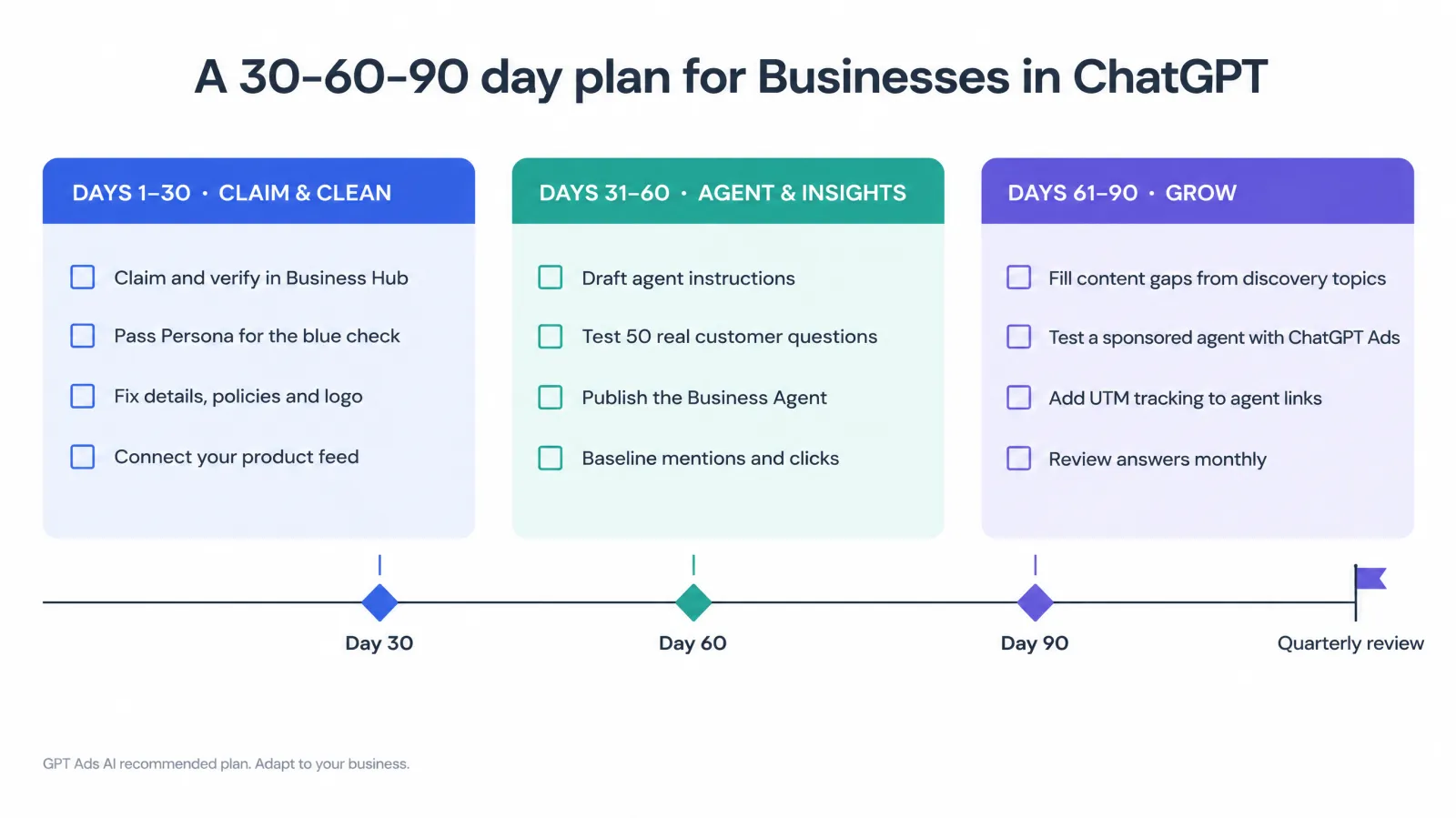
Days 1–30: claim and clean
| Task | Done when |
|---|---|
| Choose the managing ChatGPT account (brand-owned, not agency-owned) | Account decided and documented |
| Claim the business and verify (Shopify, domain, email or phone) | Claim approved |
| Complete Persona with documents that match official records | Blue check visible |
| Audit facts across site, directories, feeds and marketplaces | Consistency audit complete |
| Update description, category, logo, cover photo, delivery and return policies | Changes submitted and published |
| Connect the product feed (Shopify, CSV or hosted URL) | Products and prices correct in profile |
| Grant teammates and agency access | Access confirmed, each with their own account |
Days 31–60: agent and insights
| Task | Done when |
|---|---|
| Check agent eligibility (US, ecommerce or online service, category) | Eligibility confirmed or deferred |
| Write agent instructions using the structure above | Instructions approved by marketing and legal |
| Build a 50-question test set from real customer questions | Test set saved and owned |
| Test, fix and retest until zero wrong policy answers | Pass recorded |
| Publish the agent | Live on the profile |
| Record baseline insights (mentions, clicks, topics) | First monthly snapshot logged |
Days 61–90: grow
| Task | Done when |
|---|---|
| Classify discovery topics (core, adjacent, off-target) | Topic log updated |
| Publish one strong page per adjacent topic | Pages live, linked and in agent knowledge |
| Fix sources behind off-target topics | Corrections made |
| Add UTM parameters to every agent link | Tagged links verified in analytics |
| Test a sponsored agent against a website destination (only if OpenAI has enabled it for your account) | Test running with a decision date |
| Set a monthly review: insights, agent retest, facts audit | Recurring calendar slot owned |
Common mistakes to avoid
| Mistake | Why it hurts | What to do instead |
|---|---|---|
| Claiming under an agency or employee's personal account | Ownership disputes when people leave | Use a business-controlled account; grant access to others |
| Persona details that don't match official records | Failed verification and delays | Use the exact legal name, address and registration numbers |
| Expecting claiming to raise rankings | Disappointment; wrong success metric | Measure accuracy, insights and agent outcomes |
| Editing the profile but not the website | ChatGPT may still use the old facts from your site | Update every source together |
| Reading a blank metric as zero | Wrong conclusions about visibility | Wait for thresholds; contact support if it stays blank |
| Publishing an untested agent | Wrong answers on policy questions create disputes | Test 50 real questions; zero wrong policy answers |
| Giving the agent a human persona | Policy violation | State clearly that it's AI representing your business |
| Using urgency or pushy follow-ups | Policy violation; erodes trust | One optional follow-up; no false scarcity |
| Sending paid traffic to an untested agent | Paying to discover errors | Get the organic agent right first |
| Untagged agent links | ChatGPT-driven sales invisible in analytics | UTM-tag every link the agent uses |
| Forgetting seasonal changes | Wrong holiday hours or delivery cut-offs in answers | Update weeks ahead; changes are reviewed |
What we still don't know
| Open question | Why it matters |
|---|---|
| Which categories are eligible or deferred for agents | Decides whether regulated businesses can plan for agents |
| When agents expand beyond the US and beyond ecommerce and online services | Timing for local and international businesses |
| What the insights thresholds are | When small businesses will see data |
| Whether agents will gain actions (checkout, bookings, order status) | Would change the agent from explainer to sales channel |
| How sponsored agents are priced and reported compared with standard ads | Budget and measurement planning |
| Whether agent-level metrics (conversations, link clicks) will appear in insights | How to measure agent quality beyond your own test set |
| When multi-brand and multi-location management arrives | Operations for groups and franchises |
We will update this guide as OpenAI answers these questions, and record each change in our news timeline.
Glossary
| Term | Meaning |
|---|---|
| Businesses in ChatGPT | OpenAI's beta programme, launched 10 November 2026, for businesses to claim profiles, manage information, see insights and offer agents |
| Business Hub | The place in ChatGPT, opened from the sidebar, where businesses claim and manage their presence |
| Claim | Asserting control of a business listing, proven by phone, email, DNS or Shopify verification |
| Persona | The identity-verification provider OpenAI uses; approval unlocks edits, feeds, insights and agents |
| Blue check | The verified badge shown on a profile after Persona approval |
| Business profile | The page customers open from a ChatGPT answer, showing your business details |
| Product feed | A catalog file (CSV, hosted URL or Shopify) sharing product details, prices and availability |
| Shopify Catalog | Shopify's integration that brings eligible merchant products into ChatGPT |
| Mentions | For online businesses, references to your website in ChatGPT answers; for local businesses, results shown for your location |
| Website clicks | Clicks through to your website from ChatGPT |
| Discovery topics | Aggregated themes of answers that mentioned or cited your business |
| Business Agent | An AI agent representing your business in a separate, labelled conversation |
| Sponsored agent | A Business Agent used as the destination for ChatGPT Ads |
| Dispute ownership | The process to challenge an existing claim on your business |
| AEO | Answer-engine optimisation: making your content easy for AI assistants to find, extract and cite |
How GPT Ads AI can help
We are a ChatGPT advertising and visibility agency. For Businesses in ChatGPT, we:
- Claim and verify your business and sort out Persona, account ownership and team access. See account setup.
- Build and clean product feeds across Business Hub, Shopify Catalog and Ads Manager from one master catalog. See product feed services.
- Write, test and maintain Business Agents against a real-question test set, within OpenAI's policy.
- Run ChatGPT Ads, including sponsored agents, with measurement that holds up. See ChatGPT Ads management.
Sources and further reading
- OpenAI, Introducing Businesses in ChatGPT, 10 November 2026
- OpenAI, Businesses in ChatGPT landing page and FAQ
- OpenAI Help Center, Setting up your business on ChatGPT (claiming, verification, Persona, insights definitions, agent set-up, FAQ)
- OpenAI, Businesses in ChatGPT policy, updated 10 November 2026
- OpenAI, Business Agents Policy, updated 10 November 2026
- OpenAI, Reimagining advertising with AI, 16 September 2026 (Sponsored Agents, Ads Manager plugin, AI creative tools, HubSpot and Shopify integrations)
- GPT Ads AI guides: ecommerce, product feeds, visual ads and measurement, conversion tracking, reporting, context hints, account, brand and legal names, news timeline
Quick answers.
What is Businesses in ChatGPT?
A beta programme OpenAI launched on 10 November 2026. Through Business Hub, an owner or authorised representative can claim a business, verify it, update its details, add product feeds, and see aggregated insights such as mentions and website clicks. Eligible US ecommerce and online service businesses can also publish a Business Agent.
How do I claim my business in ChatGPT?
Sign in to ChatGPT, open Business Hub from the sidebar, search for your business, select the matching listing, and verify using one of the methods offered: business phone, business email, a DNS TXT record on your website domain, or your Shopify store. OpenAI then reviews the claim. Complete Persona identity verification to unlock edits, insights, feeds and agents.
Is claiming my business in ChatGPT free?
Yes. OpenAI says you don't need an Ads account or a ChatGPT Enterprise agreement to claim an eligible business. Claiming, publishing an agent and advertising are separate.
How do I get the blue check on my ChatGPT business profile?
Complete Persona identity verification and wait for approval. Claiming alone doesn't add the badge. The blue check appears after OpenAI approves your Persona verification, which may require a government ID, business registration information and proof that you're authorised to represent the business.
Will claiming my business make ChatGPT recommend it more?
No. OpenAI says claiming does not guarantee higher placement or sales, and doesn't give direct control over ChatGPT's independent recommendations. It lets you make sure the information you provide is accurate and current.
Will my business show up in ChatGPT if I don't claim it?
It can. OpenAI says ChatGPT may show information about your business whether or not you have an agent, and profiles may include information from other sources. Claiming gives you a way to supply accurate details.
What is a Business Agent in ChatGPT?
An AI agent that answers customer questions about your products and policies, using information and guidelines you provide. Customers choose to start it from your profile, and the conversation is clearly labelled, separate from their own ChatGPT chat, and distinct from ChatGPT's independent answers.
Who can create a Business Agent?
Eligible ecommerce and online service businesses in the US with a website, whose claim and Persona verification are approved, and whose industry meets the requirements of OpenAI's Business Agents Policy. Business verification alone doesn't guarantee agent eligibility.
Can a Business Agent take orders or make bookings?
Not currently. OpenAI says the agent explains products and policies and links to your website, where customers complete purchases or bookings. It can't check a customer's order, and it doesn't use data from any ChatGPT plugin your business has.
Can I read the conversations customers have with my Business Agent?
No. OpenAI doesn't share users' conversations or Business Agent chats with businesses. Insights are aggregated and only appear above certain thresholds.
What insights does Business Hub show?
Aggregate activity over the past 28 days: mentions, website clicks and discovery topics. For an online business, a mention counts when ChatGPT references the business's website; the brand name alone doesn't count. For a local business, it counts when ChatGPT shows a result for that location.
Why is a Business Hub insight blank?
A blank metric can mean activity hasn't reached the reporting threshold, data is still being collected, or reporting is unavailable. It doesn't necessarily mean zero activity. If it stays blank, contact OpenAI Support.
What are discovery topics?
Common themes across ChatGPT answers that mentioned or cited your business. They are aggregate categories, not individual prompts, and OpenAI says they don't directly measure customer intent.
Do I need Shopify to use Businesses in ChatGPT?
No. Shopify is one way to get started: you can verify through your store and share products automatically through Shopify Catalog. Businesses without Shopify can verify by phone, email or domain and upload a CSV feed or provide a hosted feed URL.
What is a sponsored Business Agent?
A Business Agent used as the destination for ChatGPT Ads. After clicking a relevant ad, a user can choose to start a clearly labelled conversation with the business's agent. OpenAI says sponsored placements are clearly labelled and separate from ChatGPT responses.
Can a local restaurant or shop claim its business in ChatGPT?
Local stores and restaurants can currently claim only an existing US listing. They can't add a new one, and Business Agents are not yet available to local businesses.
Can an agency manage my ChatGPT business profile?
Yes. The admin who claimed the business can add teammates and grant an agency access to manage the business or its agent. Each person uses their own ChatGPT account. Don't forward personal claim invitations.
What if someone else has already claimed my business?
Open the profile, select the more options menu (•••), choose Dispute ownership, and verify with Persona that you're authorised to represent the business. Disputing ownership doesn't change the profile's visibility in ChatGPT.
How long do profile changes take to appear in ChatGPT?
OpenAI reviews and publishes changes and doesn't give a time frame. Updates can take time to appear in a listing or answer, and ChatGPT may also use other sources. Update your website at the same time so every source agrees.
What can't a Business Agent do under OpenAI's policy?
It can't pretend to be human, an independent adviser or OpenAI-endorsed. It can't invent prices, reviews, guarantees or results, pressure users or create false urgency, or ask for unnecessary high-risk information such as IDs, health or financial details. It also can't give advice that legally requires a professional licence, or act for the user without explicit authorisation.
Related guides.
ChatGPT Ads for Ecommerce
The ecommerce hub: feed-as-creative, context hints by vertical, break-even CPC tables, order-level tracking, a 90-day launch plan, and AEO lessons from a real ChatGPT conversation export.
Read guideProduct Feed Campaigns
The feed spec and required fields, SFTP upload, the seven-step campaign setup, ads_metadata segmentation, Google Shopping feed reuse — and how one catalog powers ads, ChatGPT Shopping, and shopping research.
Read guideChatGPT Visual Ads & Measurement
The new image-led ad unit that appears while ChatGPT generates images, plus the 20-plus measurement partners, geo-based incrementality tests and brand-suitability pilots announced alongside it — with creative briefs, a partner selection guide and a 90-day plan.
Read guideChatGPT Ads News & Timeline
The full story in one place: the November 2025 leak, the February 2026 pilot, the May 2026 self-serve Ads Manager launch, product feeds, automated bidding, and the September rollout into Europe, India and MENA — every milestone labeled confirmed or reported.
Read guideWant this run for you?
GPT Ads AI is a done-for-you ChatGPT Ads agency. The services below cover exactly what this guide describes.
Ads Manager account setup & access
OpenAI Ads Manager sign-up under the right entity and currency, verification, account/brand/legal names, billing, and team roles — done in the right order so the account is approved once and campaigns actually serve.
See the serviceProduct feed & shopping campaigns
Feed spec, automated feed refresh, bulk campaign creation, review-status monitoring, ads_metadata segmentation, and conversion-optimised product feed campaigns for Shopify and DTC brands.
See the serviceChatGPT Ads management
A senior operator runs the whole channel — account, structure, context hints, creative, bidding, measurement, and weekly written reporting — on a fixed retainer.
See the service
Tarun Kapoor
Founder · GPT Ads AI
Performance marketer with 12+ years in paid acquisition. Former senior media buyer at Neil Patel Digital. Alumni of GroupM, WPP, Ogilvy & Mather, and Toptal's Growth Collective. Fractional CMO to Fortune 500 brands and venture-backed startups.
Book a call with Tarun